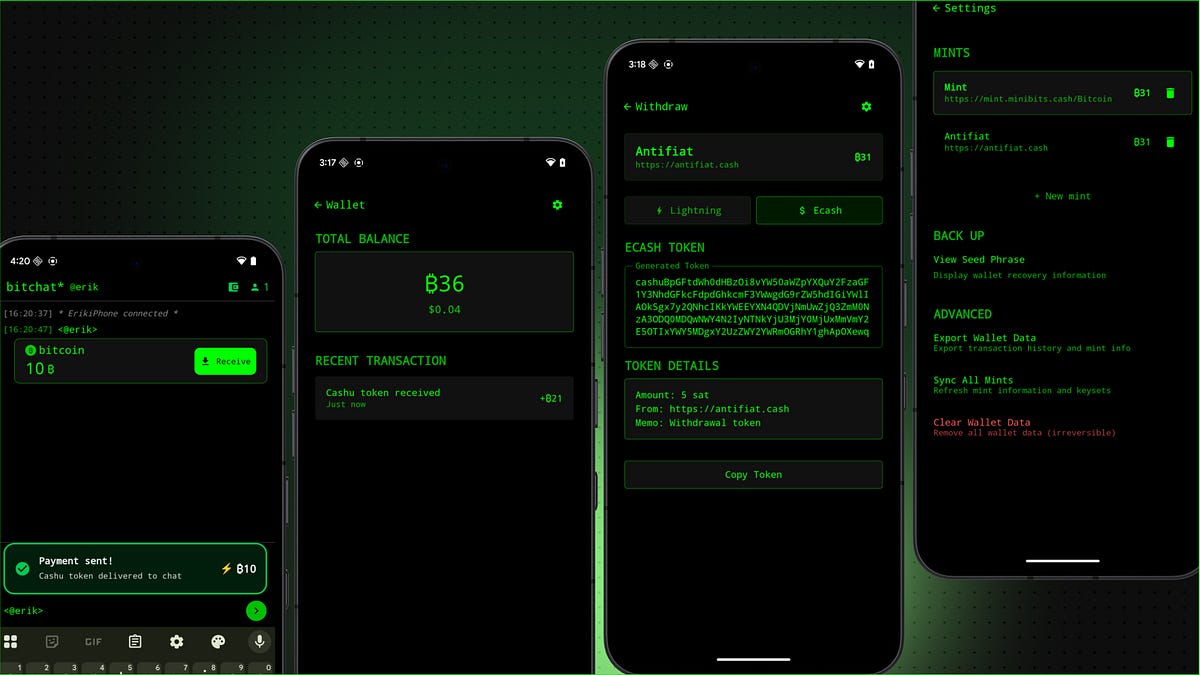
I prototyped a fully functional Bitchat Cashu wallet. From Figma wireframes to Kotlin code running live on Android. Pretty excited about the workflow. Sharing my exact flow in case it helps anyone else.
I started where I’m most comfortable: Figma. I reviewed Bitchat’s existing UI then quickly sketched wireframes imagining how a Cashu wallet might fit into the existing app. Tried to keep the IRC / TTY vibes and UX.
Next I set up the Figma x Cursor MCP bridge that lets cursor directyl read Figma frames. This took some back and forth. I didn’t want new type styles or colors cluttering up the codebase. My prompts explicitly referenced the existing theme and typography kotlin files.
Instead of trying to one-shot entire screens, I took a component-based approach. I exported individual components like buttons, input fields, and balance displays separately. Cursor generated Kotlin code for each component.
My favorite discovery: Android Studio’s Compose Preview. Seeing components live was a huge productivity unlock. The Kotlin code spit out by Figma x Cursor MCP often needed adjustments. Spacing, borders, etc... but instant visual feedback made fine tuning much faster.
After lots of re-prompting, troubleshooting, tweaking designs, I got a working wallet prototype. Still some bugs, but it’s live, and it’s pretty functional.
I prototyped a fully functional Bitchat Cashu wallet. From Figma wireframes to Kotlin code running live on Android. Pretty excited about the workflow. Sharing my exact flow in case it helps anyone else.
I prototyped a fully functional Bitchat Cashu wallet. From Figma wireframes to Kotlin code running live on Android. Pretty excited about the workflow. Sharing my exact flow in case it helps anyone else.