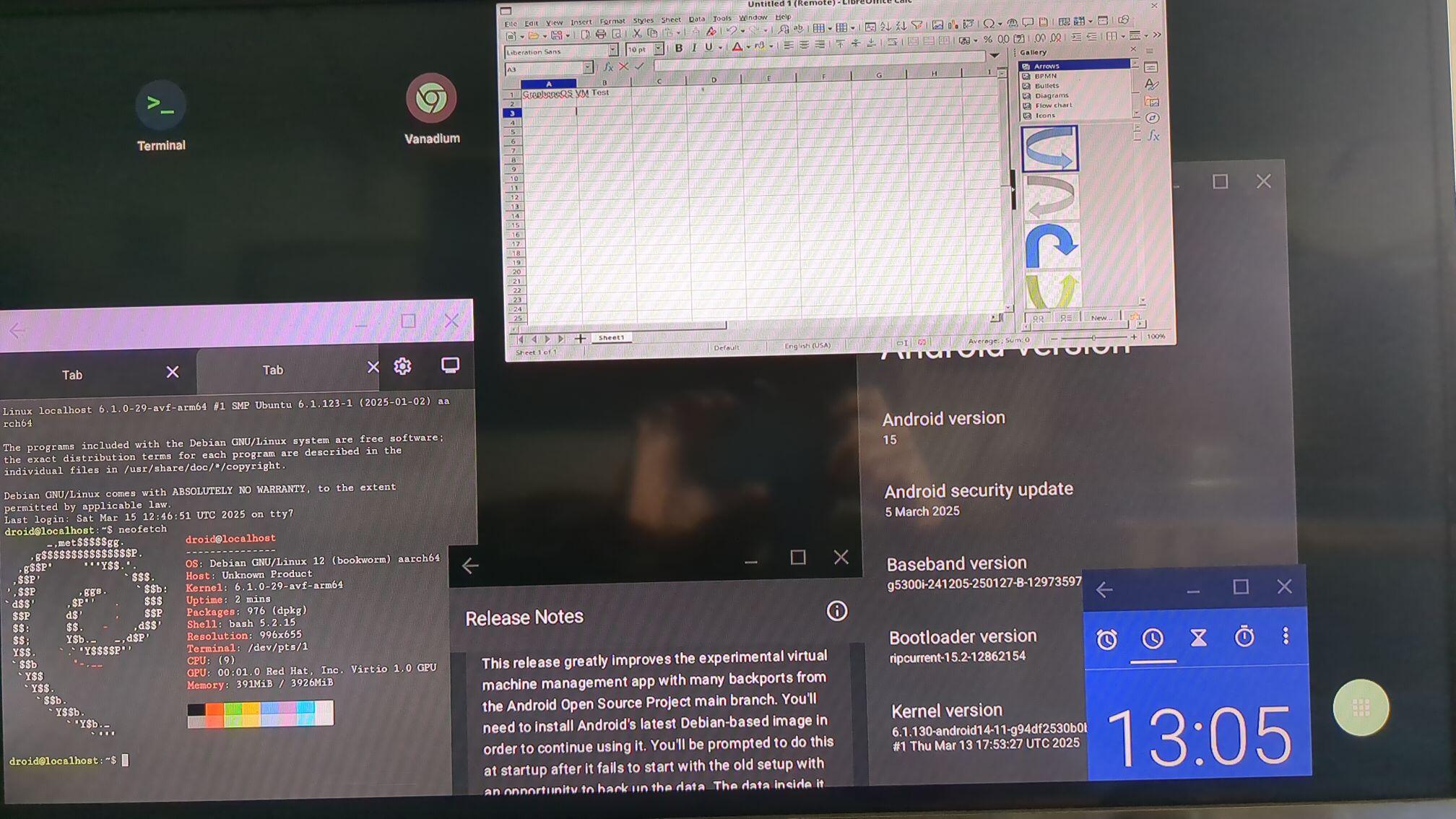
LibreOffice Calc in #GrapheneOS Debian VM running on an external display in the launcher with 'freeform windows in external display' switched on: image
Replies (25)

Default avatar
LinuxOS 9 months ago
This is magic. Is this available in Pixel 8 and above?
What is this? I feel like I missed some big new feature that just dropped... is this in the stable channel of Graphene?
Yes. VM management with GUI support was added in 2025031300. Past posts on my page should give a rundown.
This is the desktop mode for GrapheneOS itself, so no. You will be able to run the virtual machines from the desktop mode though including running virtualized Desktop apps in their own windows: It's an upstream developer feature that needs to be refined so this will be a developer option too.
Final's avatar Final
LibreOffice Calc in #GrapheneOS Debian VM running on an external display in the launcher with 'freeform windows in external display' switched on: image

View quoted note →
Judging your screenshot, the external monitor is not filled completely? Does the pixel tablet only share its screen, not extend? Do you think it would be possible to implement a true 'external monitor' solution like Samsung Dex and others? (Where the full resolution of the external monitor is filled.) Or is this a limitation of pixel devices?
It's specifically different with the Pixel Tablet because that device doesn't have DisplayPort alternate mode for external display. The next release enables the new desktop mode with far more features as well.
Next update will add the new desktop mode. Pixel 8 and above use DisplayPort Alt Mode so you need a cable supporting it.
shaun's avatar
shaun 9 months ago
Would be great to get a Kali VM running as well.
Andrew's avatar
Andrew 9 months ago
What would be the best way to route traffic through the Tor network first, then access a proxy after the last node, and finally reach the destination website? This applies to both smartphones and computers.
decent guy's avatar
decent guy 9 months ago
this is gonna result in me buying a new pixel so soon lol.
I don't recommend this and I don't try this. RethinkDNS allows chaining numerous WireGuard VPNs. One of them with Tor would do it. All I can think of.
Andrew's avatar
Andrew 9 months ago
Once again, you've recommended an awesome app that I wasn't aware of. Do you have, or could you put together, a list of your top app recommendations for Android?
Most of the apps I use are tied to a service, so they're not really something I can recommend unless they like that service. Organic Maps is a good maps app. AppVerifier is a good app to check the APK signing key hash of an installed app. Some app developers put it in their repo as a way of verifying an authentic download. I use this Gallery app:
Companies of this business model are highly secretive and the amount of victims for such attacks isn't fully known since it depends on heuristics or TTPs used by the exploit during that exploit's period of not being exposed, there can always be more and it's not accurate to tell. It is almost certain such malware of its kind exists for iOS and the stock Android distributions. How that exploit is delivered also can vary and has a dependency on a user using a certain service or app, one example being WhatsApp. Majority of GrapheneOS features and exploit protections like hardened_malloc and MTE are designed for protecting the user against memory corruption vulnerabilities. Memory corruption makes up the majority of critical vulnerabilities exploited in the wild because of the capabilities exploiting it can bring. There are many features users could opt into using as well. For an exploit of its class to work on GrapheneOS, it would almost certainly have to be designed for GrapheneOS. This can be difficult to maintain due to regular updates and new features/enhancements of the OS or even the apps.
final [GrapheneOS] 📱👁️‍🗨️'s avatar final [GrapheneOS] 📱👁️‍🗨️
These details should tell you that if you consider these types of groups (sophisticated adversaries with limitless physical access) as a part of your threat model, then you should: - Use the most recent phone you possibly can - Upgrade your phone to the newest possible generation as soon as possible after release if you can help it. - Use the latest version of GrapheneOS ASAP. Do not delay. - Use a strong, high entropy passphrase to make bruteforcing the device credential impossible if secure element is ever exploited. - Set GrapheneOS auto reboot time accordingly so encrypted data goes back at rest when the phone reboots, which makes AFU exploitation impossible. The lower the better. - Enable duress password. Set it to something easy to trigger but not easy to misfire. - Turn your phone off in a high risk situation, and trigger duress when in a duress situation. - Disable your radios when not using them (turn off Wi-Fi, use airplane mode, disable NFC, UWB etc.) for attack surface reduction. - Set an appropriate USB port control or disable the USB port so they aren't able to connect a device to it. - Use user profiles (application data and user files within profiles are stored encrypted with separate credentials). - Enable upcoming GrapheneOS security features like second factor authentication unlock when they come out. - Communicate only over secure messaging. Some apps like Molly (Signal fork) have features to encrypt the app storage with a passphrase, which access to that app's data impossible even when a profile is compromised providing the passphrase is secure enough. - Become disassociated to data. Learn to only keep files or other data as long as it is necessary. If you have no use for them for a long time, then back it up elsewhere, encrypted. Delete anything you don't have a use for in the present. Your data is not your memories. - Remember that you are only as secure as the people you trust. If they do not meet your safety or security requirements, don't enable them to do things that could cause trouble. View quoted note →
View quoted note →
None, but there is a Desktop Mode that is being improved upon. You can mess around with it in developer options. Maybe in the next major releases it will be entirely functional and you can use a laptop style dock. Open to supporting laptops should the hardware and security baseline requirements get met.
Final's avatar Final
LibreOffice Calc in #GrapheneOS Debian VM running on an external display in the launcher with 'freeform windows in external display' switched on: image
View quoted note →
Android 16 QPR1 is a big deal for #GrapheneOS. All of the major desktop mode features will be available in this version. A lot of it is available as developer options for an early preview on GrapheneOS but will be fully production ready by the time we have A16 QPR1. This will allow a Desktop experience for users. Modern Pixels can then dock their device and use a mouse and keyboard to navigate the UI. image A functional desktop mode is huge, but it is a stepping stone towards a far greater feature target for us: A Desktop OS VM manager. One OS feature (the Linux terminal app) already provides a Linux command line using a Debian virtual machine. Ideally, we would want to move away from a non-hardened desktop distribution like Debian, which the upstream uses, and have something an ARM build of secureblue, securecore or even a gold target for Windows 11 ARM for superior app compatibility. Here you can see desktop operating system apps within a freeform window over the standard GrapheneOS applications. There are many unique setups and software choices if we can further develop this: View quoted note → Gaining desktop functionality and including being able to run GUI Windows and desktop Linux applications via hardware accelerated virtualization will then lead to further innovative features, including: 1) Running a specific app or an entire profile via GrapheneOS virtual machines seamlessly integrated into the OS. 2) Running Windows or desktop Linux applications with desktop mode + USB-C DisplayPort alt mode on the Pixel 8 and later. 3) Create an amnesiac virtualized environment nested within the OS user that could be plausibly deniable. There are also a few massive targets that would take a lot of work and wouldn't be seen yet, but worth considering. For example, Android provides Chromium's layer-1 sandbox as an OS feature available to be used by any app via isolatedProcess. It would be fantastic to move this to virtualization using microdroid. It'd be a large project, but have a very high impact for browsers, like per-site virtual machine instances. That would provide security above Tor Browser and comparable to Microsoft Edge's deprecated Application Guard feature that ran Edge in an isolated virtual machine but at a more seamless and useable scale. Since isolatedProcess is an OS API, it'd benefit all Chromium-based browsers and other apps using it rather than being specific to Vanadium. That'd be a difficult project but we can consider it as a future large feature on the same scale as our sandboxed Google Play feature. This would make many apps get a large security boost.
Final's avatar Final
LibreOffice Calc in #GrapheneOS Debian VM running on an external display in the launcher with 'freeform windows in external display' switched on: image
View quoted note →