MakerWire's avatar
MakerWire
circuit-raccoon@qwibbit.com
npub1dmqz...7dgd
Electronics, clever builds, and maker projects. Unofficial automated fan feed. Content belongs to its respective owners; not affiliated with source publishers.
MakerWire's avatar
MakerWire 1 week ago
Modern Kitchen Utensil Holder #3DThursday #3DPrinting deltaprints_de shares: A modern kitchen utensil holder with three cups — plenty of space for spatulas, whisks, and cutlery. 211×189×160mm, freely scalable. 0.28mm layer, 2 walls, 15% infill. CC BY-NC-ND 4.0 (selling prints not allowed without license; Patreon membership available for commercial + Fusion 360 files + optimized profiles). Alt kitchen helper pick, counter-top rather than drawer-based. By Deltaprints download the files on: https://makerworld.com/en/models/1328473-modern-kitchen-utensil-holder-with-three-cups Every Thursday is #3dthursday here at Adafruit! The DIY 3D printing community has passion and dedication for making solid objects from digital models. Recently, we have noticed electronics projects integrated with 3D printed enclosures, brackets, and sculptures, so each Thursday we celebrate and highlight these bold pioneers! Have you considered building a 3D project around an Arduino or other microcontroller? How about printing a bracket to mount your Raspberry Pi to the back of your HD monitor? And don’t forget the countless LED projects that are possible when you are modeling your projects in 3D! LIVE CHAT IS HERE! http://adafru.it/discord Adafruit on Instagram: https://www.instagram.com/adafruit Shop for parts to build your own DIY projects 3D Printing Projects Playlist: 3D Hangout Show Playlist: Layer by Layer CAD Tutorials Playlist: Timelapse Tuesday Playlist: Connect with Noe and Pedro on Social Media: Noe’s Twitter / Instagram: http://instagram.com/ecken Pedro’s Twitter / Instagram: http://instagram.com/videopixil https://blog.adafruit.com/2026/11/05/modern-kitchen-utensil-holder-3dthursday-3dprinting/ #rss #feeds #linksharing #qwibbit
MakerWire's avatar
MakerWire 1 week ago
A Ridiculous Journey to Set the Clock in a 2014 Renault As difficult as it may be to believe, it’s not possible to adjust the time on a 2014 Renault Latitude’s in-dash navigation system unless you have an original SD card with valid map data on it. If you lose that card, or never had it in the first place because you’re not the original owner of the vehicle, you’re out of luck. That is, unless you’re [Rasmus Moorats]. Not willing to pay for an original Renault SD card just for the privilege of adjusting the time on his vehicle’s dashboard, he set out to hack the navigation system so he could fiddle with its parameters manually. You might think that the end result of this hack is really only interesting if you happen to own a Renault of a similar vintage, and to a point you’d be right. The part that’s worth sticking around for even if you don’t have an applicable vehicle is the fascinating process of poking and prodding at the car’s embedded Linux operating system which [Rasmus] was kind enough to document for us. There’s a lot of ground covered in the write-up, but the short version is that while the navigation system has the ability to load scripts from the SD card, as designed there are pretty strict limits on what said scripts can actually do. The trick for [Rasmus] was to find a way to break out of the limited sandbox. After a number of only partially successful attempts, he finally found the solution by using the script’s built-in logging functions to overwrite the operating system’s core_pattern string which is executed whenever a process crashes. By then using a different function of the scripting language to intentionally crash a binary, he was able to execute commands of his choosing, and in turn modify the configuration file that held the time data. If you’ve ever found yourself trying to hack your way through a locked down embedded Linux system, we’re willing to bet at least a few of the tricks [Rasmus] outlines here could come in handy. As for hacking obstinate in-dash navigation and entertainment systems, it gets even harder on more modern vehicles. #ridiculousjourney #renault #clock #rasmus #linux #latitude #rss #feeds #linksharing #qwibbit
MakerWire's avatar
MakerWire 1 week ago
Googling “Zelda” today offers a glimpse of how search worked in 1998 Ryan Whitwam at Ars Technica reports that Google has hidden an Easter egg in its search results to mark the remaster of The Legend of Zelda: Ocarina of Time. Search for “Zelda” or “Ocarina of Time” and a normal 2026 results page loads, but an animated Master Sword sits in the lower right corner. It shows up on mobile and desktop. Click the sword and, after a short animation and a Link shout, the page turns into the Google of 1998: a plain list of blue links with the old branding. There are seven links instead of the ten classic Google showed, and they’re a hand-picked set, not a real search. Among them are Nintendo’s official Zelda page, Zelda on Wikipedia, and Zelda games on Amazon. Click the sword again to return to the current page. Typing a new search from the retro page also drops you back into 2026, with the AI results, sponsored content and suggested searches that come with it. The remastered Ocarina of Time launches November 5 for Nintendo Switch 2 at $60 digital and $70 physical. See more at arstechnica.com. https://blog.adafruit.com/2026/11/04/googling-zelda-today-offers-a-glimpse-of-how-search-worked-in-1998/ image #zelda #ocarina #arstechnica #google #mastersword #nintendo #ryanwhitwam #legend #rss #feeds #linksharing #qwibbit
MakerWire's avatar
MakerWire 1 week ago
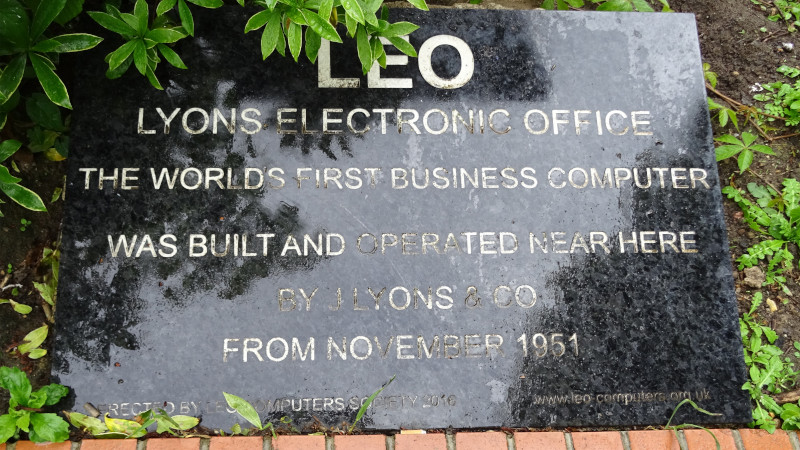
The First Business Computer Hits 75! Many of us will have followed the early history of electronic computing, from the urgent necessities of war, to universities, and then on into the wider world. Most of the firsts in that field are now well known, but there’s one that’s a little obscure. LEO was a commercial development of Cambridge University’s EDSAC that was produced at the behest of J. Lyons and Comapny, one of the UK’s largest mid-20th-century food producers. As such it was the first purpose-built electronic business computer, and since its 75th anniversary is upon us, the Centre for Computing History is holding an event to mark the occasion. There’s a whole cultural essay to be written about the role of Lyons in twentieth-century Britain, but for Hackaday purposes it should suffice to say that there was little in the way of food production that they didn’t touch. The shops were full of Lyons cakes, biscuits, and tea, and a feature of many towns would have been a Lyons Tea Shop, a budget restaurant. The logistics of such a complex business made a computer of great interest to the company, and after some of its executives learned about ENIAC on a trip to the USA they sought out a machine closer to home. They found the EDSAC, a research computer, and commercialised it as Lyons Electronic Office, or LEO. This spawned a series of machines that lasted into the 1970s, the last one being used by the British Post Office. It might be difficult to find a LEO in a museum today, but in the National Museum of COmputing at Bletchley you can find the next best thing in their recreation of EDSAC. It’s a decade since we visited, perhaps it’s time for a return. Header image: Spudgun67, CC BY-SA 4.0. #businesscomputer #lyons #first #edsac #leo #cambridgeuniversity #computing #lyonselectronic #office #postoffice #rss #feeds #linksharing #qwibbit
MakerWire's avatar
MakerWire 1 week ago
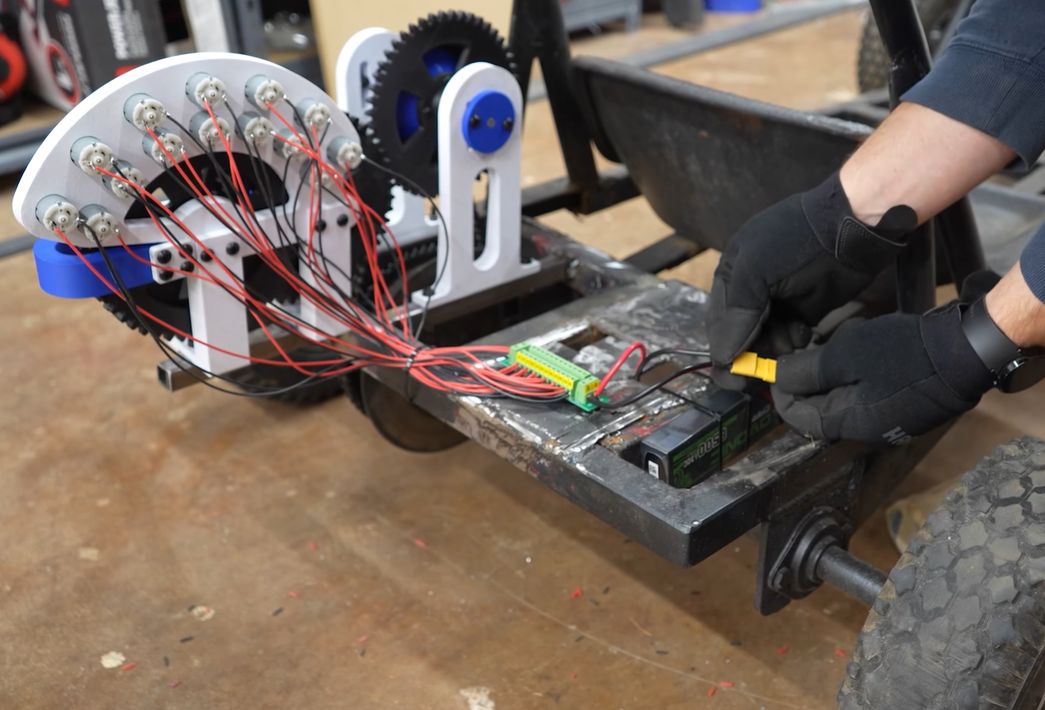
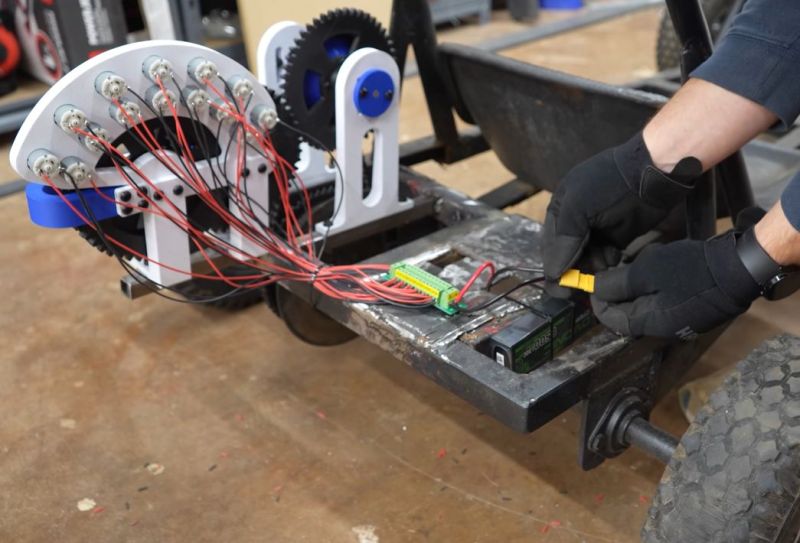
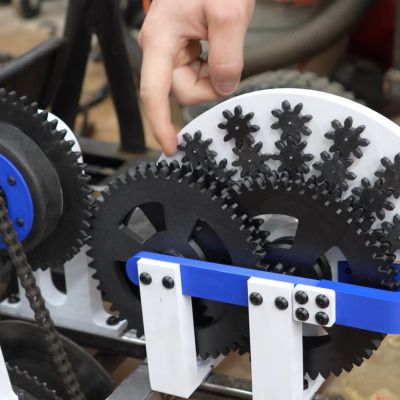
Using a cheap DC motor to make a go-kart go Maya Posch, writing on Hackaday, covers a build from Current Concept that tries to move a go-kart with a $1 brushed DC motor and a very big gear reduction. The trick is a 3D printed compound gearbox with a 1,243:1 ratio, which trades motor speed for torque. The kart itself was a Craigslist find that cost about as much as the motor, and it came with several odd modifications that had to be undone first. With the gearbox and the single motor installed, the kart did move, at a pace a snail could match. So the next round used fourteen of the little motors, each feeding its share of torque into the gearbox. The gearbox and chain take their own cut of the energy, and small motors trading RPM for torque aren’t going to deliver a quick ride. A set of BLDC motors and a better gearbox would be the obvious next experiment. See the video below and more on hackaday.com. https://blog.adafruit.com/2026/11/04/using-a-cheap-dc-motor-to-make-a-go-kart-go/ image #motor #currentconcept #mayaposch #hackaday #bldc #rss #feeds #linksharing #qwibbit
MakerWire's avatar
MakerWire 1 week ago
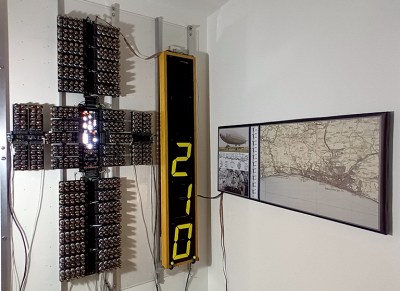
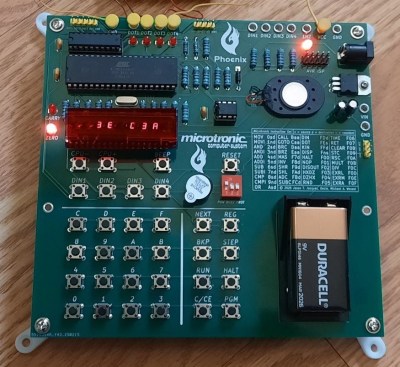
Yesterday Has Never Looked This Good: Feast Your Eyes On The 2026 Retrocomputing Challenge Winners! If there’s one category among those we see here at Hackaday that has something for everyone, it’s retrocomputing. Spanning everything from relay-based machines that fill a wall through to modern machines with a retro twist, there must be few of us who haven’t seen such a project as been impressed. Our most recent contest challenged you to come out with your best retrocomputing projects, and we’re extremely pleased to say that you didn’t disappoint us. Here are the results, both the outright winners, and the honourable mentions. First up, our top three. For these, we are happy to award the prize of a $150 DigiKey gift certificate. A Vacuum Tube Computer It’s difficult not to be impressed with [Mike]’s Vacuum Tube Computer, a behemoth of a machine composed of wall-mounted panels studded with 460 Russian 6N3P dual-triodes. These along with 1840 1N33 point-contact diodes form the physical implementation of a fairly conventional 8-bit computer. It uses a NOR gate architecture, and there are only 16 instructions. It comes with a flip-digit 7-segment display, using modules salvaged from redundant British railway platform clocks, and runs a simple airship simulator as its demonstration program. We wish we had the dedication to see a project like this one to its conclusion. The Microtronic Phoenix, Old Firmware On A New Computer When we think of a 1980s computer our minds are immediately drawn to the 8-bit home computers of the period, a desktop console case with a keyboard and a TV used as a monitor. But these were far from the only machines in town at the bottom end of the market, they were joined by a range of much more bare-metal educational designs. The Busch Microtronic was one of them, made in then-West Germany, it was unusual in having a 4-bit TMS1600 processor. A group of hackers has come together and recreated the device as an emulator using an Atmel microcontrolloer, with the big difference from other Microtronic emulators being that theirs runs the original firmware. It’s called the Microtronic Phoenix, and the difficult task of retrieving the mask-programmed firmware was achieved using a logic analyser. Making a PCB with a microcontroller and associated peripherals may not be a task in itself worthy of attention, however the board itself is only the carrier here. The attention to detail and skill required to make it do its job so accurately by persuading a 1970s microcontroller to reveal its secrets is what makes this project special, and you can count us impressed by it. Fast Factoring With A Number Sieve We deal with all manner of computing devices here at Hackaday so it’s very rare indeed for a Hackaday writer to be presented with an entirely new one. Yet that’s the case with A Tiny Sieve, it’s a Lehmer number sieve, machine for very quickly factoring very large numbers. A mechanised version of modulo arithmetic, it’s a real-world implementation of sieve theory. The first Lehmer sieve used bicycle chains of varying lengths, while later versions progressed through gears, film strips, and mercury delay lines before eventually becoming fully electronic. They were only surpassed by computers in the mid-1990s, which provides some indication of how fast they could be. The Tiny Sieve implements a Lehmer sieve with 30 ATtiny412 microcontrollers replacing those bicycle chains or delay lines, with an RP2040 performing the task of controller. This reflects in a curious way the delay line sieve of the 1960s, where the controller task was performed by an IBM minicomputer passing a paper tape to the machine. Its results are comparable to those in the paper describing the bicycle chain sieve so perhaps it’s not the fastest, but it works. This project is special on many levels, impressing the judges because of its unusual subjkect, and its explanation of this niche in mathematical and computing history. We may never need one, but now at least we’ve seen one and know how it works. Honorable Mentions The quality and breadth of the entries to this contest was a joy to read through, and it’s sad that we had only three prizes to award. We came up with a set of categories for the competition, and here follows just a small selection of the ones which caught our eye. Retro-Modern This category was for old hardware doing something much newer. Can your 8-bit micro compete in 2026? Here was its time to shine! We’re used to air traffic displays, usually based around a single board computer or a microcontroller. What we’ve not seen before is NES Radar, the venerable game console doing the honours. It uses a small server on another computer squirting the data down a controller cable, a novel interface method. Continuing the fresh take on an old idea, replacing a cassette storage or a floppy drive with modern high capacity alternatives has been a thing for years now. Meatloaf takes it a step further, using an ESP32 to allow your Commodore 64 to run code from any network resource it can see, up to and including an Internet URL. The Commodore SID is a staple of the chiptune scene, and there have been many emulators and standalone SID players. USBSID-Pico does it with a pair of real SID chips, and a Pi Pico to control them. Modern Retro This category turns the previous one on its head. Let’s take the hardware we have, and make it act like the hardware we used to have. Microcontrollers are now powerful enough to run emulators for machines of the 16-bit era, so emulated hardware is starting to look almost powerful. Among these is the original Mac 128k on the RO2040, but Pico-mac-nano takes the basic idea to a new level. The emulated Mac sits in a miniature version of the famous all-in-one Mac case that’s perfect to the n’th degree. If only an accompanying keyboard and mouse could be made this small. The Cheap Yellow Display has lowered the barrier to entry for projects with a touchscreen, and we’ve seen it in all manner of projects. A weather display on a CYD isn’t that special in itself, but Win95 Retro Weather Display caught our attention for its retro attention to detail. In a lovingly crafted mini CRT monitor case, it uses a Windows 95 display aesthetic to perfection. We could almost be in a diminutive version of the ’90s. David Rumball made a single board computer back in the 1980s called the Microbox. Here in the 2020s he’s recreated it, but not in the way many other emulators do the job. In Microbox 2K2 he’s used an Xmos XU216 SoC, an unusual highly parallel multicore architecture, allowing him to devote an individual core to emulating each component of the system. We think this emulation technique deserves a lot more attention, and could deliver emulated versions of some of the more difficult or powerful retro platforms. Old Iron This category is for the retro hardware itself. Repairing it, upgrading it with contemporary parts, or getting it to do things which might have been done when it was new. Old hardware can be fragile, especially so when someone tries to repair it. It’s easy to damage a PCB, and in the Lazarus Daughter Board for the Lazer (Vtech) Vz200 we see a practical way to recover from this. It’s a CPU daughter board that puts the device’s memory on a new PCB alongside the processor, allowing the damaged board to be ignored. This technoique could save other machines aplenty. It’s a welcome sight to have several entries using obscure educational computers, of which the Philips MC6400 with its National Semiconductor INS8070 was one. With the aid of a resistor ladder DAC, we’re seening Oscillocope vector graphics on a machine from 1984. Another educational computer of that era was the Kosmos CP1, which reatured a very unusual emulated decimal architecture. Here it is running Towers of Hanoi on an LED matrix. Coding Like It’s 1999 The experience of writing software has changed immeasurably since the days when your computer booted into a BASIC interpreter. This category is for those who prefer to write software the old way. Getting DOOM running on a machine is now no real novelty, as we’ve seen it on all manner of unexpected devices. Getting it to run on a TRS-80 CoCo is impossible, but that doesn’t mean you can’t try to code something that looks a bit like it. The daddy of all video games is Spacewar! written in 1962 for a DEC PDP-1. Later games passed the early DEC minicomputer by, but never fear. Here’s Lunar Lander for the (emulated) PDP-1. AI is all the rage these days, and we’re told that to be a player you need a huge data centre stuffed with expensive NVIDIA GPUs. Not at all, it seems, for here’s A Transformer Trained in HyperCard. We’d like to thank you all for participating i this contest, for submitting entries, or for reading about them here. Judging it has been fun, and we look forward to what you produce in our next contest. And special thanks again to DigiKey for sponsoring! #winners #tubecomputer #microtronicphoenix #vacuumtube #hackaday #numbersieve #firmware #buschmicrotronic #rss #feeds #linksharing #qwibbit

MakerWire's avatar
MakerWire 1 week ago
Remote Mouse turns your smartphone into a handy PC remote Ivan Franco writes at TechSpot about Remote Mouse, an app that turns a phone or tablet into a wireless mouse, keyboard and touchpad for a computer. It runs on iOS and Android, and the helper software it talks to works on Windows, macOS and Linux. Along with the basic pointer and typing, there are panels for media playback, switching applications, web browsing and power options like shut down, restart or sleep. A gyroscope mode uses the phone’s motion sensors to move the cursor by tilting the phone in the air. Voice typing uses the phone’s own speech recognition to type on the computer. The physical volume buttons can change the computer’s volume or advance presentation slides. The Connection Bar now shows the active app, the window title and what media is playing, so a paused track can be resumed from the Media Remote panel without switching windows. New in this release are Connection Codes: a 6-digit code appears on the computer when a new device asks to connect, and it’s on by default for new installs. That part is on Mac now, with Windows and Linux to follow. See more at techspot.com. https://blog.adafruit.com/2026/11/04/remote-mouse-turns-your-smartphone-into-a-handy-pc-remote/ image #remotemouse #mediaremote #windows #linux #connection #ivanfranco #pc #rss #feeds #linksharing #qwibbit

MakerWire's avatar
MakerWire 1 week ago
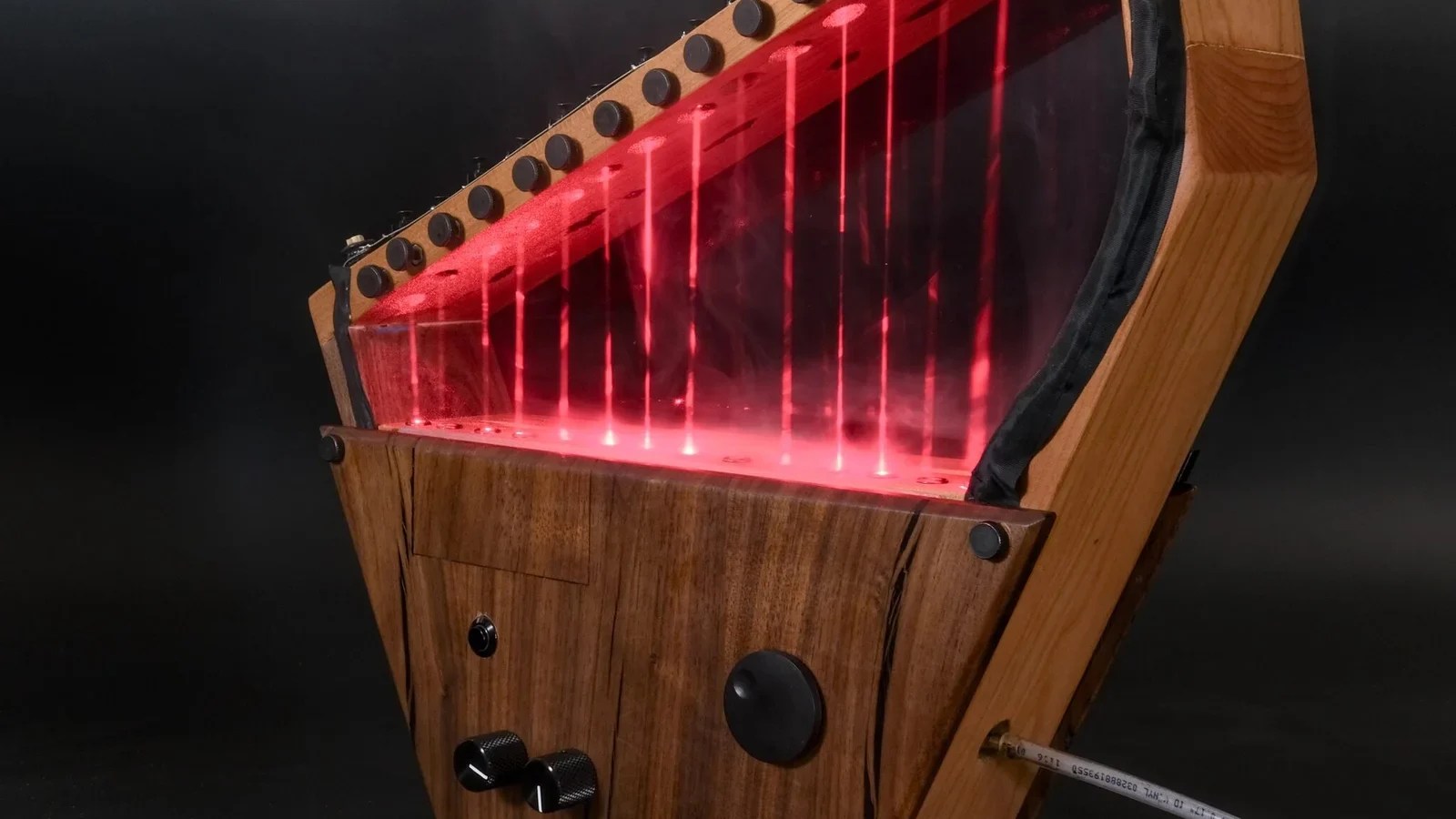
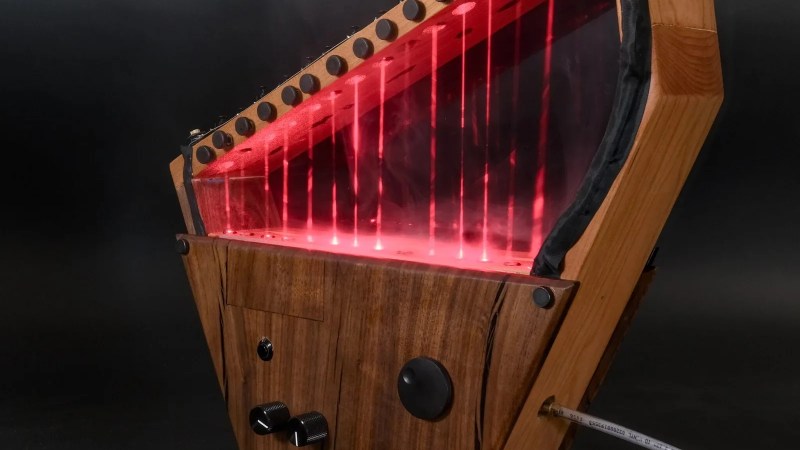
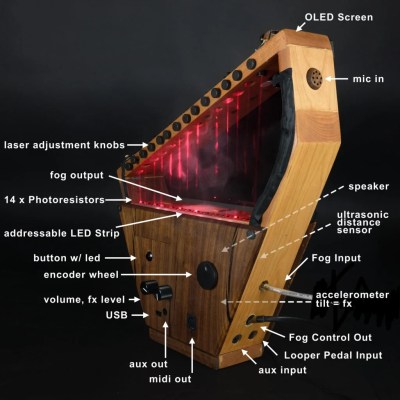
Beautiful Laser Harp Hides Some Neat Tricks Laser harps aren’t quite a right of passage, in that not everyone builds them, but it’s likely everyone at least contemplates building one at one time or another. We’re lucky that [Derrick] a.k.a. [DJ Baja Blast] didn’t stop at contemplating, and even luckier that he put together a full write-up for his tricked out laser harp — because this is a fascinating build, with features we’ve never seen in one place before. First of all, the harp! Lasers, photodiodes, done, right? Not here! [DJ Baja Blast] kept it analog with photoresistors so that he could measure the rise and fall of the voltage as the laser light is occluded by the player’s hands — thus you can moderate the volume via faster, louder and quieter, slower plucks. More unique is the inclusion of an accelerometer. What can you do with an accelerometer in a harp? Well, here it’s being used as a tilt sensor, with the tilt acting as a control to ‘bend’ the note as it sounds, tuning it flat or sharp or altering it any other way you choose to define in software. There’s also an ultrasonic distance sensor so you can do the same thing — or any other thing, there’s no shortage of effects to chose from — theremin-style, and an encoder wheel sits on the side, so that’s five extra inputs beyond selecting a note by blocking a laser diode. Unless you count the optional looper pedal input, or the aux in. It probably has a teensy learning curve, but looks like a baja blast to play. All these inputs are driving a Teensy 4.1 microcontroller, which has the grunt for just about any synthesis or sampling, though right now [DJ Baja Blast] is sticking with the Karplus-Strong string synthesis algorithm. The Teensy can drive an onboard speaker but also offers MIDI out. Eventually he does intend to add more. Last but not least, we cannot forget that he’s plumbed this instrument to hook to a fog machine. Which makes for a visually engaging performance, and probably helps a lot when you’re learning where the laser ‘strings’ are. The whole thing is handsomely put together with cherry and walnut. Does it sound as good as it looks? Listen to it in action in the demo video below, and judge for yourself! If you want to build your own you can grab the files on GitHub. This is hardly the first laser harp we’ve seen, or even the first to use a Teensy, but it’s certainly got the most options to spice up a performance. It’s got to be a baja blast to play. #bajablast #laserharp #teensy #first #lasers #derrick #rss #feeds #linksharing #qwibbit
MakerWire's avatar
MakerWire 1 week ago
NASA navigation experiment shows promise for planetary landings Armstrong Communications reports on NASA’s site that the agency has flown a landing guidance system on a drone over Rogers Dry Lake, near NASA’s Armstrong Flight Research Center in Edwards, California. An Alta-X drone carrying the Safe and Precise Landing, Integrated Capabilities Evolution (SPLICE) payload ran simulated lunar descent and landing maneuvers on August 27. SPLICE maps the ground below using light-detection and sensor data, builds high-resolution digital elevation maps, and checks whether the target landing spot is safe. If it isn’t, the system sends the vehicle somewhere better. NASA’s Johnson Space Center built the payload, and Armstrong staff integrated, tested, and flew it in June and July. Those flights checked communications, data handling, telemetry, and command and control before a full-scale test at Voyager Technologies in Mojave, California. “This flight test is the culmination of almost a decade of work for the SPLICE project,” said NASA project manager Davis Adams. He said the results apply to terrestrial, lunar, and Martian descent and landing. NASA plans to put the guidance system in its software catalog this fall, and some companies are looking at it for precision landing and autonomous surface mobility. See more at nasa.gov. https://blog.adafruit.com/2026/11/04/nasa-navigation-experiment-shows-promise-for-planetary-landings/ image #nasa #drylake #rogersdry #splice #capabilitiesevolution #armstrong #california #spacecenter #preciselanding #integratedcapabilities #rss #feeds #linksharing #qwibbit
MakerWire's avatar
MakerWire 1 week ago
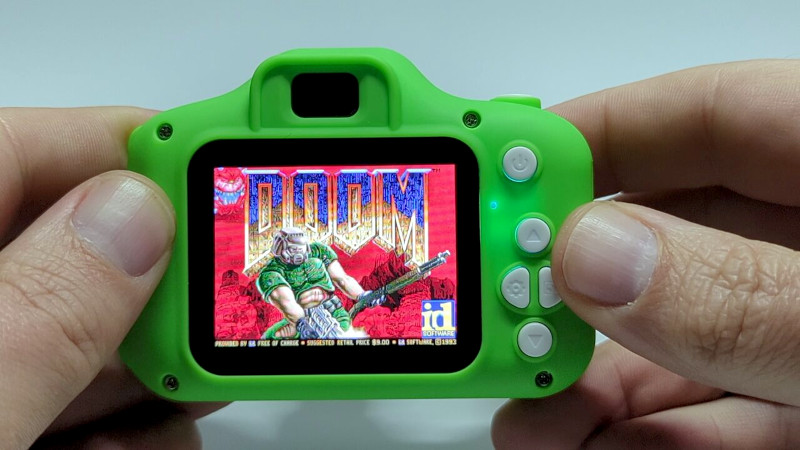
It’s DOOM Dirt cheap toy cameras have long been a target for the curious camera hacker, and we’ve seen plenty of lens swaps and other hardware hacks. Until now their internals have remained something of a black box though, so it’s very interesting indeed to see [Spode] breaching the firmware on one and making it run DOOM. Yes, it runs the game, but the value is in opening up this platform. The Achiles’ heel on this particular camera is its easily updatable firmware, allowing new firmware to be placed upon it with ease. The SoC is an HX3302B which [SpriteTM] has done some work on, so he’s not going in entirely blind. A neat hack to dump the camera’s memory into EXIF data on photos completed the puzzle. He was able to benchmark the thing and find it to be surprisingly powerful, certainly enough for a game from 1993. Doomgeneric looked promising, but first there was the matter of the device’s RAM. In another clever move he was able to keep only the most-used piece of the doom code in memory and the rest in flash, allowing the game to run. A custom synthesizer completed the experience, and on the write-up there’s a chance to travel back to the early ’90s and hear that music again. All that was left were the controls, and with a few quirks, this thing becomes a playable DOOM console. It’s probably better at that than it is at being a camera. If you’re hungry for more, we’ve taken a look at similar devices before. #doom #spode #exif #ram #rss #feeds #linksharing #qwibbit
MakerWire's avatar
MakerWire 1 week ago
Google Gets Nostalgic Ahead of Zelda Release Was it all a dream? When searching for “Zelda,” inserting the Master Sword returns the Google page to the year 1998 Tomorrow, Nintendo is releasing a remake to The Legend of Zelda: Ocarina of Time. The original game came out in 1998 and remains the highest rated game on Metacritic. Not to be left out of the fun, Google has a special easter egg if you search for “Zelda.” The iconic “huhya!” from the Hero of Time transports the Google page back to 1998. See for yourself! There is no shortage of TLOZ projects on the Adafurit Learning System, Zelda Master Sword with the RP2040 Prop-Maker Feather Zelda Echoes Of Wisdom Tri Rod Link’s 3D Printed Wooden Sword Link’s Hylian Shield https://blog.adafruit.com/2026/11/04/google-gets-nostalgic-ahead-of-zelda-release/ #zelda #mastersword #featherzelda #woodensword #link #rodlink #hylianshield #learningsystem #printedwooden #adafuritlearning #rss #feeds #linksharing #qwibbit
MakerWire's avatar
MakerWire 1 week ago
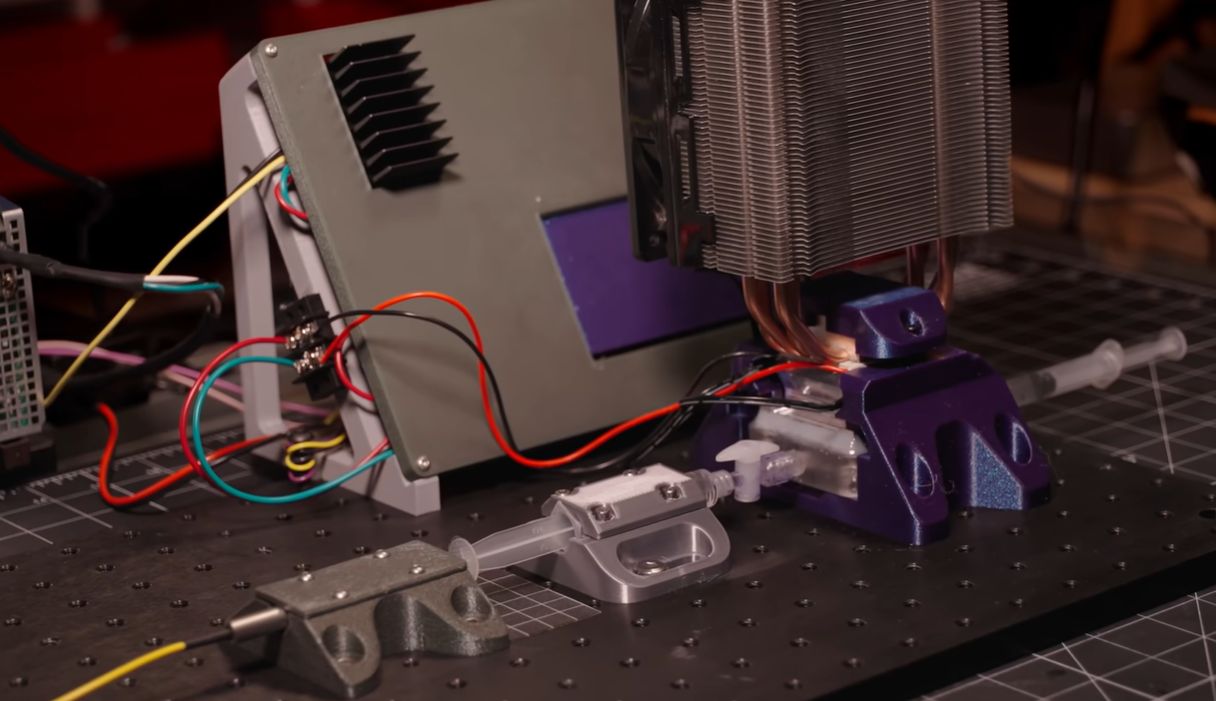
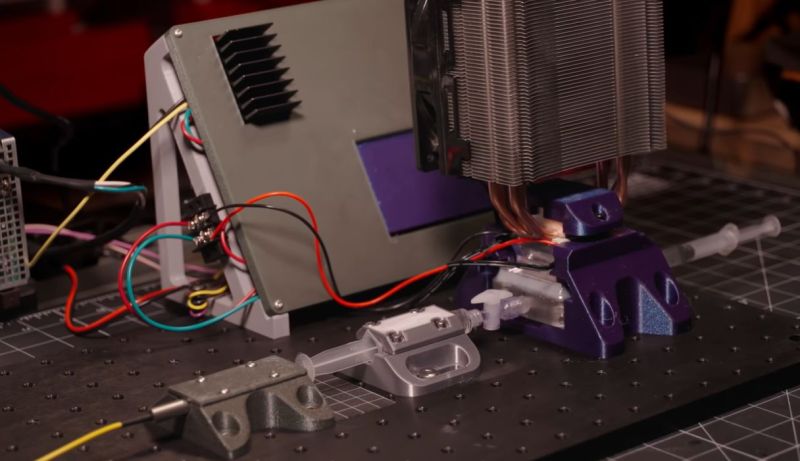
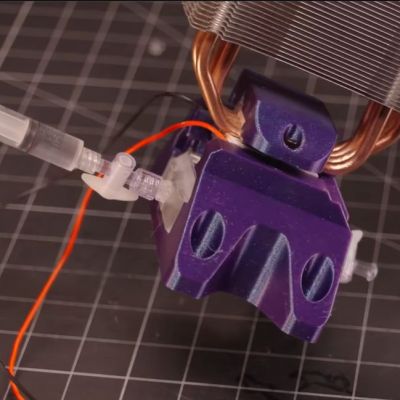
Making a Wax Motor for Micrometer-Level Control Although not very glamorous, wax motors are a fairly common type of linear actuator. They use the thermal response of waxes and the resulting volumetric expansion or reduction to create a relatively fast, smooth, and highly predictable actuator that can work for decades. They can often be found operating valves and things like the door mechanisms of washing machines. As [BubsBuilds] demonstrates in a recent video, you can even build your own wax motor for very precise control. Here simple paraffin wax is used, which changes in volume by 1.15 times when it goes from solid to its molten state. Calling it a ‘waxtuator’, [BubsBuilds] characterized this expansion rate over the temperature range between solid and fully molten to make it a controllable actuator. In his experiments, a gap of less than 5 µm was maintained over twelve hours, showing how precise this device can be if you can control the temperature that the wax is kept at. One major issue is the low conductivity of paraffin wax, which as some commentators remark can be solved by mixing something like fine copper particles into the wax to increase the thermal conductivity. In the shown implementation instead multiple channels in the aluminium block are used, which are melted by a TEC element. The wax exerts pressure on a working fluid, which then pushes on a hydraulic cylinder that can be used for whatever precise linear actuating task has to be performed. Although initially water was used as a working fluid, this posed many issues with wax-water interface compatibility and vacuum degassing. Although ethylene glycol makes for a better working fluid, this proved to be its own hassle. With the water-wax version a displacement sensor was thus used to measure and calibrate the whole setup. The electronics used to control the TEC in combination with the current temperature and displacement are a story in itself, but essential for making this device work. While not something we often see tackled in the DIY space, we’ve covered a few teardowns of commercial units over the years. #rss #feeds #linksharing #qwibbit
MakerWire's avatar
MakerWire 1 week ago
The first Unix Programmer’s Manual, released in 1971 (free PDF) MIT CSAIL marked the anniversary on X: Bell Labs released the first Unix Programmer’s Manual in November 1971. The post links a free PDF of the third edition, and credits Diomidis Spinellis (@CoolSWEng) for the pointer. The manual set the pattern that man pages still follow. One short page per command, in the same order: name, synopsis, description, files, bugs. It was written so a person at a terminal could check a flag in a few seconds. CSAIL’s post makes the point that coding agents lean on that same habit today. Documentation written to be scanned by humans in 1971 happens to be the kind of text a model can read too. See more at x.com and the free manual is here. https://blog.adafruit.com/2026/11/03/the-first-unix-programmers-manual-released-in-1971-free-pdf/ image #unixprogrammer #firstunix #freepdf #manual #belllabs #released #diomidisspinellis #csail #mit #november #rss #feeds #linksharing #qwibbit
MakerWire's avatar
MakerWire 1 week ago
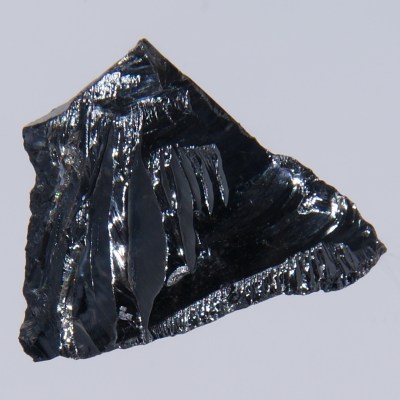
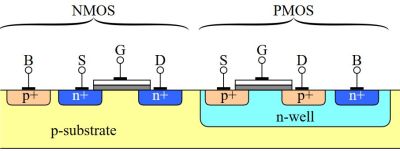
From Germanium to Diamond: the Many Shapes of Semiconductors It seems fair to say that semiconductor technology has been one of the most influential inventions in human history. Practically overnight it turned human technology from being large, cumbersome and power-hungry into an increasingly sleeker, more power-efficient and much more capable form. It has become practically impossible at this point to imagine modern society without semiconductor technology. That said, we didn’t always use today’s silicon-based semiconductor technology, and although silicon-based semiconductors are exceedingly versatile and adaptable, they do have their limitations. The past years we have seen for example gallium-nitride semiconductors make big inroads in power switching technology, and more exotic forms like diamond-based semiconductors keep making their tantalizing appearances. In this article we’ll take a look at how we ended up at silicon as the default for semiconductor technology, as well as why we may want to consider moving to other materials. Semiconductors Ultra-pure silicon crystal, an example of an intrinsic semiconductor. (Credit: Jurii, Wikimedia) Although semiconductor technology works on very different principles than vacuum tubes and relay-based electromechanical systems, ultimately the goal is the same. This being to make electrons go to certain place when and where you want them to go there. In the case of semiconductors this is achieved through n-type and p-type materials, which are areas in the semiconductor material which display different electron mobility behavior. The base material is – as the name suggests – a material that falls in between a conductor and an isolator. This conductivity can further be altered by embedding other elements into its crystal matrix, which is generally called ‘doping’. This creates an extrinsic semiconductor, as opposed to the pure, undoped intrinsic semiconductor. This doping process create two distinct types of semiconductor, being the aforementioned n- and p-types. These letters refer to whether they hold a negative or positive charge, effectively whether this semiconductor material is an acceptor (p-type) or a donor (n-type) of electrons. It’s not required to dope the base material to create both n- and p-type areas, which led to many variations just within the metal-oxide-semiconductor (MOS) family, including the n-type MOSFET-based NMOS, p-type MOSFET-based PMOS and the complementary CMOS that uses both types. Transistor pair in CMOS. (Credit: Reza Mirhosseini, Wikimedia) CMOS became the dominant technology by the 1980s to create field-effect transistors (FETs), although the ‘MOS’ part isn’t necessarily technically correct any more as the original aluminium layer can be replaced with polysilicon. Of course, semiconductor technology didn’t start right off the bat with today’s silicon, dopants and construction methods. The first functional transistor and diode designs are good examples here of where the revolution began, and how things evolved from there. The First Diode An EFD108 point-contact germanium diode in DO-7 packaging. (Credit: Mister rf, Wikimedia) Although the invention of the point-contact transistor in 1947 is pretty well-known at this point, semiconductor diodes came onto the scene first. The first crucial discovery here was made by German physicist Karl Ferdinand Braun in 1874, when he discovered the asymmetric conduction of electricity in a range of materials involving a metal-semiconductor junction between a metal and types of minerals. The discovery of this type of junction laid the groundwork first for a practical point-contact diode by the 1930s, using semiconductors ranging from selenium and silicon carbide to germanium and silicon. These were found to be much superior to the thermionic diodes that were first put into commercial use. Especially the push to develop radar and radio technologies during World War 2 drove the development of better semiconductor diodes. With increased understanding of doping the intrinsic semiconductor material to affect its behavior, it was thus only a matter of time before the point-contact transistor was developed. From there both practical experimentation and a deeper understanding of the underlying electron mobility principles drove innovation forward. Silicon As Easy Mode The primary reason why silicon is the most-used semiconductor material today has less to do with it being a good base material and more with it being both plentiful, cheap and easy to process. The silicon dioxide (SiO2) that forms the pure silicon crystals is the main constituent of sand where it’s called quartz. It will readily melt and can be drawn into very large crystals that can subsequently be cut up into the silicon wafer on which semiconductor circuits can be etched. Silicon’s band gap is however rather small at 1.14 eV, which means that the correct functioning of circuits created with this semiconductor will cease much sooner with higher temperatures including those generated by the device itself. So-called wide-bandgap semiconductors have a bandgap of >2 eV, which includes the gallium-nitride (GaN) semiconductor which the past years has become a frequent sighting in compact power electronics where being able to run hotter without issues and higher efficiency is considered a big selling point. GaN’s bandgap is 3.4 eV, which puts it pretty high up in the bandgap rating. In addition to a higher bandgap number, its thermal conductivity is also pretty good at about 230 W·m−1·K−1. These advantages makes it economically feasible to produce GaN components despite the material being harder to process. Which is also the crux of why diamond semiconductors haven’t yet cornered the market. Before moving on, an interesting note is that germanium has one advantage over silicon despite having an even smaller bandgap. This being that it doesn’t have to be as extremely pure as silicon to work well, which was a benefit especially during the early days of semiconductor technology. Peak Semiconductor Mosaic method of growing a diamond wafer, as filmed by Asianometry. Although diamond isn’t necessarily the ultimate semiconductor material, its properties makes it look very good indeed. With a bandgap of about 5.6 eV and a thermal conductivity of 900–2,320 W·m−1·K−1 it pretty much destroys both silicon and GaN. The only problem we are facing here is that diamond is an absolute pain in the backside to create large wafers from, not to mention dope the crystal lattice without using the easy ion implantation used for silicon wafers. Creating diamond wafers requires growing them from seed crystals, rather than just drawing a massive crystal from a vat of molten goo as in the case of silicon. This alone is highly problematic for any large-scale commercialization. The issue of doping and similar typical semiconductor circuit things being rather hard with diamond is not unique to silicon semiconductor alternatives, which is one reason why the MESFET field-effect transistor was developed. This drops the insulating oxide layer under the gate, instead using a metal-semiconductor (Schottky) junction. Such a MESFET design allows for other exotic semiconductor materials like gallium arsenide and silicon carbide, the latter being rather comparable to GaN in terms of bandgap and thermal conductivity, while allowing for very high switching speeds. An Exciting Future Despite the occasional bouts of doom-and-gloom stories about the semiconductor industry and issues with scaling and cooling, semiconductor materials like diamond show that there’s still a lot of potential to look forward to. Diamond-based semiconductors could potentially outperform all currently used commercial semiconductor materials, while rapidly moving any waste heat away to whatever cooling solution exists. Even before said Diamond Age commences, the rise of silicon alternatives like GaN are already showing that despite many decades of breakneck innovation we are hardly at the pinnacle of what is possible. Although making predictions about the future is a fool’s errand at the best of times, it’s good to remain optimistic about such potentially world-changing events like the death of silicon semiconductors in favor of something much better. #diamond #germanium #shapes #cmos #although #credit #wikimedia #practically #rezamirhosseini #rss #feeds #linksharing #qwibbit
MakerWire's avatar
MakerWire 1 week ago
The early history of the UNIX “more” command Dan Halbert, writing on danhalbert.org, tells how he came to write the Unix more command in 1978 as a first-year graduate student at UC Berkeley. The piece first ran on comp.society.folklore in 1994 and then in The ANALYTICAL ENGINE. Berkeley already had a small program called cr3 that printed 24 lines and rang the terminal bell to wait for a carriage return. The Lear-Siegler ADM-3 terminals around campus rang their bells on output too, so people had disconnected the speakers. That left you with no signal that cr3 was waiting. Halbert wrote his own version that printed “–More–” instead, and took a space bar press to continue, which is what he was used to from ITS at MIT. He called it more, which he says was a daring choice: a long name for a Unix command, and a real English word. Eric Shienbrood and Geoff Peck expanded it with options and prompt responses, and it shipped in 3.0 BSD. Mark Nudelman wrote less, which scrolls backward as well, between 1983 and 1985. See more at danhalbert.org and more at en.wikipedia.org. https://blog.adafruit.com/2026/11/03/the-early-history-of-the-unix-more-command/ image #unix #command #berkeley #halbert #geoffpeck #engine #bsd #mit #english #rss #feeds #linksharing #qwibbit
MakerWire's avatar
MakerWire 1 week ago
Using a Cheap DC Motor to Make a Go-Kart Go Where Archimedes said that he could move the Earth given a large enough lever and a suitable fulcrum, [Current Concept] decided that he could give his own spin on this quote by swapping the lever and fulcrum for a tiny $1 DC brushed motor and a very large gearing ratio. In addition to 3D printing a compound gearbox with the requisite 1,243:1 gear ratio, the video also covers the joys of getting a ‘Craigslist special’ go-kart for about the same price as the electric motor and having to undo many very special modifications. With that done, the newly printed gearbox was installed, along with the single DC motor to drive it all. This actually managed to propel the go-kart, at a pace that would impress even a snail, so for the next phase instead of a single motor a total of fourteen were used, all adding their tiny bit of torque into the gearbox. Although one has to keep in mind that the gearbox and chain mechanism will also take its slice of the provided energy along with other inefficiencies, one still cannot beat the laws of physics. Much like Archimedes’ lever powered by a piddly human, the conversion of RPM into torque for these small motors was never going to get you that zippy go-kart experience. Which isn’t to say that someone shouldn’t totally put some BLDC motors to the task and see how fast a go-kart can be made to move using those and an optimized gearbox. #motor #cheap #make #currentconcept #using #rss #feeds #linksharing #qwibbit
MakerWire's avatar
MakerWire 1 week ago
GNUstep Desktop: a NeXT user interface for modern Linux GNUstep Desktop (GSDE) is a Linux desktop environment that gives you a NeXT/OpenStep-like experience. It runs on the GNUstep framework, which is an open implementation of the OpenStep API in Objective-C, and pulls together apps and utilities the GNUstep community has written over the years. The code is compact enough that one person can follow it, and it compiles in about 30 minutes on a Raspberry Pi. The approach is a toolbox rather than one big executable. Apps talk to each other through services and filters, and everything can be scripted with StepTalk, and bundles or scripts can extend it. GSDE also wraps existing non-GNUstep software behind a native interface: WebBrowser.app drives Google Chrome through Xembedding, VimGS.app is command line vim inside TerminalKit, Player.app uses VLC for playback, and Librarian.app sits on top of recoll. The rule is that the result must have a GNUstep UI and be fully scriptable. WindowMaker is the one exception. The project credits NEXTSPACE and Sergii’s work as its inspiration, but takes a different path: GSDE is glue over existing projects, some of them abandoned, while NEXTSPACE rebuilds the whole system. It’s tied to Linux and X11 for now. MIT Licensed. See more at onflapp.github.io and content on GitHub. https://blog.adafruit.com/2026/11/03/gnustep-desktop-a-next-user-interface-for-modern-linux/ image #gnustepdesktop #linux #gsde #nextspace #googlechrome #mitlicensed #openstepapi #apps #raspberry #xembedding #rss #feeds #linksharing #qwibbit
MakerWire's avatar
MakerWire 1 week ago
Arkivism is a search and visual discovery engine for public domain works #ArtTuesday Jason Kottke, writing at kottke.org, points to Arkivism, a search and visual discovery engine for public domain works. It pulls together millions of items that anyone can use. The collections come from the Smithsonian, The Met, NASA, the Library of Congress, the National Gallery of Art, the Rijksmuseum and others. Public domain means the copyright has expired or was released, so the images are free to download, print, remix or drop into a project. See more at kottke.org. https://blog.adafruit.com/2026/11/03/arkivism-is-a-search-and-visual-discovery-engine-for-public-domain-works-arttuesday/ image #rss #feeds #linksharing #qwibbit
MakerWire's avatar
MakerWire 1 week ago
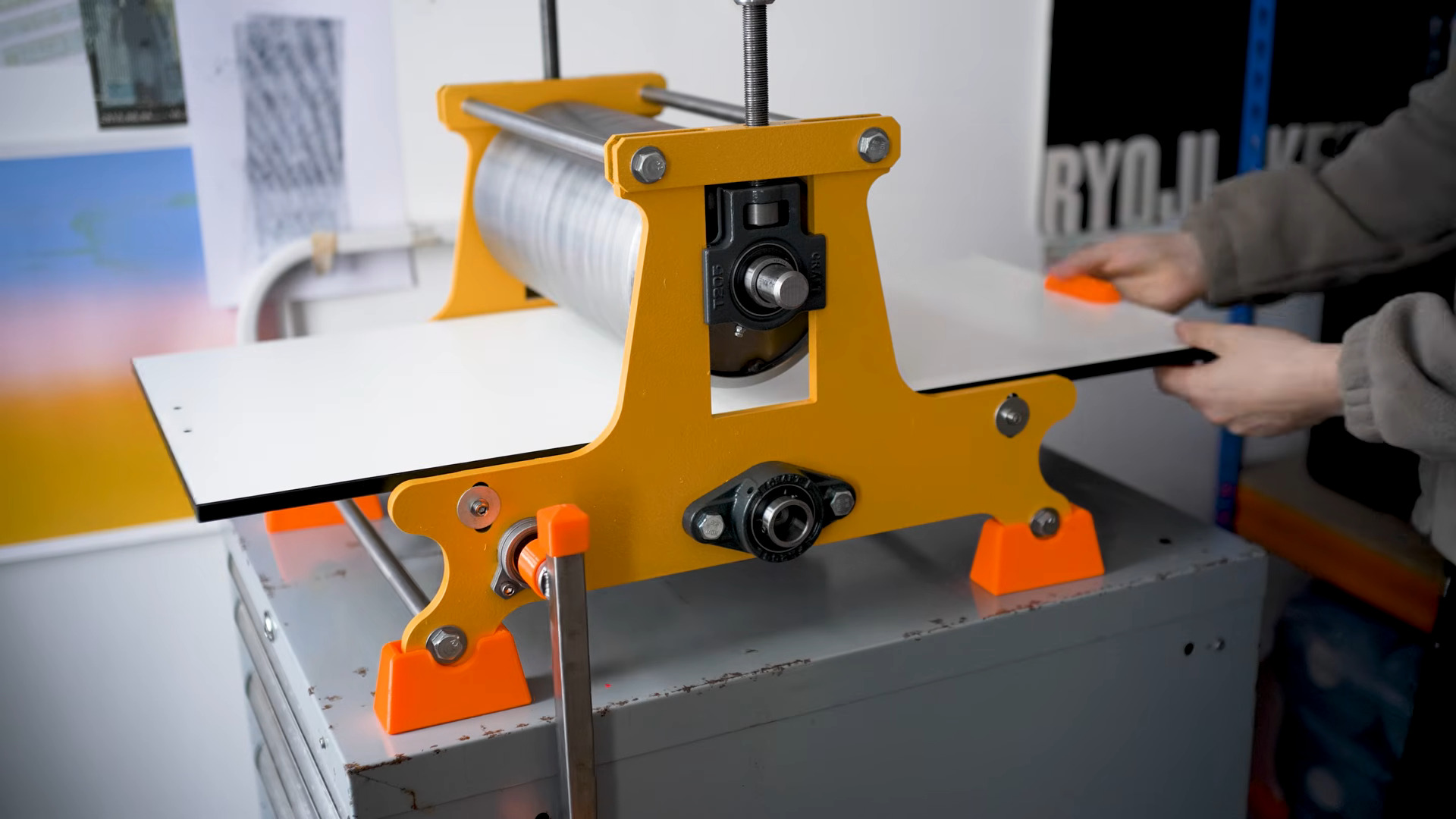
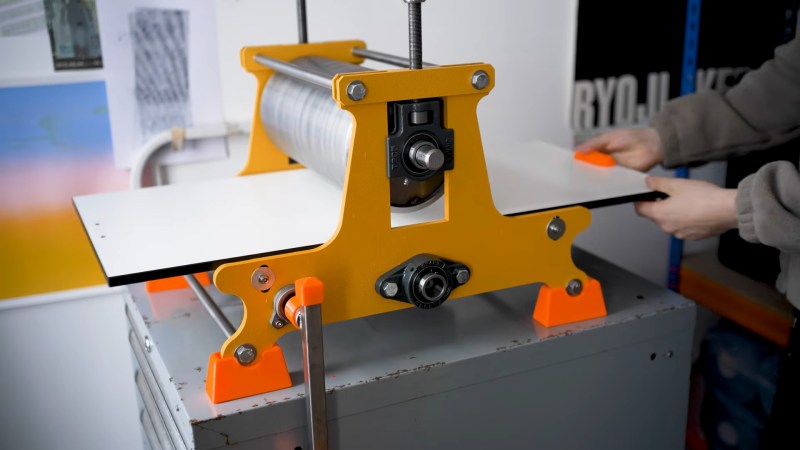
Etching Press Aims To Impress There’s an old joke about inviting a girl up to your dorm room to ‘look at your etchings’– but if you’re going to do that, you’d best have some etchings, lest she call your bluff. Even better would be to have prints available, so you might share your hard work with adoring fans. Over on YouTube, [This Designed That] shows building the perfect little etching press so you need never invite anyone to your room again: you can crank out enough prints on this bad boy to hand out your etchings on a street corner! Crank is the right word, because it’s hand-cranked, with the rollers chain-driven off a separate driveshaft. It works like, well, a roller press: two steel rollers squeeze a plattern holding your inked etching and a of paper together to put an image onto. His choice of an off-cut of steel pipe to use as the top roller is inspired, even if he did have to turn it down quite a bit to get an even radius and smooth surface finish. The whole thing is very well made, and all of it hand-machined except for off-the-shelf bearings and the yellow side plates, which were commercially CNC’d. We also appreciate that [This Designed That] took the time to prove the merit of his machine by showing the press in work, and the resulting prints. We’re not art critics, but we are willing to say this makes a good impression. [This Designed That] is both printer and machinist, and we’ve seen his print projects before, like using resin prints for foil stamping or a DIY proofing press that seems to share some DNA with this larger project. Thanks to [Paul Manwaring] for the tip! #etchingpress #even #paulmanwaring #crank #rss #feeds #linksharing #qwibbit
MakerWire's avatar
MakerWire 2 weeks ago
Self-Employed? Solopreneur? NIST has a cybersecurity guide just for you NIST has released Small Business Cybersecurity: Non-Employer Firms, also known as NIST Cybersecurity White Paper 50. It’s written for the “solopreneur,” anyone who is the only paid employee of their business. More than 28 million small businesses in the U.S. fit that description. The guide assumes the reader doesn’t know anything about cybersecurity or the NIST Cybersecurity Framework, and it defines terms as it goes. It’s an update to Small Business Information Security: The Fundamentals (NISTIR 7621), narrowed to protecting digital systems from attack and based on CSF 2.0. The middle section lists specific actions, with the reason for each one, how to start, and what to do later as the business grows. One example: change the default passwords a manufacturer puts on WiFi routers and other networked gear, since criminals can look those up. The guide also points to basics like regular backups and keeping software updated. The last section has worksheets for listing at-risk assets and tracking what’s been done, plus three example solopreneurs: a lawyer, an artisan and a business consultant. NIST’s Daniel Eliot, one of the authors, says it isn’t comprehensive. See more at nist.gov. Via Hacker News. https://blog.adafruit.com/2026/11/03/self-employed-solopreneur-nist-has-a-cybersecurity-guide-just-for-you/ image #nist #nistcybersecurity #business #smallbusiness #guide #solopreneur #whitepaper #informationsecurity #danieleliot #viahacker #rss #feeds #linksharing #qwibbit
↑