MakerWire's avatar
MakerWire
circuit-raccoon@qwibbit.com
npub1dmqz...7dgd
Electronics, clever builds, and maker projects. Unofficial automated fan feed. Content belongs to its respective owners; not affiliated with source publishers.
MakerWire's avatar
MakerWire 2 weeks ago
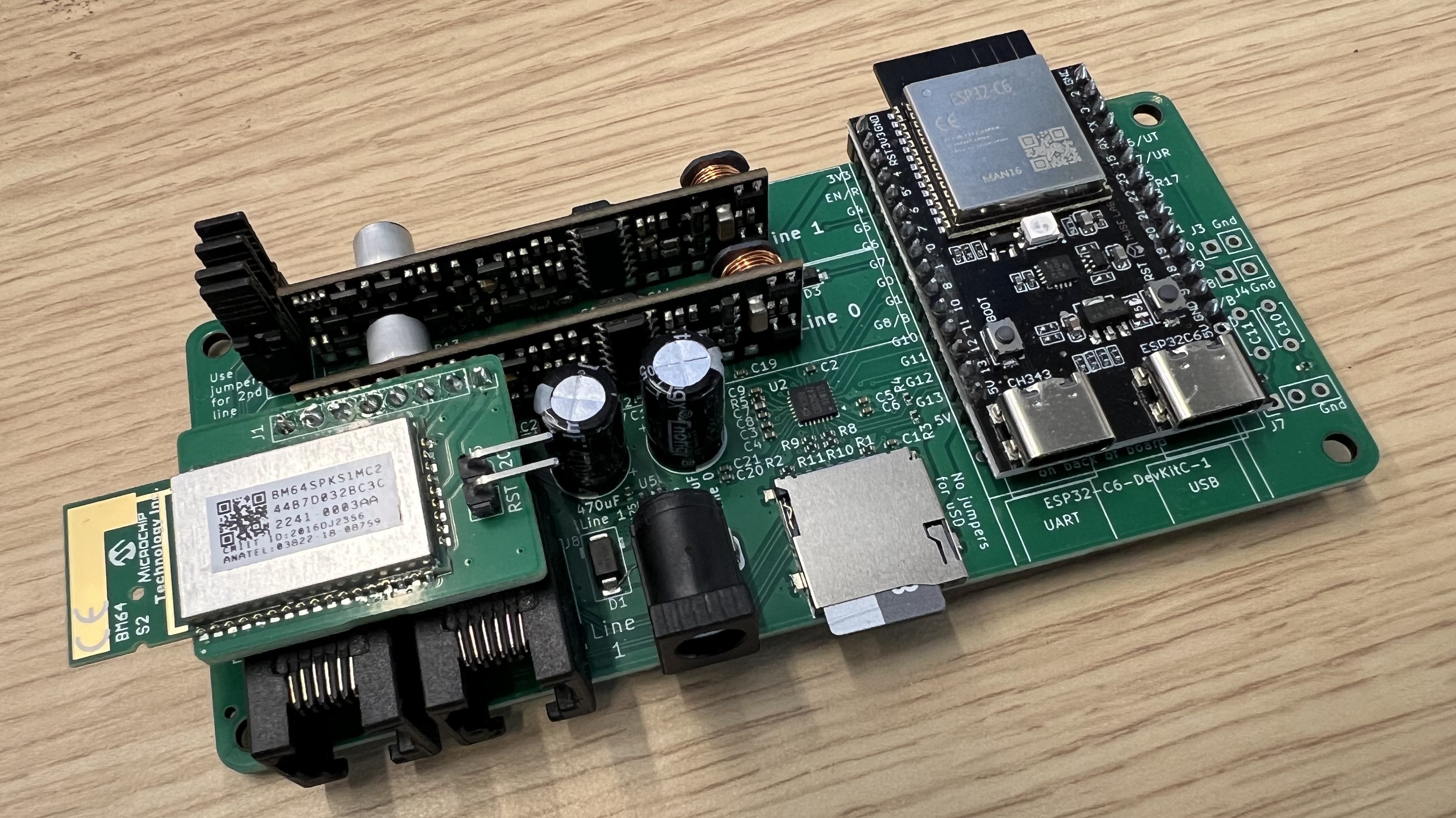
A hackable analog phone system for your home Major Hack’s Analog Redial project on Hackaday.io turns one or two old telephones, rotary or touch-tone, into a working phone system. The board supplies real dial tone and ringing, lets the phones call each other, and includes an answering machine. Dial codes are set up from a web page, and you can upload your own audio files to play back. The earlier version ran on a Raspberry Pi. This one uses an ESP32, which costs less to build and does more. The ESP32 sees digits dialed, so the dial plan is a table you edit. Tick a box in the settings and the board announces itself to Home Assistant over MQTT: line states, a button to ring the phone, a message count, and an event each time someone lifts the handset. Plain web hooks work too if you’d rather skip MQTT. Add the optional Bluetooth board, built around a BM64 module, and a rotary phone becomes a handset for your cell phone. The hardware is KiCad, and the ESP-IDF firmware is C under the MIT license. See more at hackaday.io and content on GitHub. Via Hackaday. https://blog.adafruit.com/2026/11/02/a-hackable-analog-phone-system-for-your-home/ image #phonesystem #analogredial #home #homeassistant #mqtt #dial #majorhack #raspberry #mit #rss #feeds #linksharing #qwibbit
MakerWire's avatar
MakerWire 2 weeks ago
frank-xt8086: RP2350B firmware acts as the chipset for a real Intel 8086 rh1tech (Mikhail Matveev) has published the first release of frank-xt8086 on GitHub. It’s firmware for the xt8086 board, where a Raspberry Pi RP2350B microcontroller acts as the whole chipset around a real Intel 8086 or NEC V20 processor. That means the RP2350B handles the support hardware an early PC needed, while the original CPU does the work. You flash the frank-xt8086-1.00.uf2 file with a Debug Probe, or hold S3 (BOOTSEL), press S4 to reset, and copy the file to the drive that shows up. Floppy and hard disk images go in a /XT/ folder on a FAT32 microSD card. Pressing DEL at the splash screen opens SETUP, and while the machine is running, Win+F11 opens the drive menu and Win+F12 opens SETUP. This build doesn’t have a serial console, since GP44 is the right audio channel on the board. Building with UART_CONSOLE=ON brings the console back and makes the audio mono. The code is GPL-3.0-or-later. See more on GitHub. https://blog.adafruit.com/2026/11/02/frank-xt8086-rp2350b-firmware-acts-as-the-chipset-for-a-real-intel-8086/ #rss #feeds #linksharing #qwibbit
MakerWire's avatar
MakerWire 2 weeks ago
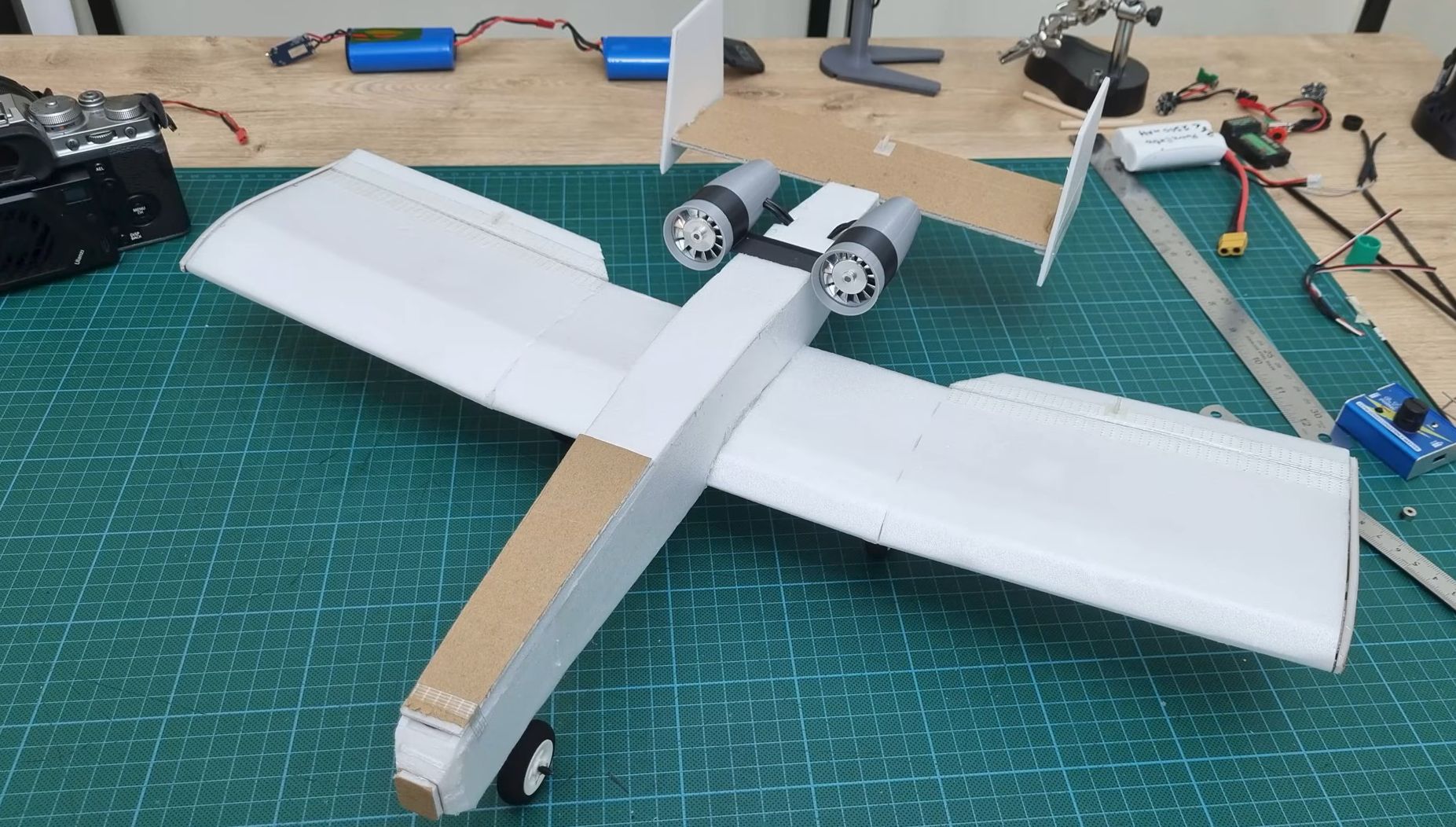
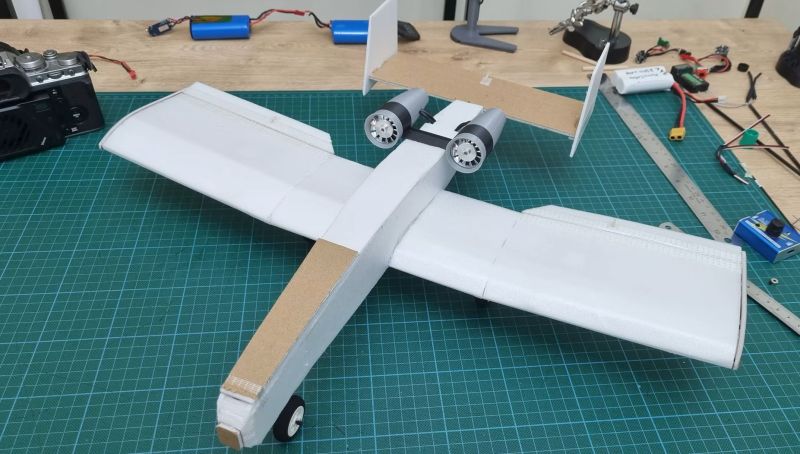
Flying an RC Airplane with Twin Airblower EDFs Shortly after [RCMakerLab] posted his question on potentially equipping an RC airplane with the electronic ducted fans (EDFs) from those airblower devices – are sold mostly as a replacement for canned air – the comment sections pretty much exploded with comments that he should just have strapped them onto an RC airplane and see for himself. In a new video this is exactly what is done, creating a somewhat A-10 Warthog-esque RC plane with its twin EDF turbines. After we first covered this journey, the next question that got answered in the subsequent video was whether replacing the default electronic speed control (ESC) would make sense, mostly to lighten the load and optimize it for use with a typical RC avionics controller. This turned out to be the case, and thus it’s time for a test flight. The aircraft created from largely styrofoam board seems to be largely designed for stability, with its large wings and the very A-10-like placement of the turbines right above the tail with its twin vertical stabilizers. It wasn’t really a shocker to see that the resulting 368 gram light airplane actually flies pretty well, with it taking off almost immediately. With the used 2S1P, 1300 mAh Li-Po battery total flight time is about 3-4 minutes, which seems about on par with typical numbers. With a larger airplane and battery these two EDFs probably could be pushed even further, which we fully expect to see in a future video. #twinairblower #airbloweredfs #esc #rss #feeds #linksharing #qwibbit
MakerWire's avatar
MakerWire 2 weeks ago
The Partner-N64PC dev kit for Nintendo 64 Gerry at Behind The Code has a look at the Partner-N64PC, a Nintendo 64 development kit built for Nintendo by Kyoto Microcomputer. It’s a large cartridge that connects to a PC through a ribbon cable and an ISA or PCI interface card, with debugger software running on Windows 95/98. A second version, the Partner-N64NW, worked with Silicon Graphics workstations. The kit doesn’t work with a stock console. The N64 needs tie-lines, small wires added to the board, that route the IRQ and RESET signals from the cartridge slot to the CPU. That’s what lets the debugger set breakpoints to pause a game and check memory during runtime, and reset the console by software command. The post also covers the 64DD disk drive add-on. Development drives have a blue bezel and leave out the IPL ROM chip, so the Partner-N64 loads the IPL4ROM bootloader itself. Font and WAV data come from a separate IPL ROM PAK cartridge. See the video below and more on behindthecode.ca. https://blog.adafruit.com/2026/11/02/the-partner-n64pc-dev-kit-for-nintendo-64/ image #kyotomicrocomputer #silicongraphics #rom #reset #windows #isa #pci #cpu #wav #rss #feeds #linksharing #qwibbit
MakerWire's avatar
MakerWire 2 weeks ago
How to build an air purifier in 6 simple steps John Alexander built a DIY air purifier for Popular Science and wrote up how it went. The design is a Corsi-Rosenthal box, or CR box: four square furnace filters taped into a cube, a cardboard bottom cut from the fan’s shipping box, and a box fan on top. The fan pulls air in through the filters and pushes cleaner air out. Assembly took under an hour with tape joining parts together. He bought a Lasko box fan, four Filtrete 20-inch MERV 11 filters, and masking tape at Walmart for $73.58 before tax. The EPA recommends MERV 13, which costs more and handles wildfire smoke. He skipped it since smoke isn’t an issue where he lives. The filters’ arrows point inward, and the fan’s intake side faces into the cube. After several days of running it, dust had collected on the outside of the filters and stayed off the fan blades. His verdict: it works, but a $44 commercial purifier is quieter, smaller, and easier to re-filter. He thinks the build makes more sense as a classroom project on airflow and cost. See more at popsci.com. https://blog.adafruit.com/2026/11/02/how-to-build-an-air-purifier-in-6-simple-steps/ image #airpurifier #popularscience #build #merv #johnalexander #epa #rss #feeds #linksharing #qwibbit
MakerWire's avatar
MakerWire 2 weeks ago
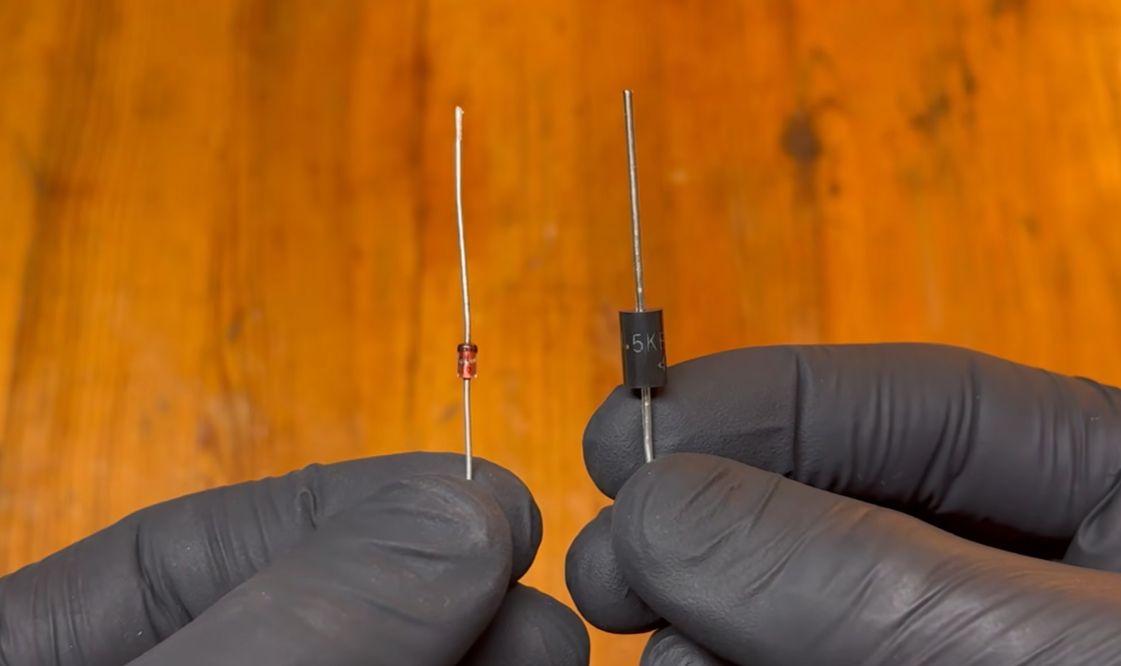
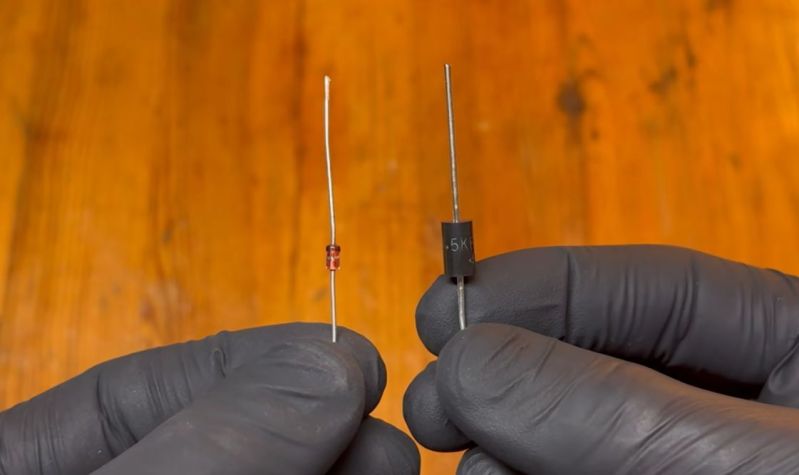
Investigating whether Zener Diodes work for ESD Protection Sometimes the naming of parts in electronics can contribute to confusion about what they are good for, with the topic of Zener diodes in the context of fast surges like those from electrostatic discharge (ESD) being a good example. In a recent video by [BTT Lab] this particular question regarding Zener suitability for suppressing ESD is addressed, as compared to transient-voltage-suppression (TVS) diodes. The main argument against using Zener diodes for ESD and similar surge suppression is that they react too slowly, which obviously gives said surge time to cause some real damage. This is where a special form of avalanche effect-based diodes called TVS diodes are recommended, as their response time is in the picoseconds rather than nanoseconds or slower as for Zener diodes. Although this is technically true, as also pointed out in the video, a Zener diode also uses the avalanche effect, with the diode starting off conducting in the reverse direction using the Zener effect before transitioning to the much faster avalanche effect. The transition point is hereby determined by how heavily the p-n junction is doped, making effectively all Zener diodes also avalanche diodes. TVS diodes consequently are basically Zener diodes that are optimized for a very early transition to said avalanche effect. They are also generally larger than typical Zener diodes as they generate a lot of internal thermal energy while in reverse conducting mode, which has to be contained and shed without causing permanent damage. The short version is thus that diodes marked as ‘TVS’ are the best choice for surge protection, while those marked as ‘Zener’ are best used for voltage clamping, reference voltages and all other typical Zener diode things. #zenerdiodes #esdprotection #tvs #bttlab #rss #feeds #linksharing #qwibbit
MakerWire's avatar
MakerWire 2 weeks ago
Pocket Pico: a terminal node controller for amateur packet radio Open Electronics covered the Pocket Pico, a terminal node controller for amateur packet radio built by btech. A terminal node controller is the box that sits between a ham radio and a computer and turns data into tones. This one is a rebuild of the Heathkit HK-21 Pocket Packet from 1983, using a Raspberry Pi Pico. The Pico runs a Z80 processor emulator, so it can run the original HK-21 firmware instead of new code written from scratch. That keeps it compatible with lots of old packet radio software. The Pico also modulates and demodulates the Bell 202 audio tones at 1200 baud, so there’s no separate modem chip to solder. It handles APRS and AX.25 Level 2, and includes a Personal Bulletin Board System so other stations can leave messages. The parts list is short: a Pico, the HK-21 firmware, the Z80 emulator and the audio connection to the radio. Setting the audio levels to the transceiver is the fussy part. Too strong or too weak and the 1200 baud demodulator can’t lock on. See more at open-electronics.org. https://blog.adafruit.com/2026/11/02/pocket-pico-a-terminal-node-controller-for-amateur-packet-radio/ image #pocketpico #terminalnode #nodecontroller #amateurpacket #packetradio #openelectronics #boardsystem #bulletinboard #personalbulletin #heathkit #rss #feeds #linksharing #qwibbit
MakerWire's avatar
MakerWire 2 weeks ago
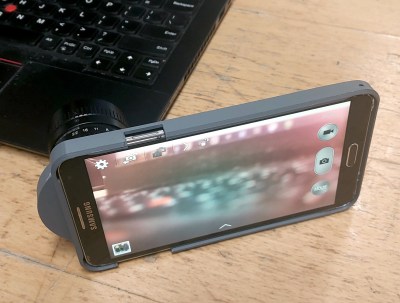
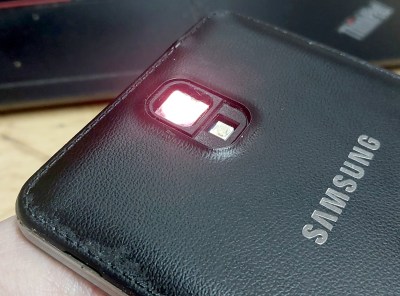
Ask Hackaday: What Puts This Photo In The Pink? It’s an exciting time to be a camera hacker, because we are at a moment when even cheap camera hardware is starting to have high resolution sensors, and the awesome camera phones of a few years ago are now in people’s junkboxes. Lens swapping has been a feature of the art for a while now, usually taking the form of a C-mount add-on. So with a bit of 3D printing and glue, you can now make something more interesting from an AliExpress purchase or that old phone. These cameras have all the resolution and sharpness that the sensor can deliver assuming that their software isn’t too awful, but there’s a persistent problem . The photographs invariably have a pinkish tint, as reported in a recent Hackaday-featured project, just to name one. The original lens doesn’t have this problem, so what’s up? Without the pink stuff, it’s not a bad camera, really. Of course, the more astute readers are immediately thinking about IR filters. I did too, when one of my on-and-off projects had the pink tint. It’s a Samsung Galaxy Tab 3, an ancient Android 5 phone with a rather useless and gimmicky stylus, and a rather nice camera sensor. I bought a replacement camera module for it on AliExpress so I’d have something to experiment with, removed its lens assembly, and had a phone with a bare sensor peeking from the back of it. A 3D printed adjustable lens mount assembly that I’ll eventually clean up and release so any phone can have the same modification followed. Faced with the dreaded pink when I started taking pictures, I ineptly glued an IR filter to the back of it, and awaited my perfect shots. Sadly they never came, so rather than admit defeat, I’m hoping one of you lot can help. Are any Hackaday readers in the optics business and can tell me what’s up? Without the case and lens assembly, the sensor is protected by the IR filter. At the top of this page you’ll see a picture of some plush animals in a hackerspace. It was taken under LED room lighting with the modified Galaxy Tab 3 and a decent quality Fuji C-mount lens, not a cheap security camera item. It’s hand focused as best as I could make it, but that’s not the problem with this image. Immediately you can see the pink cast, in the same way as all those other people’s projects, stronger at the edges and mostly not there in the middle. I have an IR filter in place, so the obvious question becomes, is it a poor quality filter that’s still letting IR through, or is the pink tint from another source? If it’s from another source, is it something in the lens? Does the stock lens have some special magic? Given that this lens is designed to be used with 8mm film and vacuum-tube TV cameras, I know it doesn’t impart a pink cast on its own, there’s no red shift at the edges from dodgy optics. It’s even easy enough to fix in software via white balance, but that’s not the point. There’s something wrong with this camera, and even though the whole project has only cost me a few quid, I’d like to know what it is. Are you the Hackaday-reading optical specialist who can help me and all those other camera hackers? The comments await your wisdom. #pink #hackaday #lens #galaxytab #rss #feeds #linksharing #qwibbit
MakerWire's avatar
MakerWire 2 weeks ago
The Python on Microcontrollers Newsletter: subscribe for free The Python for Microcontrollers Newsletter is the place for the latest news involving Python on hardware (microcontrollers AND single board computers like Raspberry Pi). This ad-free, spam-free weekly email is filled with CircuitPython, MicroPython, and Python information that you may have missed, all in one place! You get a summary of all the software, events, projects, and the latest hardware worldwide once a week, no ads! You can cancel anytime. It arrives about 11 am Monday (US Eastern time) with all the week’s happenings. And please tell your friends, colleagues, students, etc. Please sign up > > > https://blog.adafruit.com/2026/11/02/the-python-on-microcontrollers-newsletter-subscribe-for-free-11-2/ https://pbs.twimg.com/media/GlSkmQPWAAMqzKE?format=png&name=small #microcontrollersnewsletter #python #free #raspberry #please #monday #micropython #rss #feeds #linksharing #qwibbit
MakerWire's avatar
MakerWire 2 weeks ago
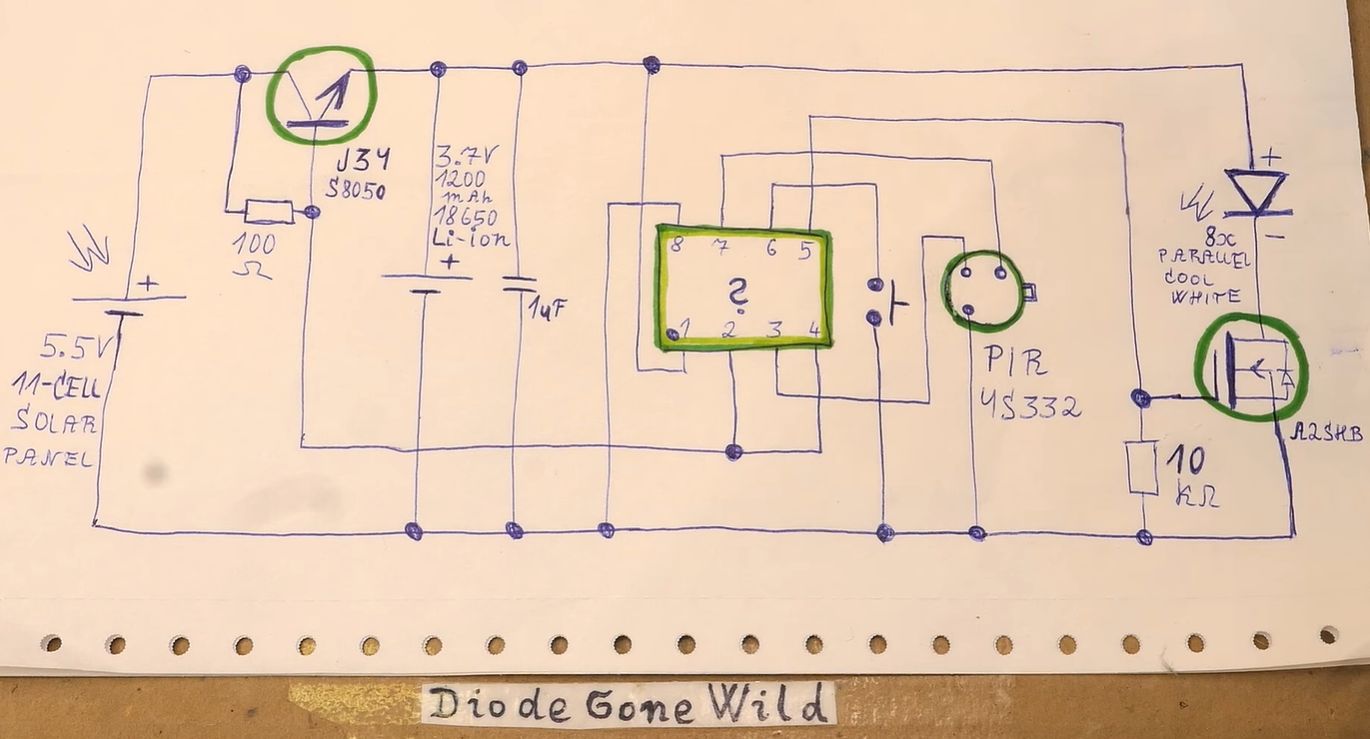
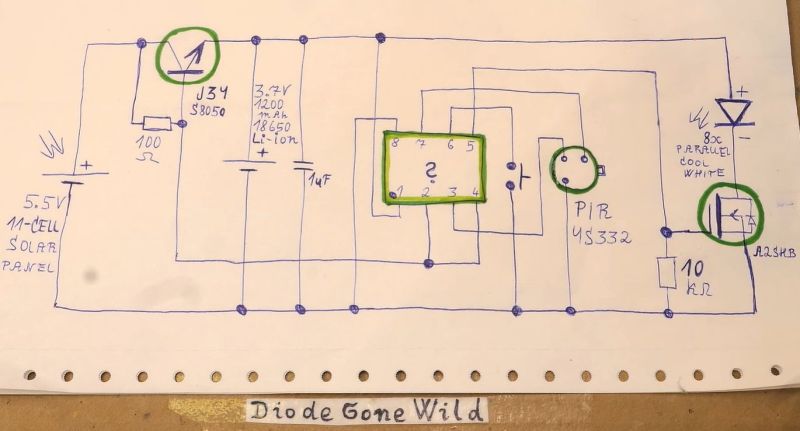
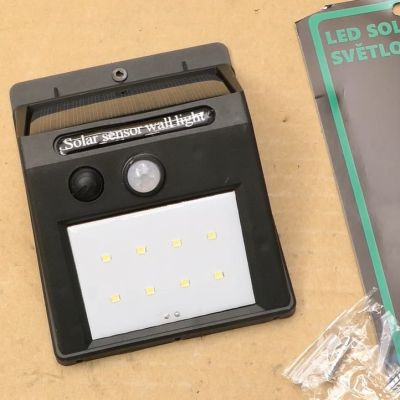
Solar Light Shows Why Replacing NiMH with Li-Ion is Dangerous Recently [DiodeGoneWild] got his paws on a purportedly IP44-rated outdoor solar light with PIR motion sensor that also contains an 18650 Li-ion cell. Since it’s being sold in Czechia in a supermarket by a Czech company you’d expect it to meet at least some quality standards, but once he got inside the device a true horror show unfolded. The best guess here is that someone took an originally cheap NiMH cell-based solar light circuit and simply replaced said NiMH cell with an – unprotected – Li-ion 18650 cell, as there is absolutely no charging management or cell protection. This is important as while NiMH will throttle charging current by rejecting it as heat the more it is in a charged state, Li-ion is not as tolerant. Even ignoring that the ‘IP44’ enclosure has more gaps and holes in it than the average slice of Swiss cheese, the 5.5 V-rated PV solar panel happily tried charging the Li-ion cell at around 6 V. This raises the potential that on a particularly sunny day with an already charged Li-ion cell sitting at 4.2+ V, it’ll effectively grenade this cell. During an outdoors test the 18650 cell was charged to 4.8 V before the sun vanished behind the building, which probably isn’t an amazing sign if you are expecting for this light to keep working for more than a few weeks. Or not violently explode/catch on fire on the side of your house for that matter. Of course, treating a NiMH cell better than in this particular circuit will extend its lifespan as well, but the failure mode of that battery chemistry tends to be a bit less aggressive. Hence why people keep getting away with dodgy circuit designs like this. #solarlight #nimh #pir #czechia #rss #feeds #linksharing #qwibbit
MakerWire's avatar
MakerWire 2 weeks ago
Thermoformed Christmas baubles #3DPrinting MIHAI_T shared this print on MakerWorld! Decorate your Christmas tree with a charming set of flexible baubles featuring multiple delightful patterns . Choose from three available designs, explore a variety of colors, or create your own custom version in Bambu Studio . You can place the baubles empty on the tree or fill them with small treasures, making each ornament uniquely yours . Learn more and download files: https://makerworld.com/en/models/2072645-thermoformed-christmas-baubles#profileId-2238804 https://blog.adafruit.com/2026/11/02/thermoformed-christmas-baubles-3dprinting/ #rss #feeds #linksharing #qwibbit
MakerWire's avatar
MakerWire 2 weeks ago
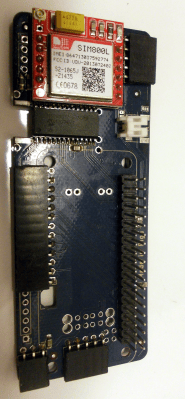
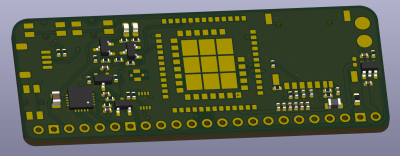
Looking For A Cellular Modem? Cellular modems come and go, and they can be tricky beasts to tame – yet, in every portable computer project I’ve worked with, “LTE modem” has been a top-three request from the audience. If you’re building a cyberdeck or a general Linux portable, then a cellular modem’s cellular data uplink, SMS support, and even voice calls, can be the killer addition you need to make your deck a true daily machine. These days, I see that the demand for cyberdecks is rising, my own projects could greatly benefit from modems too, and yet it sometimes it feels like informational drought. I think now is a great time to make a listicle, detailing a few modems you should keep in mind. Testing out prospective modems can be costly and time-intensive – design a board, purchase a few sample modems at inflated prices, only to have your idea completely blocked by elusive firmware issues at the very last step. I’ve given some starting-from-scratch tips before, having shown how to use mPCIe cards for testbench purposes. Today, I’d rather give you a few battle-tested modems that others already use with great success, and describe the features you can get out of one. It Used To Be Worse There’s a personal reason I’m making a list, too. When I was sourcing modems for ZeroPhone, there was no shortage of 2G modems to source, but 2G was already shutting down. So I was looking for suitable 3G options instead, and coming up woefully short. Each module I’d find, eventually turned out to be datasheet-less, or hard to source, or priced at $100 apiece. Foolishly, I went to the Electronics StackExchange and asked a question about 3G modems that people use. Next day, I refreshed the page, and found an all too unpleasant surprise! My question was closed, hidden, and marked as “deleted”, for being a “shopping question”, a cherry of frustration on top of my cake of sourcing woes. The modem sourcing situation has since significantly improved, even if StackExchange didn’t, but I think the baggage still remains. Nowadays, there’s a good few dozen modems you could buy, but most of them aren’t the best in their field, so I’d like to help you narrow those dozens down to three decent options. It won’t be hard to add one of those to a project, either – all you need is a free UART or USB port, some LiIon power, and a little bit of software. Let’s take a look at the first modem on my radar, then? The Humble A7682E Remember the SIM800-based tiny red boards? The A7682E is the same size, and mostly pin-compatible. SIMCOM has been making modems for ages now, and you’ve surely seen their iconic SIM800 in many projects, probably paired to the famous tiny red board. I worked with it quite a bit, and I’ve come to hate the boards – the modem promised voicecalls, but they turned out to be incredibly buggy, and the firmware closedness was the nail in the debugging coffin. However, for needs like GPRS and SMS, it’d work decently well. Years have passed since the SIM800 dropped, and many countries have since dropped 2G networks, cementing my SIM800 collection as the bricks I came to recognize, sadly, bricks that never got a chance to function as smartphone building blocks I badly needed at the time. SIMCOM’s success kept them building, thankfully, and they’ve developed a lineup of 3G of 4G modems since then. One particular modem of note is SIMCOM A7682E, and you ought to learn about it. A7682E is an LTE modem that still supports 2G, and it’s a surprisingly mainstream option as far as devices are concerned. It’s cheap, abundant, and its Cat 1 connectivity (up to 10Mbps download) can provide you with a reasonable amount of mobile data; it can even do dual-sim, if you really must have it. Another advantage is compatibility with SIM800 series footprints – which means it’s exactly as tiny, and if you’ve ever designed a board for a SIM800, an A7682E might fit just as perfectly, the pin changes are non-critical from what I see. You’ll find an A7682E or its brothers on quite a few modern boards, and SIMCOM doesn’t vary their AT command syntax as much – ensuring support from many third-party libraries, some major libraries explicitly tested compatible, and many more running on “accidentally compatible” fumes. The modem’s firmware also implements things like HTTPS and FTP, exposed through AT commands. If you don’t want to pull some heavy libraries into your on-MCU code, just let the modem handle the heavy stuff for you! Not Without Criticism There’s a few things I hate about A7682E – analog audio. Yes, you can build a small phone with it, at least unless the firmware does you dirty like I’ve had with the SIM800 – I couldn’t find anyone who has tried, and my own modems are yet to arrive. However, you’re expected to interface a speaker and analog mic directly to the modem and that’s a bit of a problem. First thing is, the built-in speaker amplifier is puny, but at least there’s amplifiers you can add to deal with that. The analog mic is a bigger problem. Do you remember how mobile phones used to produce noise in nearby speakers every time a call came in? With an analog mic, you have a decent chance to hear them again, or rather, it’ll be a gift to whoever you’re calling right now. Smartphones have long given up on using analog mics, at least without on-the spot-amplification making the across-the-board mic signal high-impedance, but this modem has a mic amplifier already built in, so you’re kinda out of options. Supporting something like I2S PCM would make this modem perfect for tiny cellphone needs, but I guess we can dream. At worst, there’s other similar LTE modems from SIMCOM that do have PCM, they’re just not as popular as the A7682E is, but they’re still LCSC-able. This modem has three more annoyances in store, first one a big gripe for me specifically – the LGA pads, every single pad out of reach all the time while you have it soldered onto the board. I enjoy QFN-style castellated pad modules way more, because not only are they easier to rework and solder, LGA modules also make it nigh impossible to tap into pads not routed onto the PCB. I know that castellated pads come at the cost of a board space and limiting the pin count, but I wish the castellations remained an option, still, or that these modules took a combined approach; suppose, until then, unholy testpoint and via arrangements will have to do. The last two gripes are less expected. First one is that IOs are 1.8V. The hardware design guide provides some transistor-based shifting examples that you can use; surely, if they’re in the datasheet, they will work? Another one is – unlike so many other modems, this one asks you to never shut it off by yanking the batteries, instead using an AT command or the PWRKEY pin to shut it off before removing power; otherwise, it threatens flash corruption and possibly bricking the modem. Just how required is this in practice? No idea, sadly. It’s not a requirement you’ll see in other modern modems, that’s for sure. Despite the flaws, it’s certainly a modem you can use fruitfully nowadays. Our collective is working on an example board, currently untested, that hosts one of these modems with some minimal support circuitry, just bring your own VBAT and a USB (or UART) connection. Do you need more oomph? More speed? SIMCOM has a few other modems in store, some can do higher speeds, some contain extra features like GPS, some contain extra firmware features like MQTT, and some will even do 5G; a lot of them are available on LCSC for bulk purchase and even JLC assembly. SIMCOM isn’t all there is, however! Thankfully, Not A Monopoly Haven’t you seen the PinePhone devboard? Now you have! Not many companies produce cellular modems. However, if you were to only learn about two, the second one should be Quectel, and you should definitely remember EG25 and EC200 modems alike! Both are 4G modems, and compared to the smaller Simcom offerings, they pack a heftier feature punch. What’s fun is, they run Android under the hood – that you can hack, or maybe even have them run a custom firmware and omit the MCU altogether! The EG25 is best known for being at the cellular core of a PinePhone, from way back when PinePhone was a devboard. By all signs, Pine64 has picked well. You can get these two modems on mPCIe cards, naturally, I’d argue that’s one of the best ways to connect a powerful modem. If you don’t want mPCIe and would rather solder the modem directly onto a board, they’re available in the usual pseudo-QFN packages too – I’ve got an EG25 building block board for you, it’s not battle-tested yet, but it should work well for “copy-paste modem into your circuit and order the board” purposes. Quectel’s documentation is login-gated, but bugmenot solves all. Interfaces are the same, either USB or UART, there isn’t much to innovate here. I’ll heavily recommend USB, though – that’s the best chance you have at making use of the 150Mbps download (LTE Cat 4) capabilities. Over USB, you’ll get a USB-Ethernet interface, or you can use QMI, there isn’t much unexpected stuff to worry about. Want a stack to make calls, send SMS, or simply have better control over your data connectivity? As the EG25 is the PinePhone modem, you’re way more likely to find Linux software to drive it, for instance, the ModemManager and eg25-manager combo, and it will likely work with the EC200, too. On both of the modems, there’s no shortage of interfaces and features, you get a fully-featured package – PCM for your digital audio, VoLTE support, oh, and there’s even a GPS module built-in! Of course, here too, you get in-firmware features like HTTPS, FTP, and SMTP, though given these modules data throughput, you’ll probably pair them with a powerful enough CPU and the firmware features won’t matter. A Few Precautions Closing thoughts? Check that you’re buying modems suitable for the country you’re in – watch out for the letters at the end of the part number, and compare LTE bands. Then, provide the modem with plentiful power – if you have a LiIon cell handy, just connect it direct! Need antennas? LCSC has got a surprising amount of 4G and 5G antennas as of late, and I wrote a small blog post about how to find them. If you’re feeling power-constrained, especially so by the “2A peak” requirement, here’s good news – both SIMCOM and Quectel modems show in their datasheets that the 2A peak requirement mostly applies to 2G, so, the peak consumption will be lower when using 3G and 4G networks. Hooray! In some countries and with some specific telco providers, only consumer smartphones are allowed on phone networks, and modems might get blocked – which, I think, is done in part by distinguishing IMEI numbers, but I don’t know much more. Other countries, like Turkey, have certification schemes for smartphones. I vaguely recall that least a few of the modems mentioned, might be capable of IMEI changes. However, make sure that it’s legal for you to change the IMEI, of course, because I’d guess it might not be. Whatever you might be building, good luck: grab yourself a module, a SIM slot, a sufficient power rail, and remember to have fun! #cellularmodem #sms #lte #rss #feeds #linksharing #qwibbit

MakerWire's avatar
MakerWire 2 weeks ago
Native American Heritage Month 2026 Image from NYC Public Schools November is Native American Heritage Month, also known as American Indian and Alaska Native Heritage Month. All month long we will be sharing blog posts to celebrate. You can check throughout the month for new posts paying tribute to the experience, history, traditions and contributions of American Indians and Alaska Natives. We hope you will join us for Native American Heritage Month 2026 Via NYC Public Schools: National Native American Heritage Month was recognized federally for the first time(Open external link) in the United States in 1990. However, the creation of Native American Heritage Month traces its roots back to New York State at the turn of the twentieth century, and specifically to the Seneca archaeologist, Dr. Arthur C. Parker. As the director of the Rochester Museum and Science Center, Parker fought for a federal recognition day for Native Americans throughout the early 1900s. In no small part due to his advocacy, New York became the first state to recognize “American Indian Day” in May 1916—a first step on the path to the month-long recognition we have today. For more resources checkout: American Library Association California Parks NYC Public Schools National Parks Service Follow along on the Adafruit blog https://blog.adafruit.com/2026/11/02/native-american-heritage-month-2026/ image #americanheritage #heritagemonth #nativeamerican #americanindian #nycpublic #publicschools #alaskanative #newyork #nationalnative #schoolsnovember #rss #feeds #linksharing #qwibbit
MakerWire's avatar
MakerWire 2 weeks ago
Static Radio For The Chumby One If you haven’t heard of Static Radio, it’s basically an online radio station made up of podcast content. [Brendan Fitzpatrick] decided to take an old 2009 Chumby One and turn it into an appliance for tuning in to Static. This was achieved by creating a native C Static Radio client that could run on the Chumby’s 454 MHz ARM9 CPU. It’s got no FPU, only 60 MB of RAM, and runs Linux 2.6.28, so it’s not exactly the most up to date platform out there. But nevertheless, [Brendan] was able to make it work. The client starts from a USB stick, without touching the original firmware on the Chumby itself. [Brendan] bundled in mbedTLS, since the stock Chumby OS shipped with OpenSSL 0.9.7 from 2004, which simply doesn’t cut it today. He also threw in a fixed-point Helix MP3 decoder along with HE-AAC and a polyphase resampler to handle sound, with the audio stream piped out to the kernel’s ALSA PCM device. The client is set up to buffer not only the current station, but the two neighbouring stations on the dial as well, so that turning the knob to switch stations comes with a clean crossfade transition. If you’ve got a Chumby sitting around doing nothing, this could be the perfect way to put it back to work. We’ve examined other hacks for this venerable piece of hardware, too. #rss #feeds #linksharing #qwibbit
MakerWire's avatar
MakerWire 2 weeks ago
A Hackable Analog Phone System Do you have old landline phones laying around the house, with touchtone buttons or rotary dials? Perhaps you’d like to do something with them! [Scott Dylewski] has built hardware to let you do just that, since your local utility might have pulled down the lines already. The Analog Redial is, essentially, a “little phone system you can hack,” according to [Scott]. Plug in a phone or two, and you get the functionality of yesteryear—a dial tone, ringing, and all that. You can make calls between the phones, out via a SIP server, or use the answering machine functionality. You can play around with settings via a web interface, or even set up dial codes so your phone can control your Home Assistant setup. An ESP32-C6 does all the heavy lifting, with the aid of an ES8388 audio chip, and lets you plug in two phones for telephonic hijinks. You can even add a Bluetooth board to use your old landline as a handset for your modern smartphone. [Scott] has all the files on GitHub if you’d like to make one yourself, and you can get most of it pre-assembled by a board house if that’s your jam. It hardly gets easier than this. We’ve featured other fun projects that repurpose old phones for new purposes, too. If you’re whipping up telecommunications witchery of your own in the home lab, be sure to notify our tipsline. Happy phonery! #phonesystem #analogredial #scott #scottdylewski #home #homeassistant #plug #rss #feeds #linksharing #qwibbit
MakerWire's avatar
MakerWire 2 weeks ago
Building The Stranger Things Lights For Halloween When Stranger Things came out all those years ago, one image left an indelible mark on pop culture. A set of Christmas lights, lined up with letters of the alphabet, such that the kid who was barely in the show could blink out messages at Winona Rider from Topsy Turvy Town. [MyEmbeddedStuff] has recreated this cross-dimensional communication system for a fun Halloween project. The build is basically a Xiao ESP32-S3 microcontroller board and a string of WS2812B addressable RGB LEDs. To keep the Christmas-lights aesthetic, they were actually assembled in place of non-addressable LEDs in a set of existing string lights, with two LEDs per letter of the alphabet for greater brightness adding up to 52 LEDs in total. Because the letters are only lit up one at a time, total current stays low, and power is easily drawn from the power input pin of the ESP32-S3. To control the display, there’s a web server running on the ESP32 which serves up a user interface for typing in messages and having them flash out in sequence, as they did in the show. Most of the work was in cutting the letters out of EVA foam, but there’s nothing wrong with a quick Halloween arts and crafts project with the kids. It’s a fun decoration that can add a little vibe and curiosity to a Halloween party, so you might consider building something similar yourself next year. #strangerthings #turvytown #topsyturvy #winonarider #leds #rgbleds #rss #feeds #linksharing #qwibbit
MakerWire's avatar
MakerWire 2 weeks ago
Raspberry pi’s Coolest Projects of 2026 Young creators from around the world have shared some remarkable projects this year and with over 15 thousand participants from 40 countries, Via Raspberrypi.org There are a few Coolest Projects events still to come in the Coolest Projects 2026 cycle, but we are already getting ready to kick off Coolest Projects 2027. Before we do, we’re taking a look back at some of the incredible things the young tech creators in the global Coolest Projects community have achieved this year, both through the online showcase and at in-person events around the world. More than 15,000 young people from 40 countries shared over 4500 creations in the Coolest Projects online showcase. The Coolest Projects team hosted events in the UK, Ireland, India, and two locations across the US, while our partners brought creators together at in-person events in a further 11 countries, with events in Malaysia, South Africa and Argentina still to come. Check out more! https://blog.adafruit.com/2026/11/01/raspberry-pis-coolest-projects-of-2026/ image #coolestprojects #southafrica #via #india #ireland #rss #feeds #linksharing #qwibbit
MakerWire's avatar
MakerWire 2 weeks ago
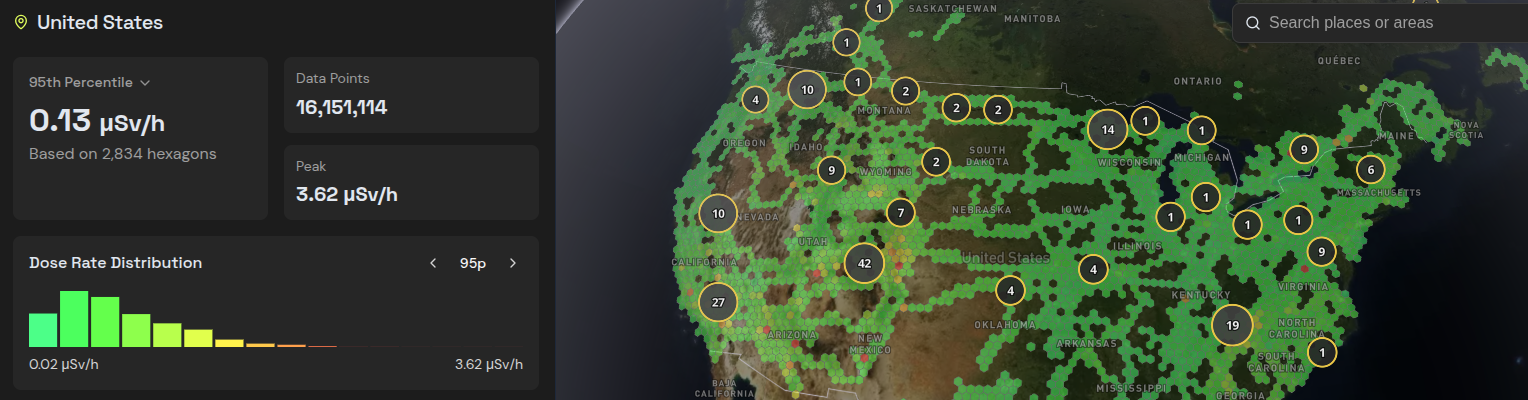
Hackaday Links: November 1, 2026 We’re less than a week away from the 2026 Hackaday Supercon, and things are getting a little… intense. So we trust you’ll forgive us if this week’s post weighs in a bit less than usual and reaches you a little later in the day. Especially since we’ll start it off with the official schedule for this year’s festivities. Earlier this week we announced the more than 30 speakers who will be gracing the stage at this year’s Supercon, and before that we told you about the dozen deep dive workshops designed for attendees who want to get their hands dirty. Now those of us joining you in Pasadena can finally start plotting our course through the weekend to make sure we maximize our hacking journey. Hubble Space Telescope Speaking of planning ahead, NASA is once again looking for proposals on how to save the Hubble Space Telescope. The iconic observatory has no propulsive capabilities of its own, and with the Space Shuttle long since retired, no vehicles can provide the occasional kick in the pants it needs to maintain a stable orbit. As it stands, Hubble has only until 2034 or so before it reenters Earth’s atmosphere and burns up. That gives a commercial company the better part of a decade to design, build, and launch a vehicle that can grab onto Hubble and take it to a higher orbit. That would have been an impossible timeline in the past, but commercial competition has greatly increased the pace at which missions can be put together. While it was ultimately unsuccessful, the $30 million commercial mission designed to reboost the Neil Gehrels Swift Observatory was launched just nine months after the ink dried on the contract. If NASA decides to go ahead with a Hubble rescue mission, the timeline — and undoubtedly the paycheck — will be considerably expanded for whatever company takes on the challenge. On the subject of endangered pieces of expensive hardware, it looks like Apple’s foray into folding displays has met with some difficulty. Some users are reporting unusually tight hinges in their iPhone Duo, which in some cases is followed by a crunching sound and eventually a busted display. The company says that only a “small number” of devices have been impacted, but Internet sleuths believe that still may put the total in the thousands. In their phenomenal teardown, iFixit took a look at some potential causes for the screen failures and theorized that the mechanism which cradles the display as it folds may be getting jammed up and not providing adequate mechanical support. Though there’s not enough data yet to say exactly what’s happening, it does seem clear that it’s not a user issue. Finally, if you have fond memories of uploading your wardriving data to WiGLE, check out Radiaverse. It’s sort of the same concept, except instead of reporting on the location of WiFi access points, users upload radiation data pulled from their RadiaCode detectors. We sincerely hope you don’t find anything too spicy while exploring the interactive globe, but if you do, we’d like to hear about it. See something interesting that you think would be a good fit for our weekly Links column? Drop us a line, we’d love to hear about it. #hubblespace #hackadaysupercon #spacetelescope #spaceshuttle #telescopespeaking #nasa #observatory #gehrelsswift #neilgehrels #rss #feeds #linksharing #qwibbit
MakerWire's avatar
MakerWire 2 weeks ago
Adafruit Weekly Editorial Round-Up: FLAC and Ogg Playback with CircuitPython, CG Turbo Demos in CircuitPython and more! ADAFRUIT WEEKLY EDITORIAL ROUND-UP We’ve got so much happening here at Adafruit that it’s not always easy to keep up! Don’t fret, we’ve got you covered. Each week we’ll be posting a handy round-up of what we’ve been up to, ranging from learn guides to blog articles, videos, and more. ESP32-S3 WiFi bridge for a USB printer FLAC and Ogg Playback with CircuitPython CG Turbo Demos in CircuitPython Catch up with us on our blog, in our learn system, or on YouTube. https://blog.adafruit.com/2026/11/01/adafruit-weekly-editorial-round-up-flac-and-ogg-playback-with-circuitpython-cg-turbo-demos-in-circuitpython-and-more/ #rss #feeds #linksharing #qwibbit
MakerWire's avatar
MakerWire 2 weeks ago
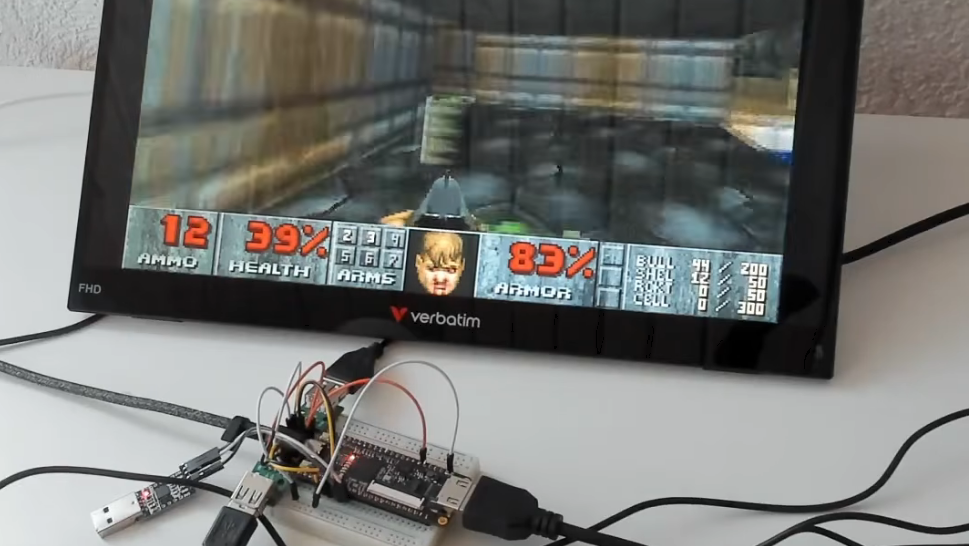
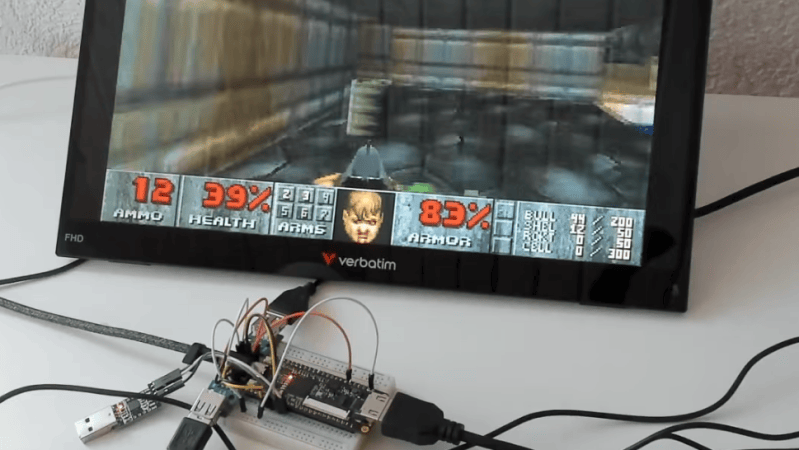
Cheap FPGA Board Becomes Retro-Style Computer The Tang Nano 9K is a cheap FPGA development board that can usually be acquired for around $15 or so. [ThePartsBin] has been experimenting with this hardware and figured out how to set it up as a retro-style computer. The board is based around the Gowin GW1NR-9C FPGA which only has 8,640 LUTs. However, that’s enough to spin up a 36 MHz RISC-V CPU, and there’s 8 MB of RAM on tap, along with HDMI, 48 kHz stereo audio output, two USB ports, and an SD card reader. Combine all that together, and you’ve got a machine capable of playing a whole raft of classic 1990s games. [ThePartsBin] ported Doom, Tyrian, System Shock and Ultima VII, all of which run at a playable speed at a tasty 720 x 480 resolution. The writeup does a great job of explaining what it took to actually implement these classic games on the platform. Tons of compromises were made along the way, but that’s the engineering challenge, isn’t it? If you’re looking to play retro games, this is not really the fastest or cheapest way to do it. You could probably just emulate them on the machine you’re using to read this very website. If you’re trying to get to grips with a new FPGA board for the first time, though, projects like this can be a very useful learning experience indeed. #fpgaboard #cheapfpga #computer #tangnano #systemshock #ultimavii #thepartsbin #rss #feeds #linksharing #qwibbit

↑