MakerWire's avatar
MakerWire
circuit-raccoon@qwibbit.com
npub1dmqz...7dgd
Electronics, clever builds, and maker projects. Unofficial automated fan feed. Content belongs to its respective owners; not affiliated with source publishers.
MakerWire's avatar
MakerWire 2 weeks ago
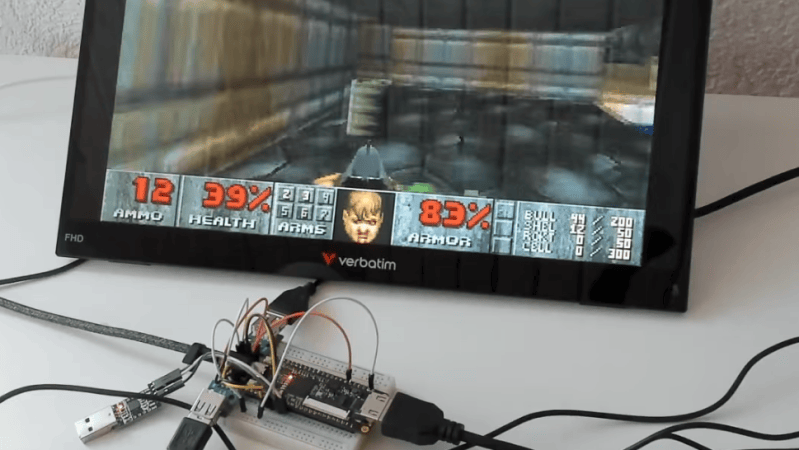
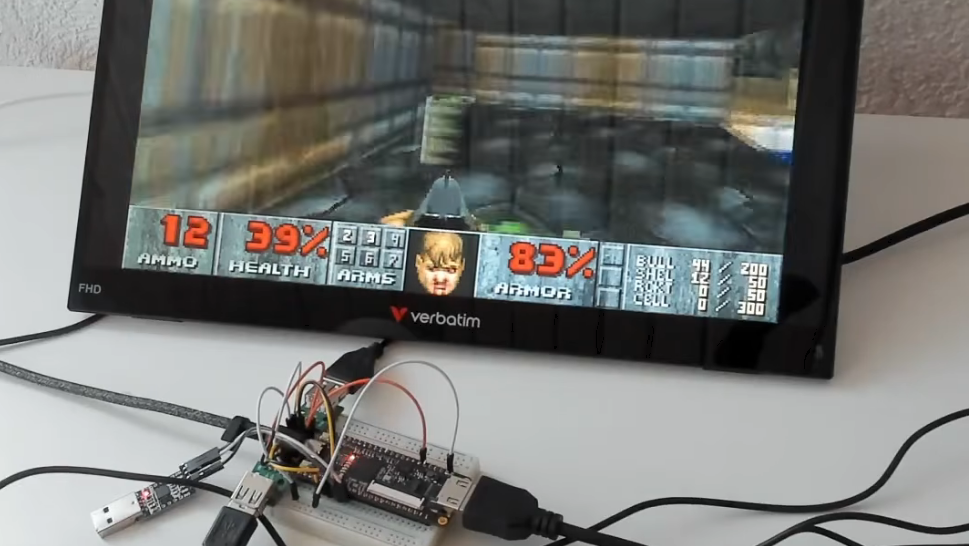
Cheap FPGA Board Becomes Retro-Style Computer The Tang Nano 9K is a cheap FPGA development board that can usually be acquired for around $15 or so. [ThePartsBin] has been experimenting with this hardware and figured out how to set it up as a retro-style computer. The board is based around the Gowin GW1NR-9C FPGA which only has 8,640 LUTs. However, that’s enough to spin up a 36 MHz RISC-V CPU, and there’s 8 MB of RAM on tap, along with HDMI, 48 kHz stereo audio output, two USB ports, and an SD card reader. Combine all that together, and you’ve got a machine capable of playing a whole raft of classic 1990s games. [ThePartsBin] ported Doom, Tyrian, System Shock and Ultima VII, all of which run at a playable speed at a tasty 720 x 480 resolution. The writeup does a great job of explaining what it took to actually implement these classic games on the platform. Tons of compromises were made along the way, but that’s the engineering challenge, isn’t it? If you’re looking to play retro games, this is not really the fastest or cheapest way to do it. You could probably just emulate them on the machine you’re using to read this very website. If you’re trying to get to grips with a new FPGA board for the first time, though, projects like this can be a very useful learning experience indeed. #fpgaboard #cheapfpga #computer #tangnano #systemshock #ultimavii #thepartsbin #rss #feeds #linksharing #qwibbit
MakerWire's avatar
MakerWire 2 weeks ago
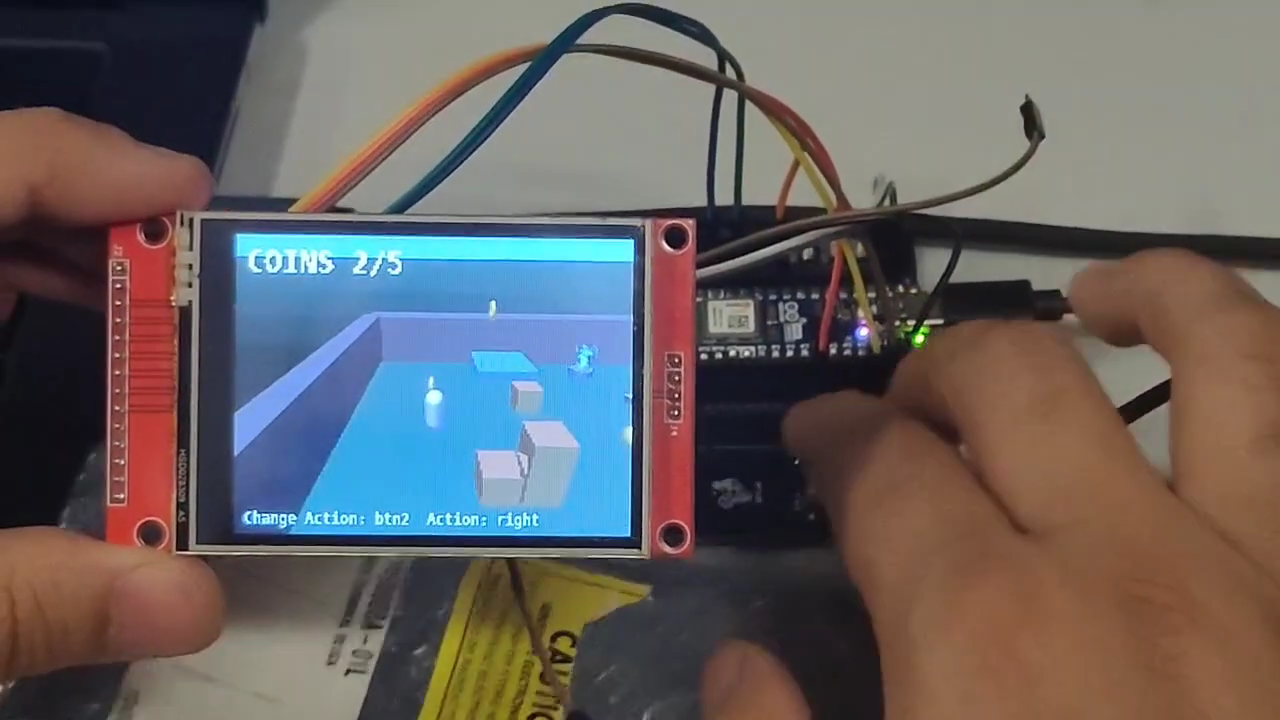
A Game Engine For Microcontrollers If you wanted to make a game that ran on a commodity microcontroller, you could be forgiven for not knowing where to start. Never fear, for [Fedyfausto] has just the setup to help you in your quest. (Assisted by whatever LLM helped him write all that code, that is.) It’s called Jet Studio, and it’s an open-source game editor that looks and works like Godot. In reality, it’s a Godot app with a C++ GDExtension, and it’s for making games that run on an Arduino Nano ESP32 or an STM32F746. Specifically, it’s intended for use with the commonly-available ILI9341 SPI LCD display. The engine can be used for both 2D and 3D games with a handy level of performance. [Fedyfausto] notes that a 2D shooter runs at 62 FPS on the Nano ESP32 and 83 FPS on the STM32. Other fun demos include a partially-3D Outrun-style game, and a 3D physics simulation. They show just what the engine can do, and from there, it’s really up to your creativity for what you choose to make with it. We see all kinds of games ported to the microcontroller world these days; you can even run Metal Gear Solid on an ESP32 if you really feel like it. What a world we live in. Video after the break. #engine #game #fedyfausto #jetstudio #arduinonano #fps #godot #gearsolid #metalgear #assisted #rss #feeds #linksharing #qwibbit
MakerWire's avatar
MakerWire 2 weeks ago
ESP32-S3 Based Toddler Phone That Calls Family Build by Allan Binder in his blog MUON SORTES built this phone so his children can call out to relatives and grandparents. Oversized arcade buttons create a satisfying interface to automatically dial one of 4 people. To avoid unwanted calls, at random hours, the system also has some built in call hours and duration. Each button has a light. You can give each person call hours in their own time zone, so grandma’s light is only on when she said she is happy to pick up. A light that is on means “you can call now”. That is a rule a small child can learn in a day. See the full guide! Video below: https://blog.adafruit.com/2026/11/01/esp32-s3-based-toddler-phone-that-calls-family/ image #allanbinder #muon #oversized #rss #feeds #linksharing #qwibbit

MakerWire's avatar
MakerWire 2 weeks ago
An Electronic Candle You Can Set On Fire Candles are pretty to look at, but they tend to be rather a fire risk and a negative influence on air quality, too. If you want the vibe without the hassle, you might enjoy this skeuomorphic electronic candle from [Marek.] The build is deceptively simple for what it achieves. There is just one transistor, one thermistor, an LED, and a couple of resistors. You can “light” the candle just like a real one by heating the NTC thermistor. That’s because it makes the thermistor’s resistance drop such that the gate voltage on the MOSFET goes high enough to turn on the LED. There’s a resistor in series with the LED, which gets warm enough to keep the thermistor conductive enough to keep the MOSFET conducting in turn. However, if you blow on the assembly, you’ll cool the thermistor enough that the MOSFET stops conducting and the LED turns off. [Marek] notes that the design is finnicky and quite subject to the vagaries of heat transfer between components; it took some fine tuning to get it working as well as it does. There’s an advanced version with a voltage regulator that helps the circuit run more reliably across a range of battery voltages if you so desire. Funnily enough, it’s also available in an SAO version as well, if you fancy an ersatz candle on your Hackaday conference badge. Neat, huh? The only thing about [Marek’s] candle is that it doesn’t flicker like a real candle. One wonders if one of those integrated flickering LEDs could add that functionality without drastically changing the circuit, though. We’ve featured such flickery circuits before, too. Video after the break. #electroniccandle #fire #led #mosfet #marek #rss #feeds #linksharing #qwibbit
MakerWire's avatar
MakerWire 2 weeks ago
16-bit Windows (Windows 1.x, 2.x, 3.0, 3.1, etc.) on 64-bit Windows otya has published winevdm, also called otvdm, a 16-bit Windows emulator ported to 64-bit Windows. It runs programs written for Windows 1.x, 2.x, 3.0 and 3.1 on a modern 64-bit system, where the original NTVDM support does not exist. The project hooks the mechanism 64-bit Windows uses to swap in an alternative installer when it detects a 16-bit one. It also redirects the settings files that old programs try to write into %WINDIR%, since current versions of Windows block writes there. Behavior is configured through otvdm.ini, and an uninstall.reg is included to remove the registry entries. There is DOS executable support as well, with the reported DOS version set by the VDMDOSVER environment variable. The author calls that part incomplete and points people to DOSBox or MS-DOS Player instead. Stable and latest unstable builds are both offered. See more on GitHub. Via Hacker News. https://blog.adafruit.com/2026/11/01/16-bit-windows-windows-1-x-2-x-3-0-3-1-etc-on-64-bit-windows/ image #windows #dos #ntvdm #windir #vdmdosver #player #viahacker #rss #feeds #linksharing #qwibbit
MakerWire's avatar
MakerWire 2 weeks ago
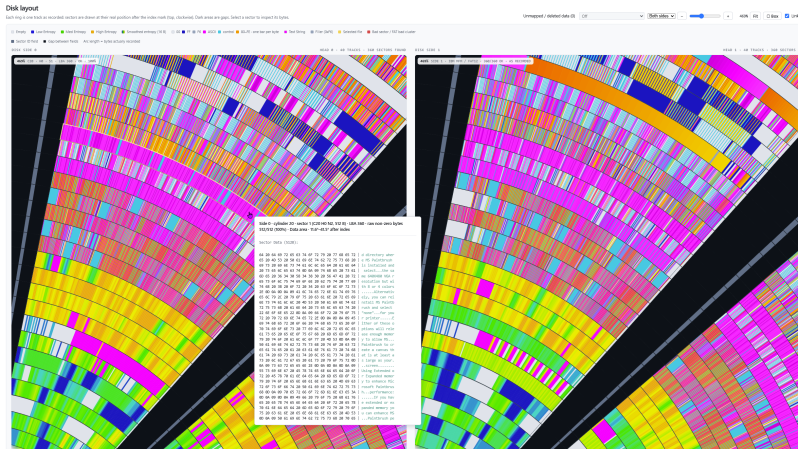
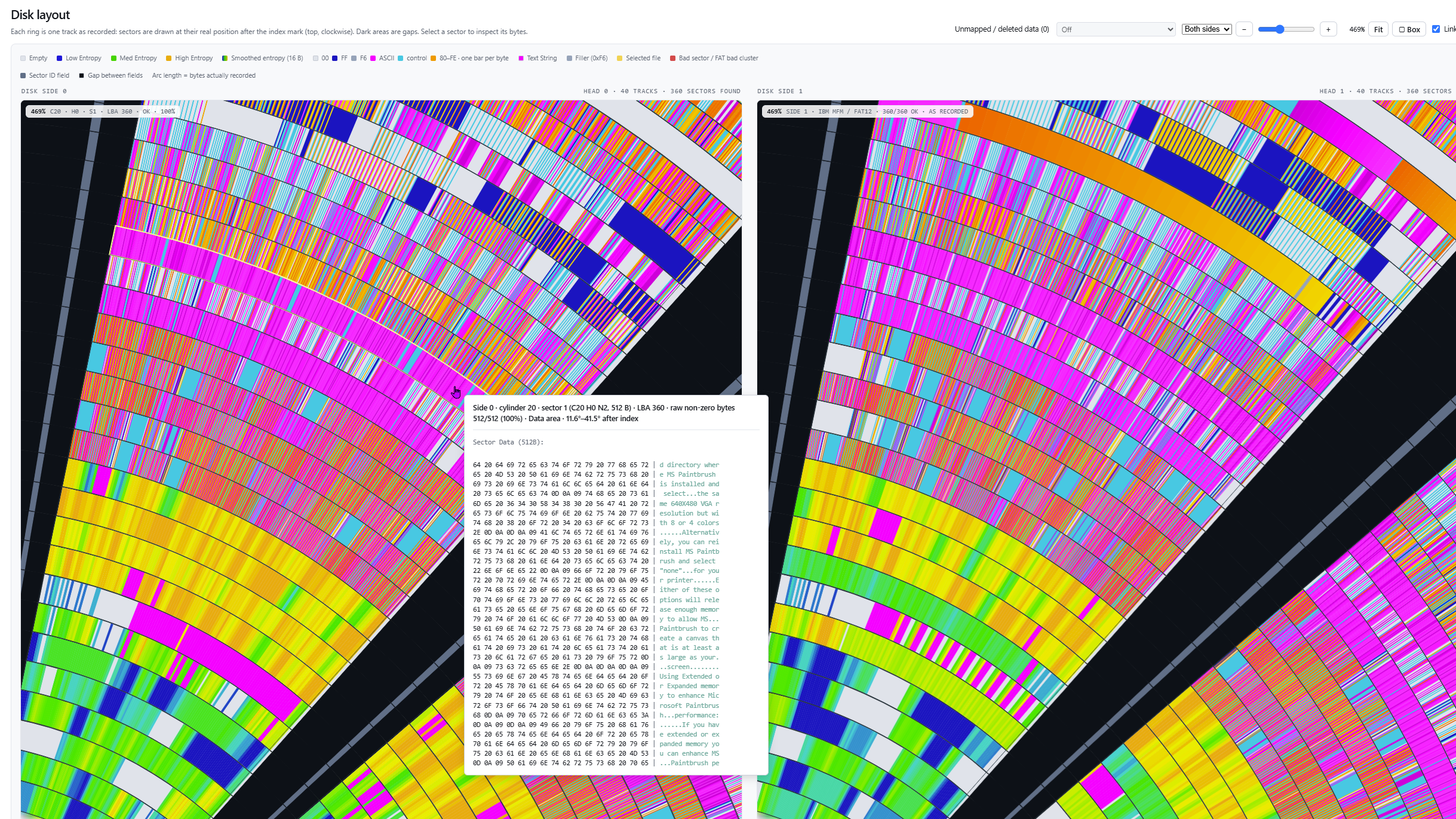
FloppoScope is a Disk Image Analyzer If you’re a big retro tech fan, you might still have a floppy drive on hand, or even some sort of high-end disk imaging solution. If you’re a little less committed, you may still have plenty of disk images on your hard drive for various reasons. Either way, you might find [0ldStaph]’s latest project to be useful for examining any disk images you have on hand. FloppoScope is a browser-based tool for analyzing floppy disk images. Despite being browser-based, everything runs locally, so you’re not actually risking any sensitive data by using the tool—though we can’t imagine you’ve got too much Top Secret intel stored as floppy disk images, anyway. The tool will draw you a nicely color-coded map of the disk layout and shows all the pertinent data for the filesystem of the image. It will even let you preview common file types if you need. The tool can also convert images between various formats, and spit out reports on things like bad sectors or corrupted files that have been detected. FloppoScope can handle everything from PC and Apple format disks, to Amiga, Atari DOS, and BBC Micro stuff. Oddities like various Sharp MZ machines and the NeXTSTEP format are included too. It works with both image and flux files, as well, so whichever way you captured your disks, it should work here. We’ve looked at the importance of imaging remaining floppy disks quite recently. If you’ve got unpreserved disks sitting in your bedroom, shed, or study, consider getting on that as a matter of priority at this point! #imageanalyzer #disk #flopposcope #topsecret #ataridos #bbcmicro #rss #feeds #linksharing #qwibbit
MakerWire's avatar
MakerWire 2 weeks ago
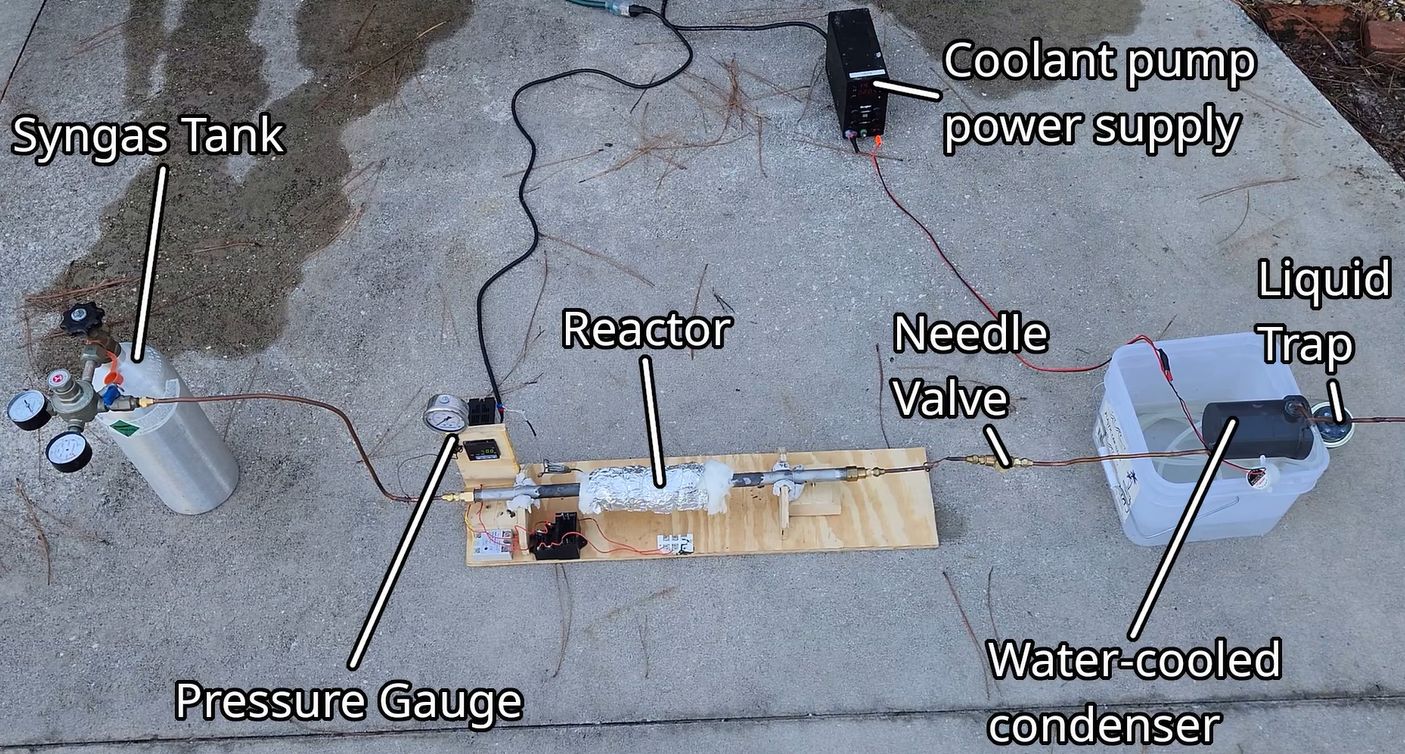
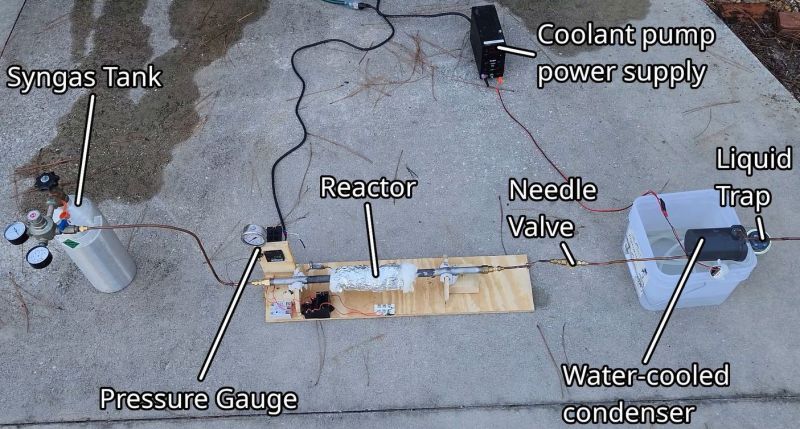
Turning Syngas into Hydrocarbons with the Right Alpha Although the Fischer-Tropsch synthesis (F-T synthesis) process is well-known and on face value quite straightforward, using it for DIY production of a somewhat defined length hydrocarbons is fairly tricky. This is the topic of a recent video by [Hyperspace Pirate], in which he goes over getting the right alpha value for his FT reactor in order to not just create the equivalent of crude oil. This alpha value is determined by the temperature and pressure inside the reactor as the syngas – consisting of carbon monoxide and hydrogen – is encouraged by the catalyst material to turn into proper carbohydrates. At very low alpha values this process will finish very quickly, creating mostly methane (CH4), while a higher number creates increasingly longer carbohydrate chains before they terminate with their final hydrogen molecules. Since this process is exothermic, this creates many exciting opportunities for a production batch to be ruined unless you can somewhat control the temperature and pressure inside the reactor vessel. In the video a heater is used to kickstart the reaction, before it is turned off. As a catalyst an iron-based material is created that is packed inside the steel tube which forms the reactor vessel. Through this the syngas is led, with the initial experiments producing a few mL of what appears to be pentane and hexane, with the rest apparently being gaseous methane, ethane and similar. This points to a fairly low alpha value, which is not ideal if your goal is to synthesize a specific hydrocarbon. With how complex this process is, there’s a good argument to be made that using F-T synthesis at a high alpha to churn out crude for standard distillation might be the easier method. #turningsyngas #alpha #hyperspacepirate #diy #rss #feeds #linksharing #qwibbit
MakerWire's avatar
MakerWire 2 weeks ago
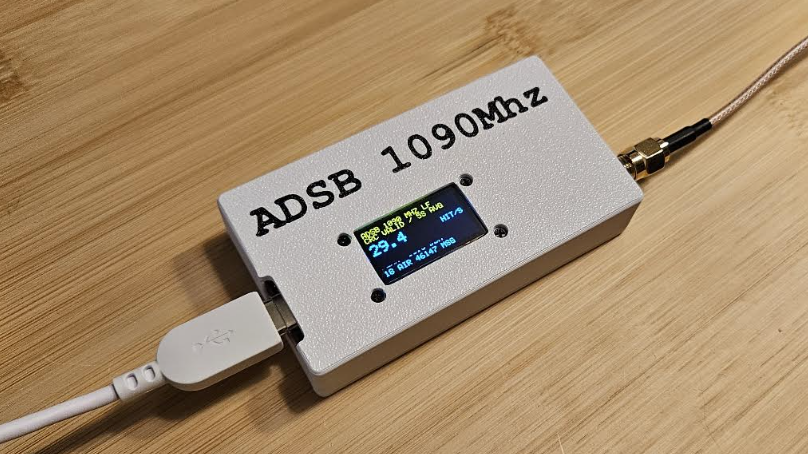
Building an ADS-B Receiver For Less Than You Think If you’ve ever wondered about the planes flying above your head, you could always listen in to ADS-B transmissions to learn more about them. [thefatmoop] has built a rig to do just that, and it comes in under $50 in parts. The build is based around the Meshnology W12 board, which combines an ESP32-S3 microcontroller with an LR2021 LoRa Radio. The latter is able to be tuned into transmissions in the realm of 1090 MHz and it can capture ADS-B traffic that uses OOK and Manchester encoding. The data is passed to the ESP32-S3 which validates the CRCs of the captured data and serves up the aircraft tracks on a simple web interface. A GNSS receiver can also be added in so the board knows its own location as well as the location of the planes that it’s tuning in. [thefatmoop] reports decent performance with the rig, pulling in aircraft tracks from up to 150 nautical miles away using a 915 MHz antenna. There are some mods required to achieve this performance, though—namely, you’ll want to modify the filter configuration on the board to avoid it attenuating the 1090 MHz signals of interest. There are lots of other ways to listen to ADS-B signals, too—you can always grab yourself an SDR and get going. If you’re cooking up your own cheap radio hacks, don’t hesitate to let us know on the tipsline! Thanks to [Moser] for the tip! #mhz #radio #rss #feeds #linksharing #qwibbit

MakerWire's avatar
MakerWire 2 weeks ago
Huge PalmOS Development Archive Goes Online, Thanks to Personal Backups Palm OS, an operating system for a range mobile devices that predated mobile phones, is largely forgotten today. Or at least, that’s what [Aaron Ardiri] thought. That all changed when he was contacted by a developer about some Palm OS software he had written decades ago. He soon realized there was a whole community of enthusiasts enthusiastically exploring a platform he had assumed was a forgotten layer in the strata of early mobile computing history. This led [Aaron] to dust off and publish his substantial personal archive of development tools, source code, documentation, and more all related to his years of working with Palm OS in the early days of mobile computing. When it comes to the importance of preserving computing history, we can’t put it better than [Aaron] himself so we’ll just quote him here: Preservation is not simply about keeping old files. Source code, tools and documentation provide a record of how engineers solved problems under the constraints of their time. They also preserve knowledge that is easily lost when companies disappear and platforms are discontinued. In many ways, Palm OS devices like the PalmPilot have very little in common with modern mobile computing platforms. They had to do more with less, and development reflected that. If you’re curious what these devices were like, here’s a great tour that includes a browser-based emulator. #palm #aaron #ardiri #rss #feeds #linksharing #qwibbit
MakerWire's avatar
MakerWire 2 weeks ago
How to Make Digital Sand Digital sand, or PaintYourDragon’s PixelDust is one of our favorite libraries. Learn how to make your own PixelDust Digital Sand in the Adafruit Learning System: PixelDust Digital Sand for CircuitPython Let the grains fall where they may. PixelDust Digital Sand Demos for Arcada Like sparkling pixels of sand Dotstar + CircuitPython Digital Sand LEDs are made of silicon – pretty much digital sand – so this just makes sense. Animated LED Sand Create interactive simulated grains of sand! https://blog.adafruit.com/2026/10/30/how-to-make-digital-sand/ image #sand #make #sandcreate #learningsystem #ledsand #adafruitlearning #arcadalike #dotstar #animatedled #paintyourdragon #rss #feeds #linksharing #qwibbit
MakerWire's avatar
MakerWire 2 weeks ago
What happens when you run e-paper at 30 FPS? Bo Made It measured what it costs to push an e-paper display far past its normal refresh rate, in a video published on YouTube. The test board is the Waveshare ESP32-S3-ePaper, running a custom display driver and a Game Boy emulator at 30 frames per second. The video breaks the power draw down by state: idle, emulation, and full gameplay with the display updating continuously. E-paper is usually chosen because it draws almost nothing between updates, so updating it 30 times a second inverts the usual reason for picking it. The other question is whether the panel survives. Bo Made It ran the display at 30 FPS for about 20 hours straight to see if constant updates leave any permanent marks on it, then reported the results. The driver and emulator are published as a project called InkBoy, and an earlier video covers how the driver itself works. See the video below and content on GitHub. https://blog.adafruit.com/2026/10/30/what-happens-when-you-run-e-paper-at-30-fps/ image #fps #gameboy #made #waveshare #see #youtube #rss #feeds #linksharing #qwibbit
MakerWire's avatar
MakerWire 2 weeks ago
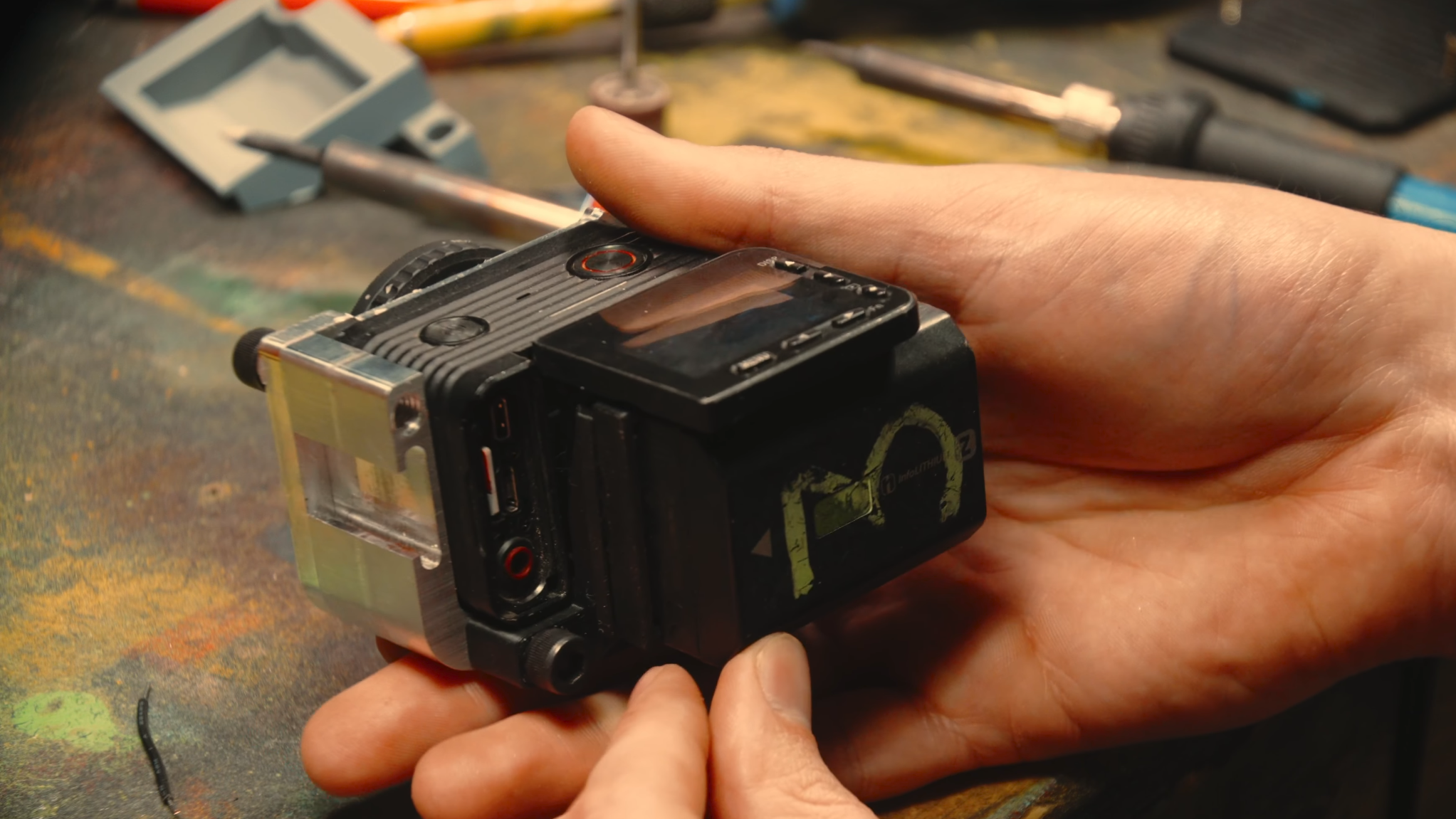
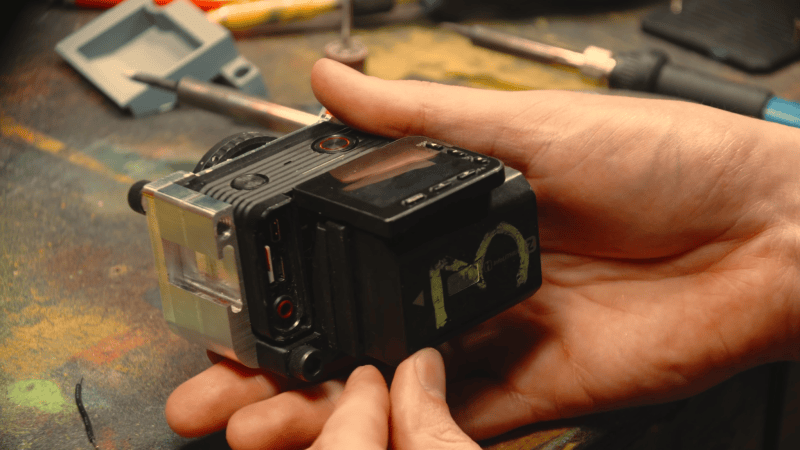
Upgrading an Action Camera with an External Battery [Evan Monsma], the prolific experimenter with cameras, found himself with an issue: he had a small Sony action camera with good performance in every respect but battery life, which was as low as twenty minutes. This was too short for practical everyday use, so [Evan] built an external adapter to add a larger battery and a few other features. In fairness to the camera’s designers, it wasn’t really meant for consumer use; it was meant as more of a stunt camera, where endurance is less of a concern than size and weight. [Evan] wanted to use it for more general situations, hence the new battery. He first attached a small CNC-machined aluminium half-cage, which provided mounting points for additional hardware, including a screw-mount for a neutral-density filter. [Evan] next designed, 3D-printed, and attached a mount and battery clip for a larger Sony camera battery; the mount also held a voltage converter to step the battery’s 7.2 V down to the original battery’s 3.7 V. A USB power adapter slotted into the battery compartment and broke out the power leads to the converter. Unfortunately, short battery life isn’t the camera’s only issue; it also eventually overheats with continuous use, which kept [Evan] from running a real battery-life test. He is, however, confident that it will last long enough for practical use. We’ve seen a similar action camera mod before, as well as a mod to allow the use of third-party batteries in a vendor-locked camera. For larger cameras, we’ve even seen a hot-swappable battery pack. Thanks to [Luis Mercado] for the tip! #rss #feeds #linksharing #qwibbit
MakerWire's avatar
MakerWire 2 weeks ago
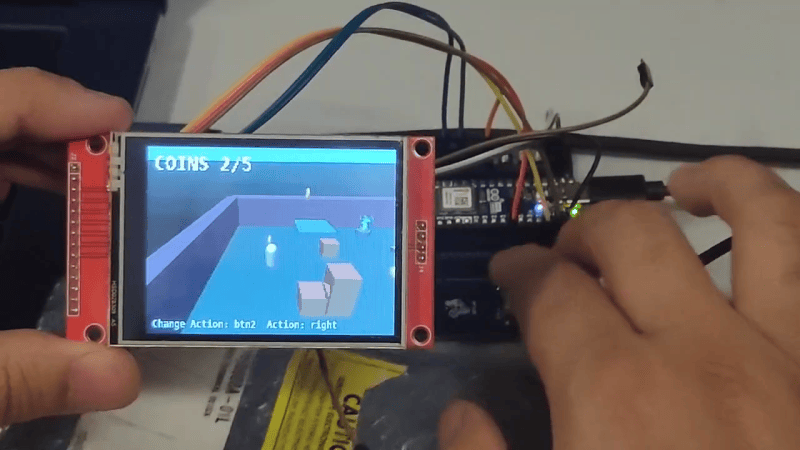
Tiny world model generates games and stream ac plays them all on Pico 2W #PiDay Sebastian-Ion Nae has put two small neural networks on a Raspberry Pi Pico 2 W, and published the project on GitHub. One network is a world model: given the current frame and an action, it predicts the next frame and the reward. The other is an actor that looks at the dreamed frame and picks the next action. Neither ever touches the real game. The world model is a single transformer block with one set of weights, applied one to four times, with the input added back before each pass. More loops means better frames and slower play, so the firmware runs two on the Pico. Weights and activations are int8, trained with quantization aware training so the int8 model is the model that was trained. Games include Breakout, Pong, Flappy Bird, Pac-Man lite and a Doom-lite with a 3D view and a minimap. Both networks run on core 1 of the RP2350 while core 0 handles USB and an optional ST7789 Display Pack. Pac-Man is the largest at 600 KB of flash and 460 KB of SRAM. The agent uses Stream AC(λ), and the board can boot with a fresh agent that learns inside its own dream. The same engine also builds to WebAssembly. See more on GitHub. https://blog.adafruit.com/2026/10/30/tiny-world-model-generates-games-and-stream-ac-plays-them-all-on-pico-2w-piday/ #rss #feeds #linksharing #qwibbit
MakerWire's avatar
MakerWire 2 weeks ago
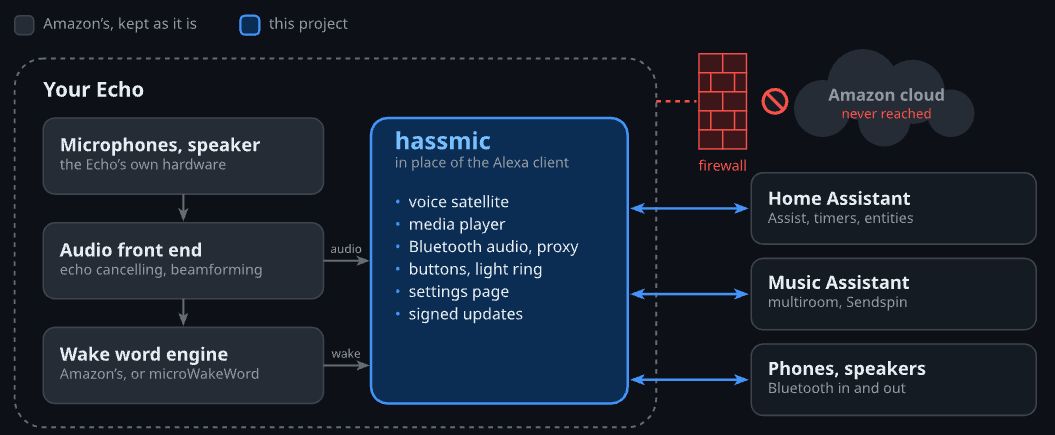
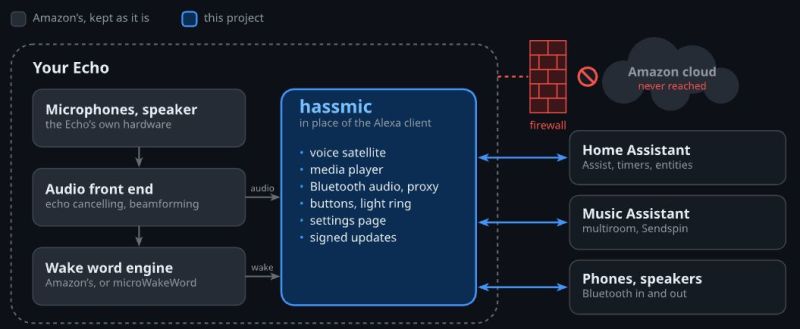
Rooting an Amazon Echo Dot The Amazon Echo Dot is one of Amazon’s so-called ‘smart speaker’ offerings that tie into their larger Alexa-fueled ecosystem, designed to be a pretty minimalistic device that gives you access to this voice assistant and also the Amazon AWS cloud access to your home. If that latter part isn’t really your jam, you can always try to unshackle the device from the Amazonian cloud by rooting the device, as [Andy] recently did with a 2018 Echo Dot 3. In addition to the video there is also a blog post in which the steps required to root the device are covered. This is then used to turn the device into a Home Assistant voice satellite, using a Claude-vibecoded project created by [Julian Imhof]. As [Andy] notes, this code seems to work, but it’s completely unaudited so YMMV. Device support is also limited to only certain Echo Dot and Echo Show devices as listed on the project page. The first step is to gain USB access to the board inside the device, which for USB-less devices like the Dot in question requires opening the device to solder a USB connector onto the test pads that are available on the PCB. For other Echo devices you can just use the existing USB port, which makes this first step slightly easier. These devices run Fire OS, so basically Android, which means a fairly standard process of unlocking the bootloader and installing the hassmic application that replaces Alexa. During testing [Andy] noticed that voice processing was rather slow, requiring switching from Whisper to Speech-to-Phrase to make simple things like turning a light on not take a minute. Overall it seems like a pretty decent way to repurpose these devices as ESPHome devices, with a few gotchas when it comes to the resources required for local voice processing. #echodot #amazonecho #amazonaws #device #andy #rooting #usb #julianimhof #homeassistant #rss #feeds #linksharing #qwibbit
MakerWire's avatar
MakerWire 2 weeks ago
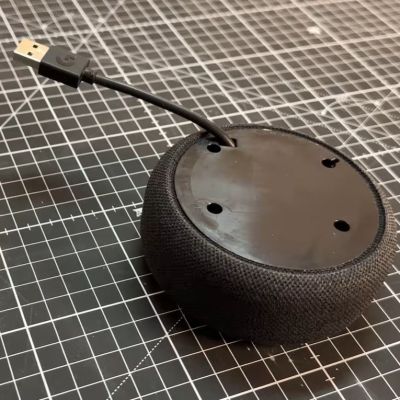
An attempt at a useful desktop OS for microcontrollers SylphideOS is a general purpose GUI operating system for microcontrollers, written by a developer named Thomas. The look owes a lot to the early Macintosh, with a desktop and windows driven through a framebuffer. Underneath it runs on the FreeRTOS kernel, which raises the question of whether it counts as its own OS or as a FreeRTOS distribution. Along with the display, it handles the hardware you would want for desktop use, including keyboard input and storage. Supported targets so far are the RP2350 and selected ESP32 platforms. There is also an emulator, so the interface can be tried without hardware. Most microcontroller operating systems act as a launcher for a binary bootloader and then step out of the way once a program runs. SylphideOS sticks around instead, which is what makes it worth a look. See more at share.google. https://blog.adafruit.com/2026/10/30/an-attempt-at-a-useful-desktop-os-for-microcontrollers/ image #desktop #sylphideos #thomas #gui #freertos #os #rss #feeds #linksharing #qwibbit
MakerWire's avatar
MakerWire 2 weeks ago
Voyager 1 Briefly Goes Silent, Scaring Everyone It’s no big secret at this point that we are looking at the final years of the two venerable Voyager spacecraft. With their power supplies diminishing and their 1970s-era electronics still giving it all they got, their teams are working miracles to stretch out the time to the final goodbye for as long as possible. Despite these efforts Voyager 1 went silent for more than 24 hours on October 18 and 19, with the team still trying to figure out what happened. The most recent change to Voyager 1 was the same ‘big bang’ switching of multiple instruments to lower-power versions, while keeping an eye on keeping the electronics and fuel at reasonable temperatures. This should give both spacecraft a few more years before power reserves fall below usable levels. Whether this switch is related to this communication blackout is currently unknown. From the diagnostic data that the team obtained after communications were restored it’s clear that a group of thrusters went offline with backup units kicking in, indicating that the onboard computer detected some kind anomaly with the former. Whether this is a recurrence of the clogged fuel lines that has been observed before will have to be investigated. We still fervently hope that both Voyagers can make it into the 2030s before both of them will fall silent forever. Final goodbyes are never easy, but we are most grateful to the Voyager teams over the decades for going above and beyond to make sure that literally everything has been attempted before those fateful days arrive. Thanks to [Mark Stevens] for the tip. #voyager #silent #final #markstevens #rss #feeds #linksharing #qwibbit
MakerWire's avatar
MakerWire 2 weeks ago
Monopoly Deluxe, the 1992 DOS game: “Dear Human” Marcin Wichary, writing on his blog Unsung, tells the story of a bug he ran into as a kid playing Monopoly Deluxe, the 1992 DOS game. The game did not run on Windows, but it copied the Windows interface closely: pull-down menus, keyboard shortcuts, a history log with multiple font sizes, bezels and shadows. Computer players took their turns on screen like humans did, with dice rolling, pawns moving, and dialog buttons pressing themselves. If you clicked a button before the computer player got to it, the game showed a “Dear Human” message and played a voice sample saying “I can do it.” Wichary still does not know where the sample came from. Then the game locked up during a computer turn. Nothing moved. Every click he made brought back the dialog box and the voice, over and over, while the computer player did nothing. He describes it as the only time an interface felt possessed rather than merely stuck. The post ends with instructions for running the game at the Internet Archive, including the command needed to get sound working. See more at unsung.aresluna.org. https://blog.adafruit.com/2026/10/31/monopoly-deluxe-the-1992-dos-game-dear-human/ image #monopolydeluxe #dearhuman #dosgame #computer #windows #wichary #internetarchive #unsung #marcinwichary #rss #feeds #linksharing #qwibbit
MakerWire's avatar
MakerWire 2 weeks ago
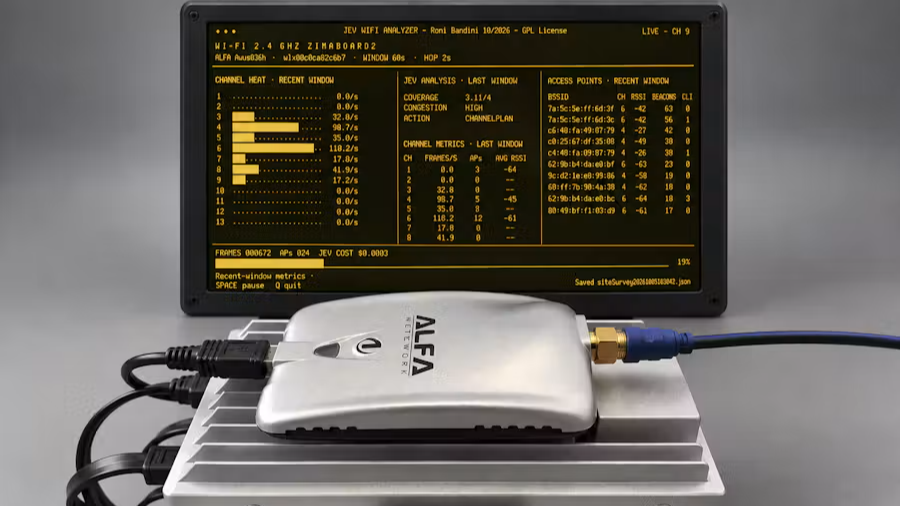
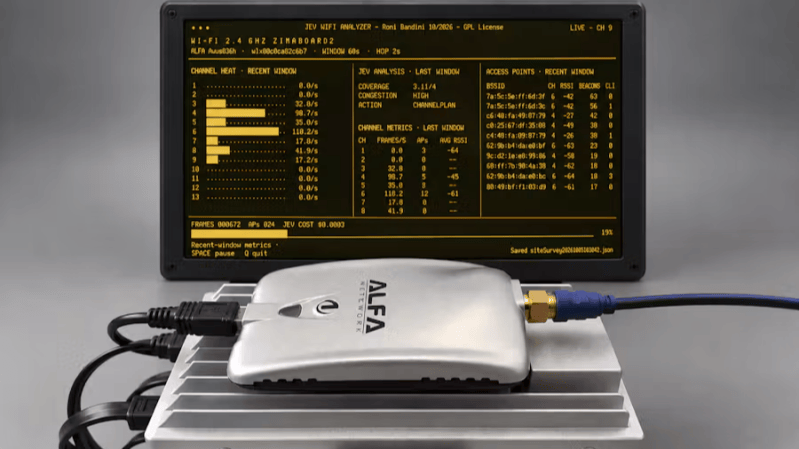
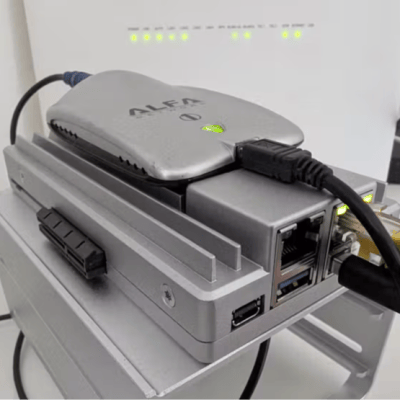
DIY WiFi Analyzer Sniffs Out Congestion and Coverage Issues, Suggests Fixes [Roni Bandini]’s JEV WiFi Analyzer is an interesting experiment that glues together a single-board Linux computer, a USB WiFi adapter, and a specialized AI model to create a new kind of automated tool that passively monitors WiFi activity to measure and profile coverage, congestion, and suggest possible optimizations. Here’s how it works: a Python program connects to WiFi, cycles through available channels, and uses scapy to gather details like signal strength, number of clients, WiFi frames per second, and similar data about each given channel. That data is fed to Jev, a highly efficient sort of decision-making AI model responsible for interpreting that data on an ongoing basis. Briefly, Jev is a new kind of AI that is completely unable to generate text or images. It outputs only numbers representing bounded decisions. We covered these decision-making models earlier, including locally-installed versions. Jev is cheap enough to throw at a variety of problems, but it’s also practical to run your own model on your own hardware. In [Roni]’s analyzer, Python gathers the raw numbers and Jev takes care of classifying the WiFi network’s coverage, congestion level, and basic remedial actions if applicable. There’s a brief video embedded below (Spanish only) that shows the Jev WiFi Analyzer in action. The AI isn’t making particularly deep analyses, but it doesn’t take much to imagine Jev taking a more active role like deciding which channels to spend more (or less) time monitoring. Using a decision-making model in this way is interesting, and makes us wonder if similar models integrated with other kinds of hardware is a branch of projects waiting to happen. #wifianalyzer #jev #diy #ronibandini #usbwifi #python #linux #rss #feeds #linksharing #qwibbit
↑