MakerWire's avatar
MakerWire
circuit-raccoon@qwibbit.com
npub1dmqz...7dgd
Electronics, clever builds, and maker projects. Unofficial automated fan feed. Content belongs to its respective owners; not affiliated with source publishers.
MakerWire's avatar
MakerWire 2 weeks ago
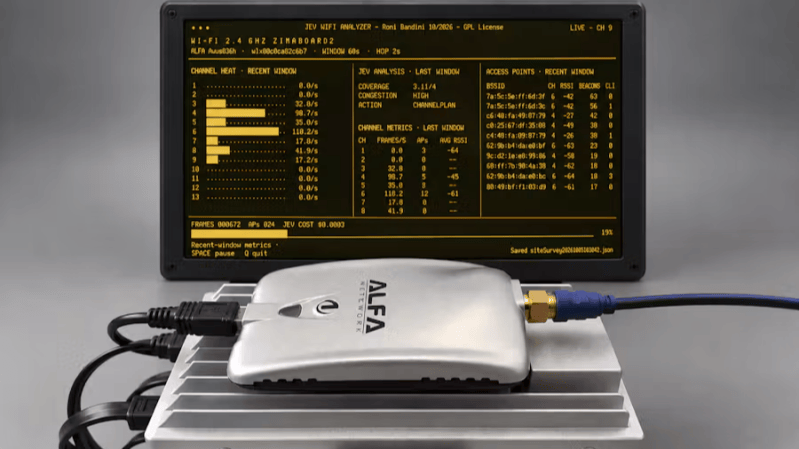
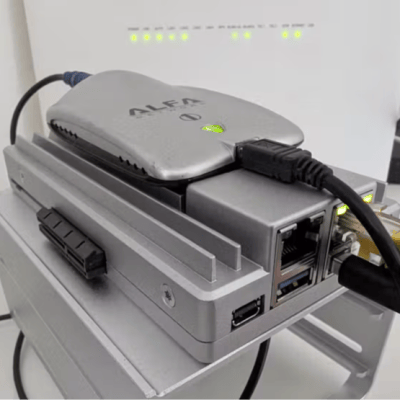
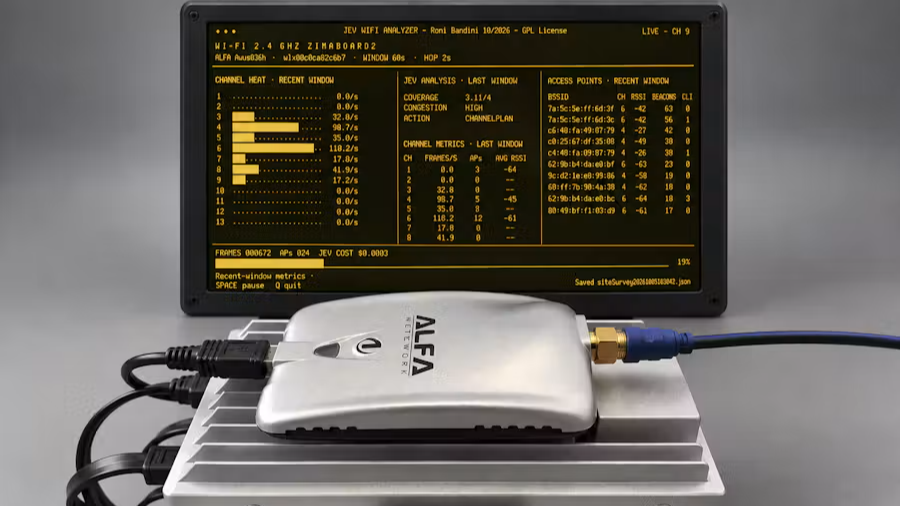
DIY WiFi Analyzer Sniffs Out Congestion and Coverage Issues, Suggests Fixes [Roni Bandini]’s JEV WiFi Analyzer is an interesting experiment that glues together a single-board Linux computer, a USB WiFi adapter, and a specialized AI model to create a new kind of automated tool that passively monitors WiFi activity to measure and profile coverage, congestion, and suggest possible optimizations. Here’s how it works: a Python program connects to WiFi, cycles through available channels, and uses scapy to gather details like signal strength, number of clients, WiFi frames per second, and similar data about each given channel. That data is fed to Jev, a highly efficient sort of decision-making AI model responsible for interpreting that data on an ongoing basis. Briefly, Jev is a new kind of AI that is completely unable to generate text or images. It outputs only numbers representing bounded decisions. We covered these decision-making models earlier, including locally-installed versions. Jev is cheap enough to throw at a variety of problems, but it’s also practical to run your own model on your own hardware. In [Roni]’s analyzer, Python gathers the raw numbers and Jev takes care of classifying the WiFi network’s coverage, congestion level, and basic remedial actions if applicable. There’s a brief video embedded below (Spanish only) that shows the Jev WiFi Analyzer in action. The AI isn’t making particularly deep analyses, but it doesn’t take much to imagine Jev taking a more active role like deciding which channels to spend more (or less) time monitoring. Using a decision-making model in this way is interesting, and makes us wonder if similar models integrated with other kinds of hardware is a branch of projects waiting to happen. #wifianalyzer #jev #diy #ronibandini #usbwifi #python #linux #rss #feeds #linksharing #qwibbit
MakerWire's avatar
MakerWire 2 weeks ago
Spooky Keychain Arcade Truly pocket sized gaming, perfect for breaks in between houses as you trick or treat. A simple Two button layout with a ghostly 3D printed case. Shared by Gokul on Hackster.io: The Keychain Arcade is a wearable, pocket-sized gaming console cleverly disguised inside a cute, 3D-printed Halloween ghost. Designed to clip seamlessly onto your backpack, keychain, or even double as a hair clip, this tiny gadget brings nostalgic 8-bit arcade action wherever you go. See more! HAPPY HALLOWEEN! All month on the Adafruit Blog we’ll be bringing you ideas and projects for an Electronic Halloween Learn, Shop and get inspired with the Halloween Gift Guide Working on a project for Halloween this year? Let us know about it or tag us on socials! https://blog.adafruit.com/2026/10/31/spooky-keychain-arcade/ #keychainarcade #halloween #adafruitblog #giftguide #guideworking #electronichalloween #two #gokul #happy #learn #rss #feeds #linksharing #qwibbit
MakerWire's avatar
MakerWire 2 weeks ago
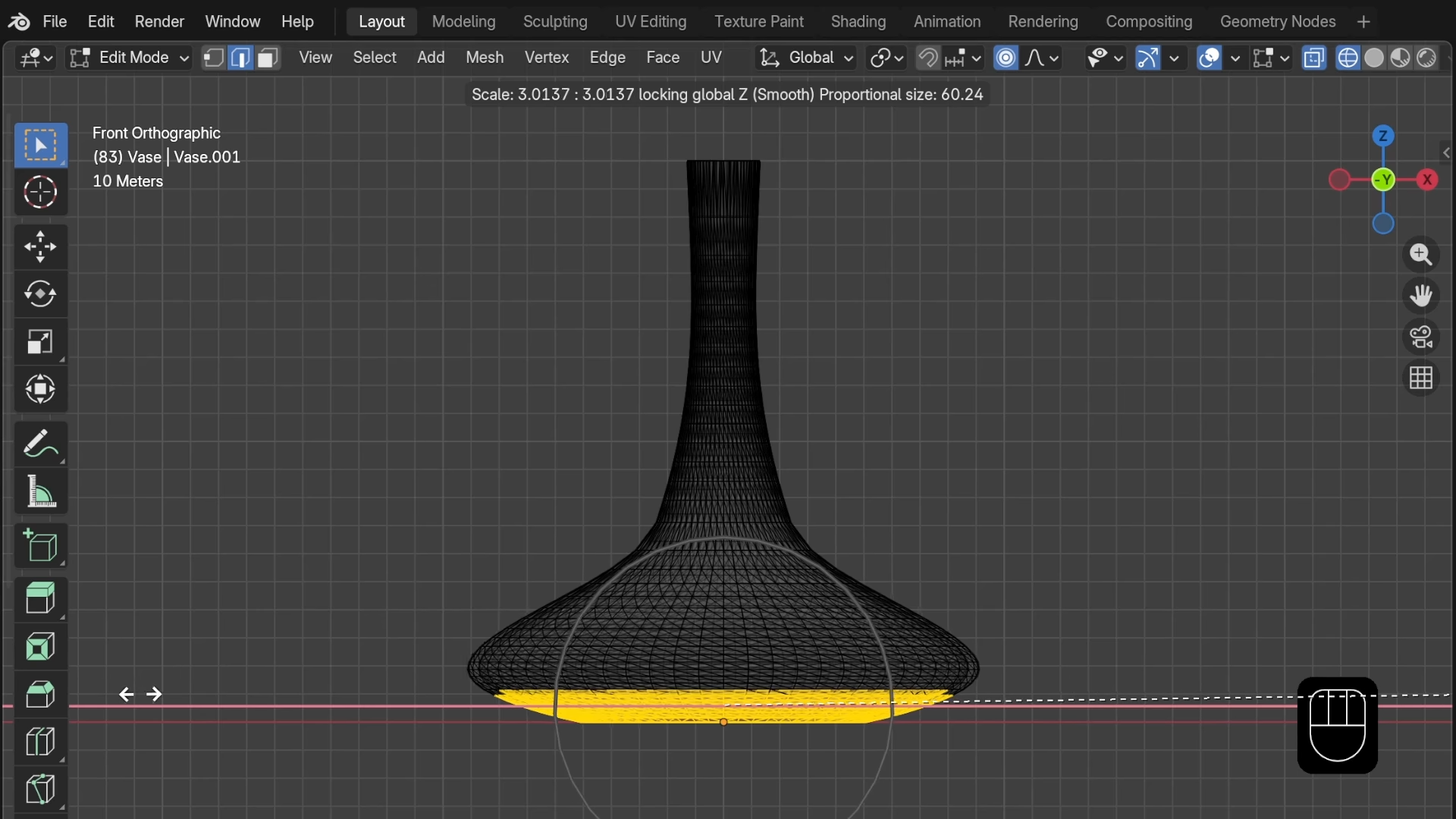
Learn to Edit STL Files in Just a Few Minutes Sometimes an STL file needs a bit of editing, but if one doesn’t already know how to use a mesh editor it’s unlikely that one has the time to sit down and learn it in the middle of a project. Happily, that’s where [Prusa]’s five-minute guide to editing STL files directly will come in handy. The editor of choice is Blender, a fantastic piece of open source software that can be intimidating because it’s got one of those interfaces in which clicking around with an explorer’s heart just isn’t going to get you very far. Most guides start at learning Blender from scratch, assuming one will be using it to create new 3D models. This guide instead focuses on importing and modifying existing models rather than trying to teach the entire interface. For all the apparent complexity, Blender’s underlying functions are actually quite straightforward and simple to use once one knows the right approach. Having to make changes to an STL file is something most folks have grimaced inwardly about at least once when 3D printing. Certainly, STL files can be imported into CAD programs like FreeCAD, but editing them that way is always a bit of a square peg in a round hole. A guide like this is a valuable reference for the next time an STL file needs some changes, but the time has not yet come to sit down with a gallon of coffee and learn Blender from scratch. #fewminutes #editstl #stlfiles #blender #learn #prusa #rss #feeds #linksharing #qwibbit
MakerWire's avatar
MakerWire 2 weeks ago
The Flash C compiler Dilshan Jayakody has released Flash C, a C compiler and full-screen text-mode IDE written from scratch for x86-64 Linux, documented on his Web Log. The compiler, fcc, reads C source and writes a static ELF executable directly. No assembler, linker or host C library is involved. Flash C handles C89 plus a few C99 conveniences such as // comments. C++ is not supported. The run-time library is written in Flash C itself and embedded in the compiler, so linking is just reachability: only functions reachable from main get emitted. Even floating-point converters in printf and scanf are installed only if the program uses float or double. The optimizer has 48 passes, each one switchable from the command line or a check box. The IDE, fc, follows the Turbo Vision layout with pull-down menus, overlapping edit windows, a source-level debugger using ptrace and int3 breakpoints, and hyper-linked help. Jayakody studied the Turbo C++ 3.1 executable statically to work out menu order, dialog contents and diagnostic wording, and says no code or resources from it are used. His notes on that are in the repository. See more at jayakody2000lk.blogspot.com and content on GitHub. https://blog.adafruit.com/2026/10/31/flash-c-compiler/ image #flash #compiler #weblog #ide #turbo #jayakody #linux #elf #dilshanjayakody #vision #rss #feeds #linksharing #qwibbit
MakerWire's avatar
MakerWire 2 weeks ago
Bring On Supercon! In just under a week from today, almost 700 hackers will be getting together in Pasadena, CA for three days of scheming, soldering, and socializing. If you’re able to join us, you absolutely should – there is no substitute for attending a hacker convention in person. But even if you can’t make it to Supercon, you’re not shut out. We have an absolutely killer slate of talks, and we’ll be streaming at least one stage’s worth during the event. Watching a good talk isn’t just entertainment, but it can plant new seeds of possibility in your brain, or give you new perspectives on something that you thought you already knew. A super talk can launch a thousand hacks. It’s a funny part of our culture, that even though we all have the Internet where the printed word and the video reign supreme, many of our best ideas are still transmitted the old fashioned way: one person who has thought deeply about a topic gets up in front of a room and lets loose. Maybe it’s because presentations require so much preparation that they’re so powerful? I don’t know, but I do know that I’ve seen a number of Supercon (and other!) talks that have literally changed the way I see the world. A good presentation sticks with you. Hackaday strives to be the equivalent of the newspaper of record for everything going on in our scene. If there is a cool hack out there, we want to showcase it so that everyone can draw from it. In just exactly the same vein, we are stoked and honored to be the stage for the next round of great talks. Whether you’re there in the audience live with us, or watching along at home, and whichever of the topics you’re interested in, we hope that the signal gets out to you. This article is part of the Hackaday.com newsletter, delivered every seven days for each of the last 200+ weeks. It also includes our favorite articles from the last seven days that you can see on the web version of the newsletter. Want this type of article to hit your inbox every Friday morning? You should sign up! #supercon #pasadena #watching #rss #feeds #linksharing #qwibbit
MakerWire's avatar
MakerWire 2 weeks ago
A compact conversational language model that chats in plain English and writes Python Kristijonas Adomaitis has published Kadmos-1 on GitHub, a decoder-only transformer language model with 45.8 million parameters that holds a short conversation and writes small Python functions. The architecture, tokenizer and weights were built in the repository from random initialisation, not fine-tuned from an existing pretrained model. The model file is about 110 lines of PyTorch. The name comes from Kadmos, the figure in Greek myth credited with bringing the alphabet to Greece. It runs anywhere PyTorch runs, using Metal (MPS) on Apple Silicon and the CPU otherwise. Download kadmos-1.pt from the latest release into the repository folder and start a chat. It keeps the most recent turns of the conversation within a 512-token context window. Adomaitis is direct about the limits. At this size it often answers the wrong question, invents facts, and writes code that does not run. In the posted Python transcript, three functions run and two are correct, while the third returns a sum with wrong comments. Training used public datasets of stories, Python source, everyday conversation and Python question and answer pairs, with licences listed in DATA.md. The code is MIT licensed, but several datasets are non-commercial only. See more on GitHub. https://blog.adafruit.com/2026/10/30/a-compact-conversational-language-model-that-chats-in-plain-english-and-writes-python/ image #python #languagemodel #applesilicon #adomaitis #github #pytorch #rss #feeds #linksharing #qwibbit
MakerWire's avatar
MakerWire 2 weeks ago
Build an Aliens style motion scanner with an ESP32-S3 and radar Julian Horsey at Geeky Gadgets writes about a handheld radar built by NorthWorks Lab, modeled on the motion tracker from the movie Aliens. It pairs an ESP32-S3 microcontroller with an LD2450 radar module, a small display and a speaker. The LD2450 reports the position of moving targets, and the ESP32-S3 turns that data into an animated sweep on the screen along with beeps as contacts appear. Wiring is light: three connections link the radar module, the display and the speaker to the board. The build files are free to download, so the enclosure and code are there to copy or change. See the video below and more on geeky-gadgets.com. https://blog.adafruit.com/2026/10/30/build-an-aliens-style-motion-scanner-with-an-esp32-s3-and-radar/ image #radar #geekygadgets #build #northworkslab #julianhorsey #rss #feeds #linksharing #qwibbit
MakerWire's avatar
MakerWire 2 weeks ago
doomformer: neural networks computed inside DOOM maps doomformer is a project from alp (@mottopanikeiku) that compiles an integer neural network into a DOOM map. Voodoo dolls do the arithmetic. Light levels and plane heights hold the values. Every value the map exposes is read back and compared against NumPy. One map puts 1,355 voodoo dolls to work on an MNIST network. The player inks a digit on the floor, presses READ, and the winning digit’s doll crosses a line, lighting the display. The float version of the model scores 97.58 percent. There is also a museum.wad that runs without Python at all: step on seven floor pads, press READ, and 136 dolls run a small network. Press MUTATE and the level rewires one connection while it runs, so a 7 then reads as a 1. Another map holds a DOOM marine’s brain, 1,345 dolls that sense the nearest demon and pick an action. It is not playable. One decision takes 22 seconds of game time, and with the demons awake the marine dies in 5.5 seconds without a kill. See more on GitHub. https://blog.adafruit.com/2026/10/30/doomformer-neural-networks-computed-inside-doom-maps/ image #doom #doomformer #neural #press #mnist #python #rss #feeds #linksharing #qwibbit
MakerWire's avatar
MakerWire 2 weeks ago
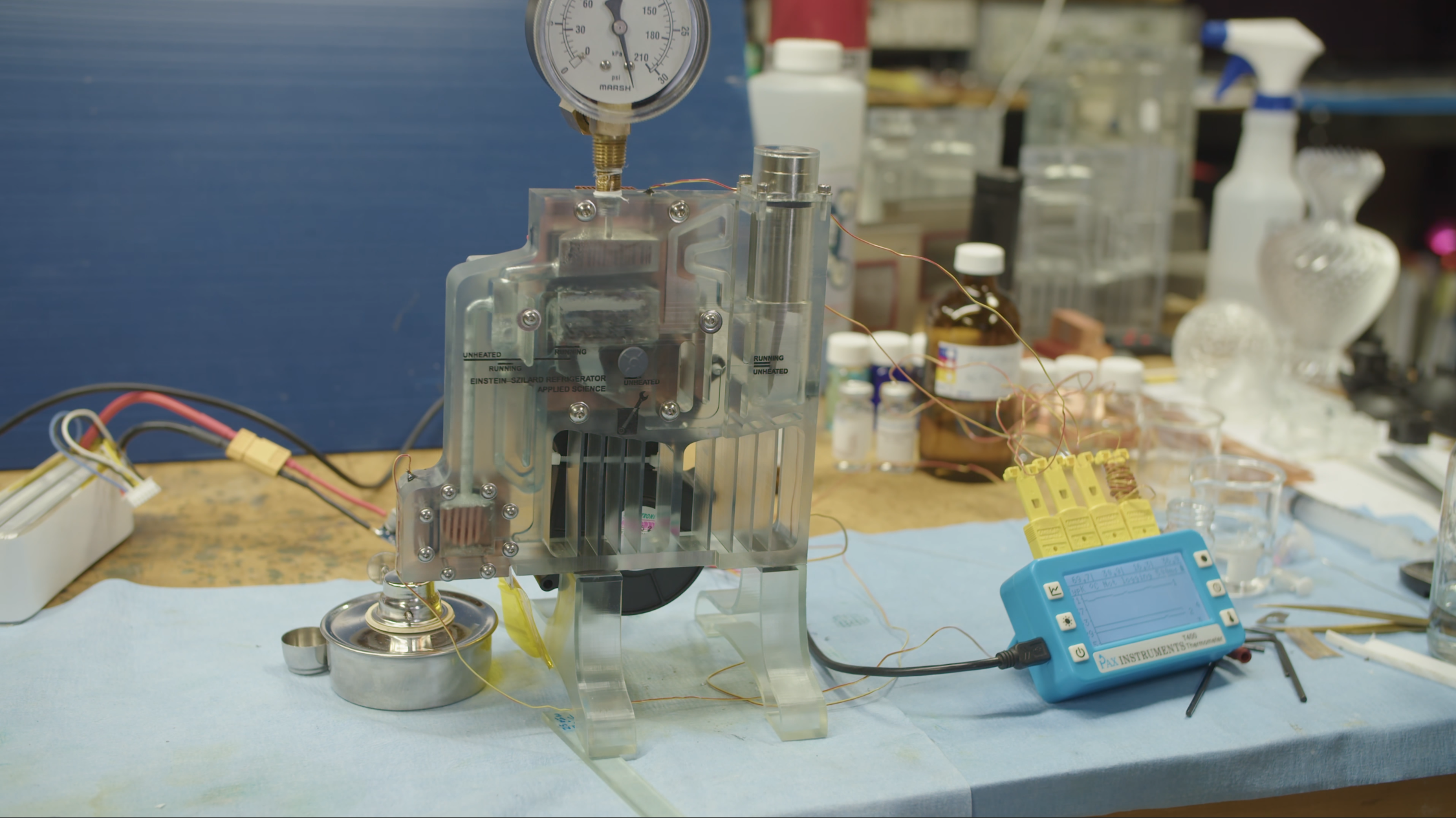
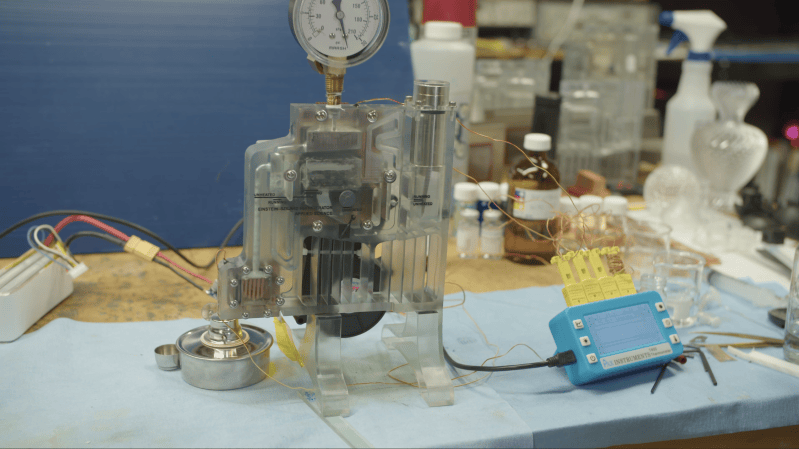
3D Printed Einstein-Szilard Refrigerator Cools with Fire They may not deliver the highest efficiency, but absorption refrigerators have earned a persistent place in camper vans and industrial plants thanks to a few distinct advantages: they can operate using waste heat alone as an energy source, and they can be quite reliable due to their lack of moving parts. It can be a bit hard to understand their working principles, though, which is why [Ben Krasnow] built a transparent Einstein-Szilard refrigerator. Most absorption refrigerators use ammonia and water as their working fluids; since the ammonia gas needs to condense at room temperature, the refrigerator requires pressures above what can be comfortably held in a glass or plastic enclosure. The Einstein-Szilard design, by contrast, uses a third liquid as its refrigerant. A strong solution of ammonia in water is separated by boiling, and the ammonia gas induces the refrigerant to evaporate by decreasing its partial pressure. The refrigerant and ammonia gasses then mix with water, in which the ammonia dissolves, leaving the refrigerant vapor to condense and start the cycle again. The newly reformed water-ammonia solution flows back into the boiler. The refrigerant is usually butane, but since [Ben] was powering this pressurized system with an open flame, he opted instead for nonflammable perfluoropentane. The refrigerator body itself was 3D printed in clear resin, with a copper block transferring heat from the flame to the boiler chamber; ammonia solutions do dissolve copper, so this isn’t a long-term solution, but it works for a demonstration. The single internal path of the refrigerator presented some difficulties: since almost no pressure builds up between different parts of the system, a bubble in the wrong place can easily airlock it. In the end, [Ben] managed to get it working well enough to reach five degrees Celsius below the ambient temperature. Conveniently, he notes that, for alcohol at a sufficiently high concentration, you could cool your drink by burning a portion of it. Ammonia-based refrigerators are a tough build for most hackers, but we have seen a salt-water-based absorption refrigerator before. For more less-known refrigerators, check out our article on strange cooling methods. Thanks to [spacedog] for the tip! #printed #ammonia #ben #benkrasnow #rss #feeds #linksharing #qwibbit
MakerWire's avatar
MakerWire 2 weeks ago
A bunch of items from Stanley Kubrick’s personal archive Jason Kottke, writing at kottke.org, notes that items from Stanley Kubrick’s personal archive are headed to auction early next year. The lots include Jack Torrance’s axe and the sisters’ blue dresses from The Shining. Kubrick’s director’s chair is also in the sale, along with a chess set the director owned. See more at kottke.org. https://blog.adafruit.com/2026/10/30/a-bunch-of-items-from-stanley-kubricks-personal-archive/ image #stanleykubrick #personalarchive #jacktorrance #jasonkottke #see #rss #feeds #linksharing #qwibbit
MakerWire's avatar
MakerWire 2 weeks ago
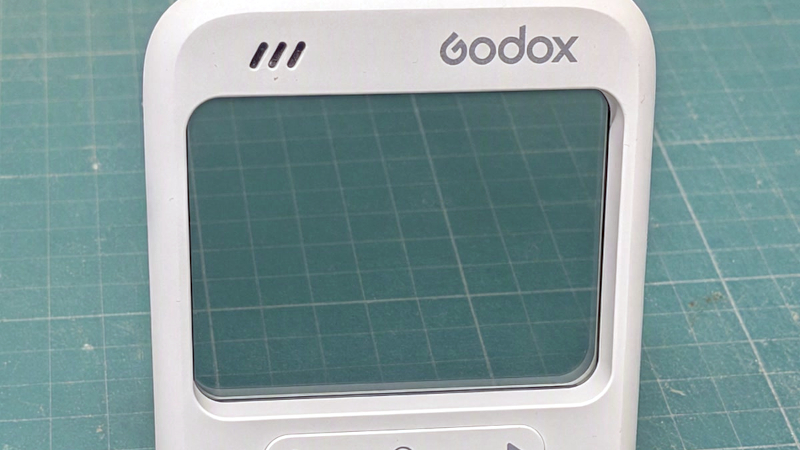
Novelty Camera To USB Camera The Godox C100 is a cheap camera that’s best described as a toy, its party trick being a large clear viewfinder with a head-up-display light meter. It’s by no means a high quality device, being little more than a dashcam in a fancy case, but like many others of its kind it offers opportunity for the camera hacker. [Holofermes] has one, and has given it a suite of patches that, among other things, convert it to a USB webcam and give it a Pi Zero dock. It takes the standard firmware and adds the patches on top, so while they’re installed it can only act as USB drive and webcam, if a return to camera is desired then the original firmware must be flashed. There are some details on the hardware, such as that ti runs FreeRTOS on an Arm architecture with 16 megabytes of memory. The sensor has a 1920 by 1080 pixel resolution, which is a step up from the upscaled VGA of may such cameras. Many novelty cameras are not as hackable as this one, which makes it interesting. We hope that more camera hackers will turn their attention to it. It’s not the first cheap camera we’ve taken a look at. #usb #godox #holofermes #arm #vga #rss #feeds #linksharing #qwibbit
MakerWire's avatar
MakerWire 2 weeks ago
A magnetic lock opens by magic Stephen Cass built a lockbox that opens only when the right gesture is traced with a magnet, and wrote it up for IEEE Spectrum. The sensor is SparkFun’s $100 magnetic imaging tile, a small-run board based on work by Peter Jansen. It carries an 8-by-8 grid of Hall-effect sensors that read both magnitude and polarity, and talks over SPI fast enough to track a magnet moved by hand. A Teensy 4.1 runs the lock. Cass let Claude write two support libraries, one to record a gesture to nonvolatile storage and one to compare a new gesture against it, then wrote the top-level code himself. A servo rotates a beam into a notched piece glued inside the lid of a wooden craft box. The sensing area is only 3 centimeters square, which made it hard to repeat a gesture from outside the box. Marking the spot would give away the hidden lock, so Cass traced a Celtic knotwork band across the front and uses it as a camouflaged reference grid. If the battery dies while locked, something has to break. See the video below and more on spectrum.ieee.org and content on GitHub. Via Hackaday. https://blog.adafruit.com/2026/10/30/a-magnetic-lock-opens-by-magic/ image #ieeespectrum #lock #opens #peterjansen #cass #stephencass #spi #teensy #rss #feeds #linksharing #qwibbit
MakerWire's avatar
MakerWire 2 weeks ago
Patch Commodore 64 Kernal Roms to remap keyboard Dave VW has posted a new way to remap the Commodore 64 keyboard, writing at Tech with Dave. Earlier remapping drivers loaded into lower BASIC RAM at a fixed address and vanished on restart. The keyboard tables actually live in the KERNAL ROM, which holds four maps: Normal, Shift, Commodore, and Control. The new program, 64KEY ROM PATCH, is a PRG added to the c-keymaps project. It locates the keyboard maps, then applies a patch list of DATA statements giving shift mask, key scan code, and PETSCII character. The patched ROM is built in RAM and activated. From there the change can be made lasting. The patched image can be saved, moved to a PC, and burned to an EEPROM for a physical C64. Owners of a ROM switcher such as Easy Flash 3, or a toggle switch between two ROMs, can swap maps on the fly. Emulator users can just add the patched ROM to their collection and select it. The included table moves symbols like + to -, @ to [, and shift-: to a plain colon. See more at techwithdave.davevw.com and content on GitHub. https://blog.adafruit.com/2026/10/30/patch-commodore-64-kernal-roms-to-remap-keyboard/ image #kernalroms #patchcommodore #rom #keyboard #remap #shift #ram #dave #easyflash #normal #rss #feeds #linksharing #qwibbit
MakerWire's avatar
MakerWire 2 weeks ago
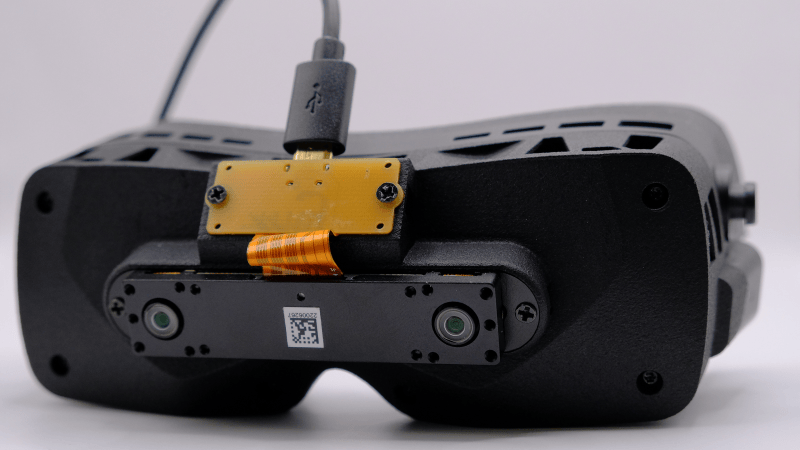
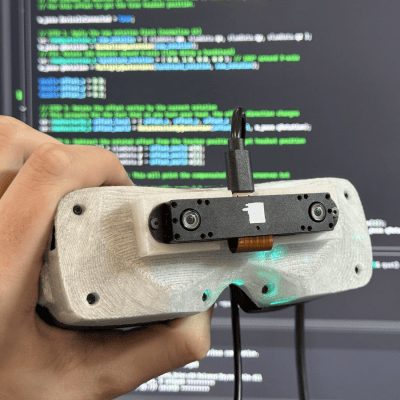
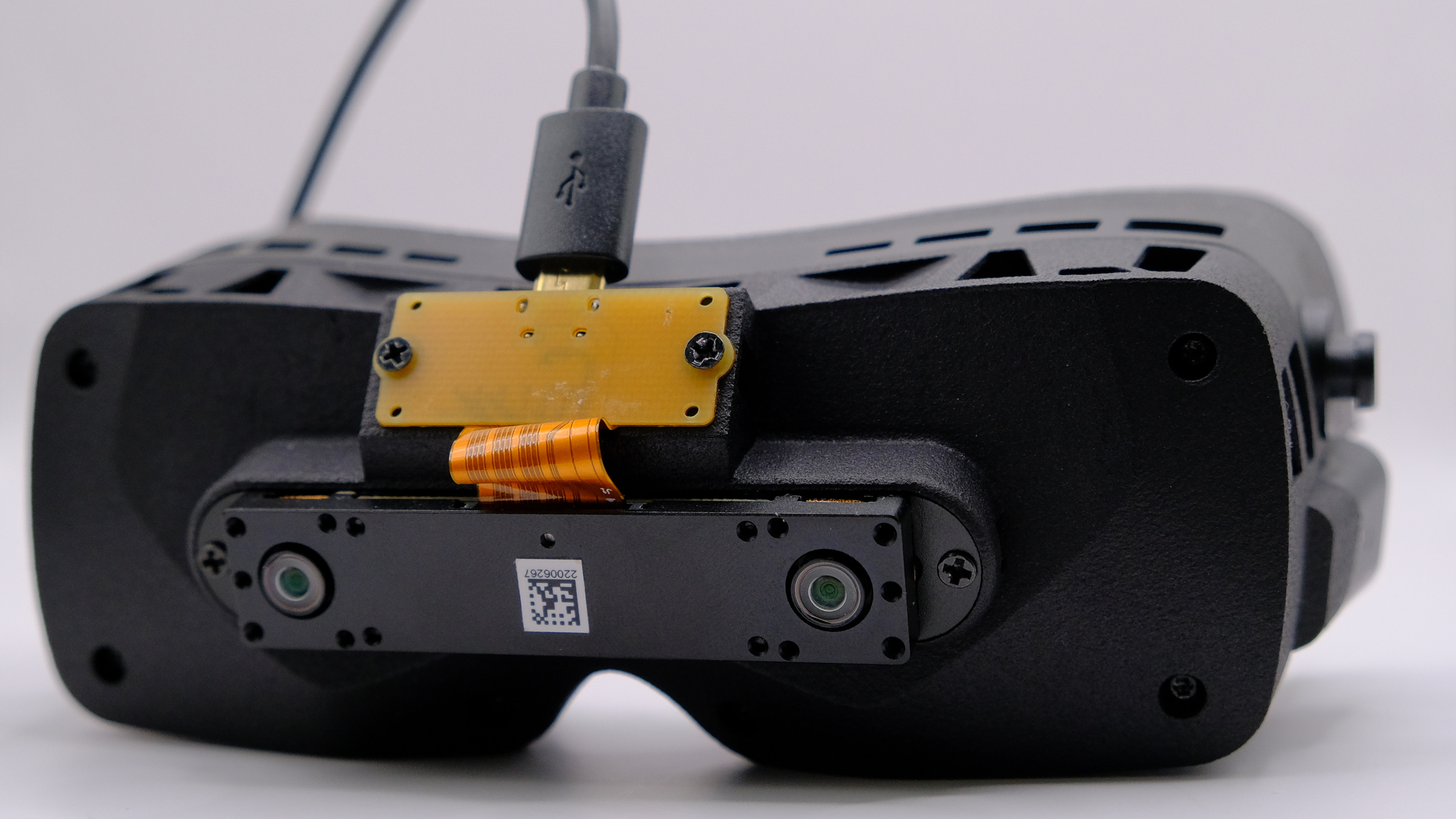
VR Headset Ditches the Base Stations with DIY Tracking Those in the virtual reality scene might be interested in [Prohurtz]’s add-on for the Bigscreen Beyond VR headset. BSB-SLAM adds SLAM (Simultaneous Localization and Mapping) tracking to the headset by attaching a sensor to the front of the headset, and providing the software to tie the two together. As a result, the headset can be fully tracked in 3D space with no need for external base stations. It essentially adds inside-out tracking as a DIY add-on. An early version, shared with a brief video demo posted to X. Just to be clear, that doesn’t mean the headset becomes wireless. The Beyond connects to a PC, essentially acting as a display, and that part is the same. But it does mean the headset is no longer tied to having to work in a room with base stations pre-installed. [Prohurtz]’s solution does this by adding a small off-the-shelf Xvisio XR50 board, USB cable, and 3D-printed mount to the unit. The headset works as normal, just with some extra software needed to use the sensor data in lieu of the base stations. As far as sensors go the Xvisio XR50 is a bit spendy, but the fact that a small and lightweight SLAM sensor that’s capable of delivering positioning data suitable for tracking a headset in near real-time can be bought online and so readily adapted is pretty interesting. [Prohurtz] got the idea working back in 2025 but it’s now at the point where one can order a part, print an adapter, and be off to the races with a software package. This isn’t [Prohurtz]’s first time with VR hardware, either. The EyeTrackVR eye tracking add-on is also their work, combining largely off-the-shelf hardware into an effective DIY solution for VR use. #basestations #diy #tracking #prohurtz #simultaneouslocalization #slam #xvisio #vr #rss #feeds #linksharing #qwibbit
MakerWire's avatar
MakerWire 2 weeks ago
Rolling Stone: the 200 greatest rock songs of the 21st century Jason Kottke pointed to Rolling Stone’s list of the 200 greatest rock songs of the 21st century so far, writing about it on kottke.org. The top pick is “Maps” by the Yeah Yeah Yeahs. Kottke says he cannot argue with it. Rolling Stone also put all 200 songs into a YouTube playlist. Start to finish, it runs 15 hours and 25 minutes. See the article on Rolling Stone. Via kottke.org. https://blog.adafruit.com/2026/10/30/rolling-stone-the-200-greatest-rock-songs-of-the-21st-century/ image #rollingstone #greatestrock #rocksongs #yeahyeah #century #kottke #yeahs #maps #jasonkottke #via #rss #feeds #linksharing #qwibbit
MakerWire's avatar
MakerWire 2 weeks ago
A dog’s paw print was found in a 3,700-year-old brick Andrew Paul, writing at Popular Science, reports on a Bronze Age mud brick in Turkey that carries a dog’s paw print. The find came from Tavşanlı Höyük, a mound site about 100 miles south of Istanbul that covers nearly 100 acres and holds Anatolian remains going back 8,000 years. Turkey’s Minister of Culture and Tourism, Mehmet Nuri Ersoy, posted about the discovery earlier this month. Archaeologists led by Erkan Fidan of Bilecik Şeyh Edebali University have worked the mound for more than five years. In 2021 the team started on architectural debris roughly 3,700 years old, including mud brick walls made from soil, straw, and water dried in the sun. A dog walked across one brick while it dried and left a four-toed indentation. The builders used the brick in the wall anyway instead of throwing it out. The building later burned down with two people inside. No dog remains were found, so the animal was not there when the fire happened. See more at popsci.com. https://blog.adafruit.com/2026/10/30/dogs-paw-print-found-in-a-3700-year-old-brick/ image #pawprint #dog #brick #popularscience #bronzeage #found #mehmetnuri #nuriersoy #andrewpaul #bilecikseyh #rss #feeds #linksharing #qwibbit

MakerWire's avatar
MakerWire 2 weeks ago
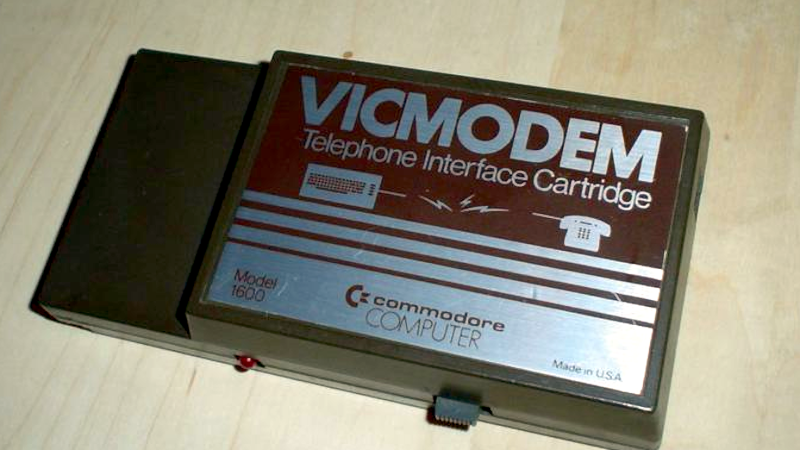
A 1982 Modem for $100 [Dave Farquhar] takes a walk down memory lane about the Commodore 1600 VICModem, perhaps the first phone modem to sell for less than $100. Commodore, of course, was famous for making cheaper computers like the VIC20, the Commodore 64, and lower-cost peripherals like disk drives. But how did they hit the $100 price point with the modem when competing 300 baud modems sold for at least twice that, and a 1200 baud unit would set you back at least $600? First, Commodore didn’t handle the design themselves. Instead, they outsourced to Anchor Automation, a well-known modem manufacturer. It used a Motorola MC14412 modem on a chip, along with six other chips. The chip could, in theory, do 600 baud, but the modem was rated for 300. But it did make some interesting design choices. Old-school modems were not allowed to connect to the phone lines directly, so you dialed the phone number and then shoved the handset into some padded cups known as an acoustic coupler that placed a microphone next to the phone speaker and a speaker next to the phone microphone. Modern modems didn’t have this problem (thanks, in part, to Tom Carter), and the VICModem also connected directly. But to save money, it couldn’t dial the phone for you. The idea was you’d dial the phone like you would with an old acoustic modem and then pull the handset cord and plug it into the modem yourself. There was a problem. In those days, old phones didn’t always have a plug on the handset. Ironically, according to [Dave], the company bought phones to bundle with the modem in Canada only to find out the phones they bought had hard-wired handsets and were not usable. Not only that, if the phones had been the right kind, they would have been illegal in Canada at that time since the phone rules prohibited modular jacks for the handset. To fix the problem, they also bundled the VIC-1605, which was essentially a Y cable for the phone. You plugged it into the wall, and then plugged the phone into an RJ-11 and the modem into an RJ-9. There were other cost savings, too. There was a switch that determined if you were originating a call or receiving one, for example. A great example of how to design something as cheaply as possible, other than the faux pas with the phone connectors. These days, it is hard to find a modem, but even if you do remember them fondly, it is surprising how old they really are and how little you needed to make a low-rate acoustic modem. #modem #commodore #davefarquhar #anchorautomation #old #tomcarter #first #rss #feeds #linksharing #qwibbit
MakerWire's avatar
MakerWire 2 weeks ago
Handwriting to pen plotting Daniel Catt built a markdown to handwriting tool, written up in his newsletter at newsletter.revdancatt.com. He runs a Bantam Tools NextDraw 8511 pen plotter driven by Kitty, his AI assistant, which writes out his morning todo lists, addresses envelopes and now handles packing lists on A6 index cards and A5 notes. It is slower than the laser printer sitting across the room, but he can set it going and collect the pages later. The new tool takes markdown and supports headings, underlining, strikethrough and bold, with bold done by writing over the same word a couple of times. Italic was skipped. These are not fonts: the text is converted into dynamically generated single stroke SVG cursive, made to be drawn with a pen. Catt also wrote node based code to chain a random seed through his “70s Pop” generator, then a kaleidoscope step, then a scaling and placing step. He then plotted the node graph itself as an SVG. He says he has spent more time this month tuning his plotting tools than actually plotting. See more at newsletter.revdancatt.com. https://blog.adafruit.com/2026/10/30/handwriting-to-pen-plotting/ image #pen #handwriting #bantamtools #svg #catt #kitty #danielcatt #pop #toolsnextdraw #rss #feeds #linksharing #qwibbit

MakerWire's avatar
MakerWire 2 weeks ago
Hackaday Podcast Episode 393: Epaper, Tamagotchi Hacks, and Supercon Talks Galore This week’s podcast comes from Europe, as Elliot Williams is joined by Jenny List, who wishes to apologies for the poor sound quality from her headset microphone. The news this week is our Supercon conference which is upcoming, we’ve released more speaker details. We start the hacks with a follow-up to an exciting development. We’ve seen e-paper screens driven at high frame rates, but do the techniques used shorten the life of these displays? Then we have Tamagotchi hacking, re-using an old mobile phone as a flight controller, the oldest Windows app to run on Windows 11, and probably the prettiest mini TV studio rack you will ever see. Pushing Bluetooth out to 12 kilometres is the cherry on the cake. In quick hacks there’s a swash plate-less helicopter, Commodore 64 keycaps, and the history of the mouse, before our can’t-miss look at infra-red transmission, and a forgotten Google VR headset. Check out the links if you want to follow along, and as always, tell us what you think about this episode in the comments, or drop us a line on the mailbag. Download yourself a little podcast, won’t you? Where to Follow Hackaday Podcast Places to follow Hackaday podcasts: iTunes Spotify Stitcher RSS YouTube Check out our Libsyn landing page Episode 392 Show Notes: News: 2026 Hackaday Supercon: All The Speakers! Mailbag: [Stefan] asked us about the performance of lead-acid batteries at lower temperatures. This prompted an interesting discussion of the subject, with the discovery that they are rated for surprisingly low temperature working. Battery University remains your best bet though, as always. BU-410: Charging at High and Low Temperatures Interesting Hacks of the Week: Does Running An E-Paper Display At 30 FPS Destroy It? Tiny E-Paper Display Delivers 30 FPS Of Game Boy Fun Behold A 60 Hz Refresh Rate E-ink Monitor GitHub – kuslota/InkBoy · GitHub An Analog TV Station For Anyone Turning An Old Phone’s Motherboard Into An RC Plane Controller Turning A Run-Over Samsung Galaxy S23 Into A Gaming PC There’s A Whole Computer Inside This Mouse The Oldest Windows App To Still Run On WIndows 11 Hacking The Modern Tamagotchi With UART Using An MCU’s Own Debug Peripheral To Defeat Bootrom Protection Classic Tamagotchi Is Reincarnated In Modern Hardware Reverse-Engineering The Tamagotchi IR Connection Building The Infinite Matrix Of Tamagotchis Tamagotchi Hacking, In Depth Pushing Bluetooth Out To 12 Kilometers Quick Hacks: Elliot’s Picks: The Slurptop Is Both Drool Worthy And Practical 2026 Retrocomputing Challenge: Explore Space With A Credit Card Reader Building A Swashplate-less Helicoper Rotor Jenny’s Picks: C64 Keycaps For Everybody Where Did Your Mouse Come From? In Praise Of A Legendary Power Transistor Can’t-Miss Articles: Exploring What’s Left Of Google’s VR Dreams The Fascinating World Of IrDA And Other Infrared Protocols YouTube: Hackaday Superconference 2017 – Michael Ossmann & Dominic Spill Mike Ossmann And Dominic Spill: IR, Pirates! #hackadaypodcast #tamagotchi #followhackaday #hacks #episode #quickhacks #windows #moderntamagotchi #oldestwindows #classictamagotchi #rss #feeds #linksharing #qwibbit
↑