Nextcloud in 2025: How 25 Million Users Escaped Big Tech's Data Prison
“Nextcloud powers 400,000+ servers worldwide, giving organizations like the German federal government complete control over their data while escaping Big Tech surveillance. Discover why millions choose open-source collaboration over Microsoft and Google's data-mining platforms.”
“Today, ITZBund operates Nextcloud for 300,000 employees across the German federal government. The French Ministry of Interior runs it for their 300,000 staff. Schleswig-Holstein deploys it across 25,000 systems. Swedish federal agencies, Dutch ministries, universities across Europe, hospitals, law firms, and millions of home users rely on Nextcloud for file storage, video conferencing, document collaboration, email, calendars, and now AI assistance. These organizations discovered they could have enterprise-grade collaboration tools while maintaining complete control over every byte of their data. No surveillance capitalism. No vendor lock-in. No data held hostage in Silicon Valley.”
NextCloud actually has way more functionality inside it than MS Office will ever have. But the real point is you have ownership and control over your services as well as your data.
But what about AI? For better or worse, AI now comes in a lot of applications. Nextcloud Assistant 3.0 also brings AI agency features to everyone, and not just those who pay for OpenAI. It is supposedly more than just chatbot functionality.
It's true too though that apart from data sovereignty and cost savings of around 50-80% you will also miss out on Microsoft license audits, and surprise price hikes (remember Microsoft moving from per CPU licensing to per core licensing).
See https://doingfedtime.com/nextcloud-in-2025-how-25-million-users-escaped-big-techs-data-prison
#technology #opensource #selfhosting #datasovereignty

Danie
danie@nostr.fan
npub1g2jp...yjj6
Testing out new wallet
How to set up a self-hosted newsletter using listmonk
“Listmonk is an amazing feature packed self-hosted email newsletter manager. It offers loads of features like analytics (clicks, opens, bounces), templates, public subscription pages, importing subscribers and much more!”
Listmonk is not perfect, as it cannot by default trigger from an RSS feed (although there is a GitHub-based workaround) and it does still need to connect to a mail service. The latter could be a pro or a con, as it certainly gives flexibility and can for example connect to a free service like Gmail.
It does track opening of mails, mail bounces, etc and whilst some may not like this, the point is it is the individual sending the newsletter who tracks and acts on this. It is not some 3rd party corporate who is doing who knows what else with the addresses or embedded tracking.
I started using a “free” mailing subscription service, and I am regretting it now, as I'm getting suspicious of the embedding I did on my website to get it working (this after I removed Google tracking and other similar services).
I do like that listmonk offers the basics of having to actively opt into a mailing list, there are easy opt out options, wiping of user data, and it does all the basics most probably need. The pain though is sometimes finding a good mailing service you don't have to pay for. Good one's, for example Proton, don't allow this type of functionality.
Interestingly, too, I see listmonk can connect using HTTP webhooks to send SMS, Whatsapp, FCM notifications, or any type of messages in fact.
So, I'll be looking into this open source offering in future to migrate my own mailing list.
See
#technology #opensource #selfhosting #maillists

How to setup a selfhosted newsletter using listmonk | 4rkal's Dev Blog
Listmonk is an amazing feature packed selfhosted email newsletter manager. It offers loads of features like analytics (clicks, opens, bounces), tem...
Thousands of Asus routers are being hit with stealthy, persistent backdoors
“Thousands of home and small office routers manufactured by Asus are being infected with a stealthy backdoor that can survive reboots and firmware updates in an attack by a nation-state or another well-resourced threat actor, researchers said.”
It is called ViciousTrap, and it basically embeds a public encryption key for access to the device through SSH. So this is one way it can be detected. Some vulnerabilities have been patched, but a good 9,500 plus devices were already affected.
It all comes down though again to the old issue of whether there are still updates available for routers that are a few years old, and also whether their owners are even bothering to check for and apply the patches.
In the case of Asus, there is the third party Merlin software available that does support the routers a bit longer, but even Merlin at some point freezes updates a while after Asus stops providing updates.
Which is why I made a clean break and decided to go with OPNsense, which keeps updating pretty well much like Linux does. OPNsense uses FreeBSD though, but the same theory applies.
See
#technology #routers #vulnerability

Ars Technica
Thousands of Asus routers are being hit with stealthy, persistent backdoors
Backdoor giving full administrative control can survive reboots and firmware updates.
KOReader is an ebook reader application supporting many formats, running on Cervantes, Kindle, Kobo, PocketBook and Android devices
KOReader is actually intended to replace your existing ebook reader software that runs on a Kobo or Kindle ereader. For Kindles, this will also mean you have to jailbreak them. But it can also install on Android, Linux and other OSs.
It does provide a much richer and more customisable experience than Kobo or Kindle offers, and the real power also kicks in with plugins that enable Wallabag read-it-later service, RSS news feeds, integration with Calibre, etc.
It supports fixed page formats (PDF, DjVu, CBT, CBZ) and reflowable e-book formats (EPUB, FB2, Mobi, DOC, RTF, HTML, CHM, TXT). Scanned PDF/DjVu documents can also be reflowed with the built-in K2pdfopt library. ZIP files are also supported for some formats.
The linked article below gives some feedback on usage experience, but I have also provided the link to the source code site of the product. If you want to see it in action, you can watch some videos on Stefan Svartling's channel.
See and
#technology #opensource #reading #koreader
Hook’s Humble Homepage
Trying out KOReader and Wallabag (the first few days and months) - Getting excited about reading again
I tested KOReader, Plato and Wallabag on my Kobo and am very happy with the outcome. (Plus some improvement suggestions.)
GitHub
GitHub - koreader/koreader: An ebook reader application supporting PDF, DjVu, EPUB, FB2 and many more formats, running on Cervantes, Kindle, Kobo, PocketBook and Android devices
An ebook reader application supporting PDF, DjVu, EPUB, FB2 and many more formats, running on Cervantes, Kindle, Kobo, PocketBook and Android devic...
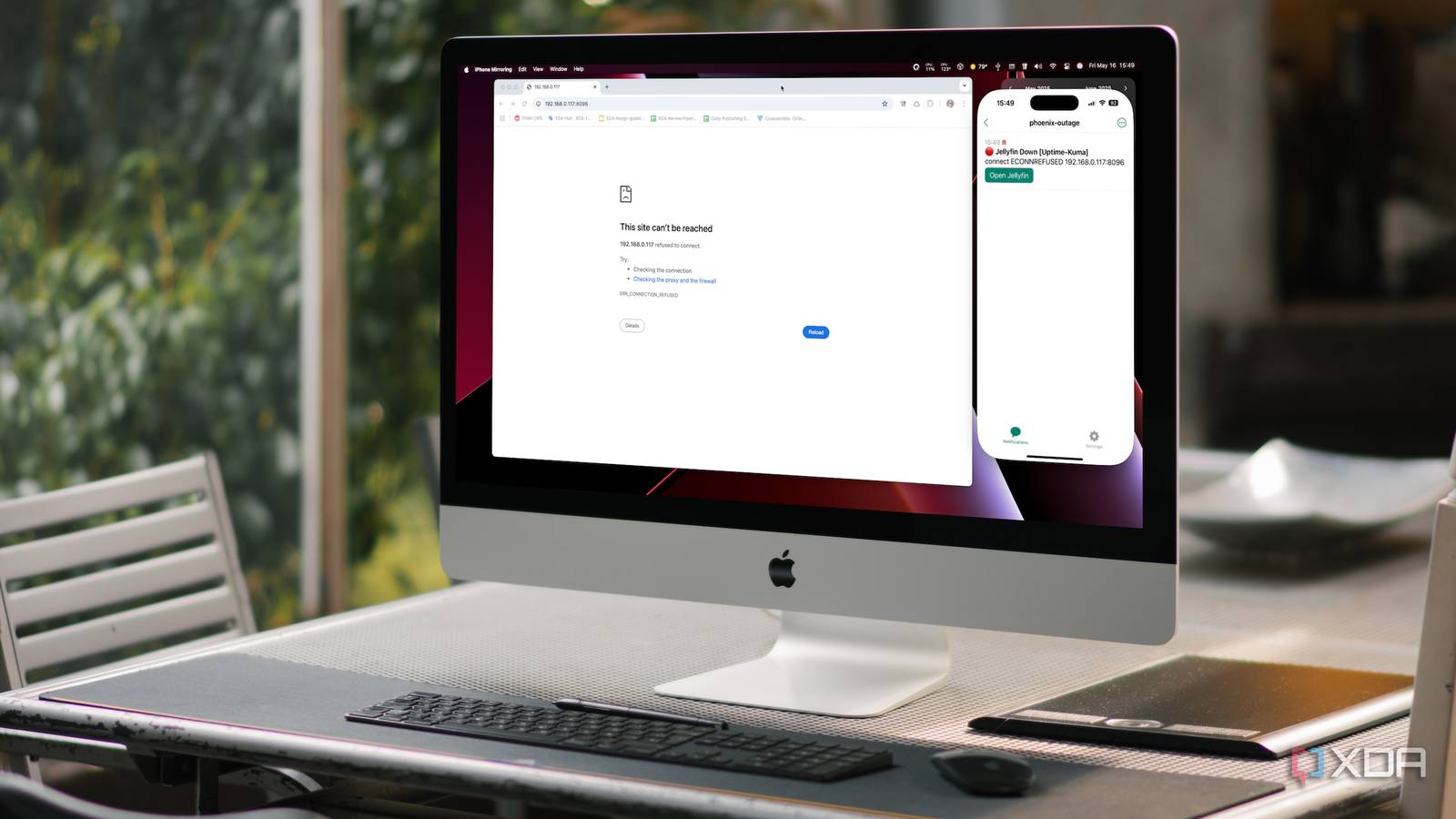
Ntfy is a pretty good open source notification service which you can host yourself
This is a pretty flexible service that will send notifications to your mobile phone. You can either use their cloud service, or host it yourself.
Apart from being able to send notifications directly from any command line, various apps such as Uptime Kuma, Home Assistant, and more also have built in support for Ntfy.
See
#technology #selfhosting #opensource #notifications

XDA
I set up a self-hosted notification service for everything, and I'll never look back
It's not just about getting the notifications, but also having the ultimate level of control over them
BleachBit 5.0 System Cleaning Utility Released with Major Upgrades
"BleachBit, a free and open-source cross-platform system cleaning utility designed to help users reclaim disk space and protect their privacy, has just released a new major version, 5.0. Users will appreciate the newly added display‑language option in “Preferences,” which allows quick switching between supported languages without delving into configuration files. In addition, standard keyboard shortcuts such as “Ctrl+Q” and “Ctrl+W” now close the application, while update notifications have been tempered to be less intrusive.”
Apart from the various other changes also listed in the linked article, running this latest version has just cleared over 11 GB of crud off my drive. The thing I need to really remember, is to run BleachBit every 6 months or so.
See
#technology #opensource #bleachbit

Linuxiac
BleachBit 5.0 System Cleaning Utility Released with Major Upgrades
BleachBit 5.0 open-source system cleaning utility is out now with new cleaners, security patches, and better cross-platform performance.
Immich Public Proxy shares your Immich photos and albums safely without exposing your Immich instance to the public
Immich is a wonderful bit of software, but since it holds all your private photos it's best to keep it fully locked down. This presents a problem when you want to share a photo or a gallery with someone. To view a shared album in Immich, you need access to the /api/ path. If you're sharing a gallery with the public, you need to make that path public. Any existing or future vulnerability has the potential to compromise your Immich instance. I'm not aware of any such vulnerability existing right now.
Immich Public Proxy provides a barrier of security between the public and Immich, and only allows through requests which you have publicly shared.
It is stateless and does not know anything about your Immich instance. It does not require an API key which reduces the attack surface even further. The only things that the proxy can access are photos that you have made publicly available in Immich, and it strips out most metadata such as locations, camera details, comments, etc.
This video will show how it operates and give some pointer son setting it up, and will also show a workaround I'm using to provide a public landing page for all your shared links on Immich, and how to nest a group of sub-albums on a webpage.
See
#technology #opensource #security #Immich
Europe plots escape hatch from the enshittification of search
“If you ever get the impression that search engines are getting worse, or that alternatives are not all they seem, it's not just you. It's what journalist Cory Doctorow calls “It has 14 partners funding it so firstly enshitiffication." Many alternatives use Microsoft's Bing for search, so when Bing goes down so does DuckDuckGo, for instance. It's important to note what this isn't, though. It's not a new search engine. Rather, the project is building a web index, the idea being to make it easier for others to build search engines that can use the OpenWebSearch database as their index.”
Nevertheless, this does look very interesting. It has 14 partners funding it, so hopefully that means it won't just run out of steam in a few months, and also means there should not be any single corporation just calling all the shots.
It also says it aims not to provide a search API, but rather it is shared as open data so that others use it in building a search engine.
But the proof of the pudding will be in the eating, as the web is changing daily, so this all has to come together and bring meaningful search results to end users. So, I guess we'll only be able to tell when such search engines are established and many people have actually tested and evaluated the results.
See
#technology #opendata #search

OpenWebSearch – a European index for European search engines
: Plus: How to make Google less unhelpful
Google eventually adds UWB support to its rebranded Find Hub tracker app
This was a feature that I noticed was missing from Google's tracking app when I wanted to buy Android tags. I was very close to buying the Motorola Moto tags but then went with the Samsung tags instead which offered UWB as well as separation alerts (does Google's offering provide that yet?).
It's pretty sad that Google lags so behind, and even it's 3rd party providers are already providing the features and waiting for Google to catch up. The name changes are also diluting a lot of brand awareness. I have completely lost count of the number of name changes for the various messenger apps over the years.
Google also announced this week that the web version of Google Keep was finally getting text formatting. This is about a year behind the mobile app version, and many years behind all of its rivals.
Maybe I just remember the early years of Google, when everything seemed to be more innovative and pushing the boundaries. It's almost as if Google has become more like Apple (except that Apple's tags already had UWB and separation alerts, and their Notes has had text formatting from the very start).
See
and
#technology #trackers

The Verge
Google adds UWB support to its rebranded Find Hub tracker app
Google just fixed the Moto Tag.

Android Police
Keep is getting easier to use on the web with new text formatting tools
Google remembers Keep has a web app and updates the note-taking service with much-needed formatting options
5 signs your NVMe SSD might actually need a heatsink
“As far as PC overheating is concerned, SSDs are often the last components you think about. CPUs and GPUs are usually the ones that you need to worry about. However, if you've been running your SSD without a heatsink, and suddenly start noticing some unusual behavior, it might be time to slap on a heatsink. High-performance SSDs, whether Gen4 or Gen5, can require a heatsink to stay cool and avoid thermal throttling. If your NVMe SSD never came with a heatsink and your motherboard doesn't have one either, you might have to consider an aftermarket one.”
I did not know there were such heatsink fans around for about US$21. Currently, I'm using an app called CoolerControl though, which watches the temp of the CPU as well as the NVMe SSD drive, and adjusts the case fans accordingly. For my NVMe drive, this is handling the cooling fairly well.
See
#technology #cooling

XDA
5 signs your NVMe SSD might actually need a heatsink
You better notice the signs before your SSD starts cooking (in the worst way).
Linkwarden is an open source self-hosted collaborative bookmark manager
Linkwarden is a self-hosted, open-source collaborative bookmark manager designed to collect, organize, and archive webpages. Its main goal is to help individuals and teams manage useful webpages and articles in one centralized place, while also preserving copies of those pages-such as screenshots and PDFs-to protect against “link rot” (when web content disappears or changes over time).
My video highlights what it does (and how it can be more useful than just using The Internet Archive), I show how its user interface works, the menu settings, how to add a link using LinkDroid on a mobile phone, how to follow public collections using RSS, and discus how to sync it with your browser bookmarks. This is a very slick and useful application to self-host and keep track of bookmarks that you either want to share with others, or want to have available in the future.
Watch
#technology #opensource #selfhosting #bookmarks
6 OPNsense plugins that make a home network a joy to use
“When you finally get tired of your ISP router, one of the most-recommended replacements is making your own with a custom OPNsense firewall. This puts the power back in your hands, limits what your ISP can do to your connection, and gives you plenty of protection and features you've been missing all this time. But one of the awesome things about OPNsense isn't just that it's a powerful router, but that you can make it even better by installing other services as plugins.”
OPNsense is a fork of PFsense, with a more modern UI, more regular updates, and slightly lighter resource requirements.
The plugins listed are all very useful, but it is worth also just making some comments about some of them here, as I've been using a few of them myself after having considered alternatives:
* Zenarmor can be used for free, but it will then lack the device tracking and alerting for unknown devices, as well as the more advanced rules management and additional profiles. For me, the device identification and management was quite key. Zenarmor is ideal for protecting the LAN side of the firewall by inspecting every network packet, and blocking/altering regarding known and emerging threats. It is similar to the free ntopng plugin, but ntopng really only analyses and inspects, and does no blocking. If you are interested in buying the Zenarmor subscription, my referral code SVNCDQ4TQW294 will get you 10% off your first payment (month or year).
* OPNsense does have a built-in IDS/IPS system, but the issue really is you have to configure the rules to be downloaded, and then set them to alert/block, and it is a rather cumbersome process.
* CrowdSec is ideal for blocking threats from outside your WAN, also compared to known threats. The free version is usually good enough for most people, and it adjusts the blocking rules of OPNsense.
* Tailscale is a remote access tool that is based on WireGuard. For me, its big advantage can be that it is easier to configure end devices for access, and it will work well with dynamic IP addresses. Although Tailscale is a commercial product, the free version will do what most home users require.
* The linked article mentions os-git-backup plugin for backing up config changes, but I am using the Nextcloud plugin to back up automatically to my own Nextcloud.
It is really worth exploring the OPNsense plugins as they can provide some really rich extra functionality. Just bear in mind everything may not work, e.g. the SMART drive plugin does not work with my Protectli eMMC drive.
See
#technology #OPNsense #security #networking

XDA
6 OPNsense plugins that make my home network a joy to use
OPNsense has tons of awesome plugins to use.
Open Document Format turns 20, but Microsoft Office still reigns supreme
“It's been 20 years since the Open Document Format (ODF) became a standard, marking a milestone in the push for open, vendor-neutral file formats — and the beginning of a long but largely unsuccessful attempt to loosen Microsoft Office's grip on the desktop.”
It's great that we have an international open standard for interoperability between different vendors, but very sad that Microsoft chose to promote its own rival standard instead (OOXML), and that MS has consistently been breaking its own standard to ensure rival vendors cannot fully support the Microsoft standard. As usual, MS played dirty instead of embracing open standards in the interests of all users everywhere, and ensuring future-proof reading/editing of documents.
The situation today I suppose it a lot better than it was in the early years when ODF came out. There is greater compatibility today. But if Microsoft had played ball properly, LibreOffice, FreeOffice, etc should all have been able to perfectly edit any documents produced by MS Office, and of course, the other way around too.
Open standards are essential to improving competition, interoperability, preventing vendor lock-in, and also ultimately reducing costs for consumers. None of this is really in Microsoft's interests, though.
Whilst many governments did in fact formally approve ODF as their standard, including South Africa, the sad reality is that they just about only exclusively send out documents in docx formats. This is despite MS Office being able to export to ODF format. The intention was to reduce costs for SMMEs and citizens who needed to interact with government.
I recall doing a post many years ago about a provincial level government social development department requiring charities to submit their business plans in docx format to them. As I said then, it was fine for the provincial government to spends millions per annum on paying for MS Office licenses using taxpayer money, but charities don't have that sort of donor money to waste. The charities actually had a right to submit their documents in ODF format to government.
See https://www.theregister.com/2025/05/03/20_years_open_document_form
at
#technology #openstandards #ODF #interoperability
Privacy Please is a browser extension that redirects users from major websites to privacy-respecting front end alternatives
When you navigate to sites like YouTube, Reddit, Twitter/X, or Google, the extension intercepts the request and redirects you to an open-source frontend. Same content, zero tracking, no telemetry, no bloat. The extension is available for Chrome and Firefox based browsers.
Privacy front ends on the internet are alternative, often open-source web interfaces that allow users to access popular online services (like social media platforms, video sites, and search engines) while enhancing privacy and reducing tracking. They act as intermediaries or proxies between the user and the original service, stripping away invasive tracking, ads, JavaScript requirements, and account sign-up walls, thereby minimising data collection and improving user anonymity.
Examples:
* YouTube → Invidious
* Twitter/X → Nitter
* Reddit → RedLib
* Google Search → SearXNG
* TikTok → ProxiTok
Yes, I am aware that Sam has a “dark” past, and he is not hiding that, but he served his time and seems to be now focusing more on Darknet & Darkweb News, OpSec, OSINT, Privacy Rights, etc now. His extension is fully open source, so anyone can see what the code does, and he is encouraging others to fork and improve it.
He also has some interesting news on these topics, which one can follow via the RSS feed at https://doingfedtime.com/rss/.
See
#technology #opensource #privacy
GitHub
GitHub - DoingFedTime/PrivacyPlease: Swaps non-privacy respecting sites with open source privacy frontends.
Swaps non-privacy respecting sites with open source privacy frontends. - DoingFedTime/PrivacyPlease
5 reasons to use CryptPad instead of Google Docs
Apart from security and privacy, as well as being a cloud based solution, CryptPad is pretty feature packed. For me, it is also a great way to share something publicly if I need to.
You may compare its privacy and security to something like Proton Docs, but where it really beats Proton Docs is that it also has spreadsheets, presentations, rich text. Kanban, code, forms, whiteboard, diagrams, and it is open source and can be self-hosted too.
See
#technology #opensource #privacy #alternativeto

XDA
5 reasons why I use CryptPad instead of Google Docs
I recently switched to something called CryptPad. It is not just a replacement for Google Docs but for the entire Google Workspace suite.
TidyOS is a free and open-source tool to debloat Windows 11
“This tool comes from GitHub user builtbybel, who has made many apps of this nature in recent years, such as Bloatynosy and Winpilot. TidyOS seems to bring together the best features of these apps in a cleaner and more straightforward UI, and it's one of the best ways to clean up your Windows install, especially if you don't feel comfortable using a terminal environment.”
This tool makes one realise how much gunk is built into Windows 11. I haven't tested it, though, as I long ago ditched Windows myself. But this may clean up the Windows 11 experience for others at least.
See
#technology #Windows11 #opensource

XDA
If you want to debloat Windows, this free and open-source tool is one of the best out there
TidyOS may just be the best way to clean up all the junk Microsoft includes with Windows 11
Ookla Founder Launches “Orb,” a Smarter Internet Quality Tracker
"Orb runs on all of your devices to collect minute-by-minute data on internet speed, responsiveness, and reliability. It presents this information in detailed charts that provide deep insight into your long-term home internet performance, though it also gives you a handy "Orb score,” which is just a glanceable figure that rates your internet performance on a scale from 0 to 100. If your score falls below 80, Orb will tap into an LLM and make suggestions for how to improve your connection.”
This does look pretty useful as for proper quality of service you really need to test a few parameters over time, and not just rely on a periodic Speedtest.
It installs on various mobile and desktop platforms (well not on Manjaro for me, although it does install on Arch, so I suppose I can make a plan). But also interestingly it has a server side that can install in docker container (which I tried) as well as in Home
Assistant. The server side apps seem to run 24/7 and your desktop and mobile apps can connect to them. You can create a free account so that the stats remain linked. So my the app on my phone will show its own Orb stats, but also sees the Orb stats from the Docker container.
I probably need to try the Home Assistant installation to see if that has a dashboard widget (as that would be really useful). Nope, no Android widget I see, and that was a pretty obvious one I was expecting to find!
See
#technology #Internet #quality #speedtest

How-To Geek
Ookla Founder Launches "Orb," a Smarter Internet Quality Tracker
Yes, I'm pondering my Orb.
Valve's Proton 10.0 Beta Released With More Windows Games Now Playable On Linux inc MS Flight Sim 2024
Looks like Proton is still progressing at a steady pace forwards. I was surprised to see about a month back it played the new Assetto Corsa Evo fine on my Linux desktop. It did not play the first week or two after I bought the game (without even thinking of checking if the compatibility was ready yet).
Ironically enough the DiRT Rally 2.0 mentioned now for compatibility, I think has a native Linux install of that game as I've been playing that a long time already on Linux.
See https://www.phoronix.com/news/Proton-10.0-Beta-Released
#technology #Linux #gaming #opensource
This is probably what desktop Linux needed: PewDiePie installs Linux
His video has hit over 4 million views in just 2 days. Most videos about desktop Linux are done by passionate techies, and they just don't tend to sway or influence most ordinary desktop OS users. What Linux has probably long needed is a few real “non-tech” celebrities to promote it more.
PewDiePie is one of the last people I'd have ever expected to install Linux, let alone to dive into some of the depths that he did. I've watched a few commentary videos today by some popular tech channels, and they are all very complimentary about the tech content he covered. No-one is faulting him on anything he mentioned in his video.
He made a very entertaining, but also very informative video. It is clear that PewDiePie is not as superficial as I thought him to be. This is no basic installation that he did, and certainly most beginners are better off just installing Linux Mint and taking it slowly from there.
His timing is probably really spot-on, too, given the looming deadline for the cessation of support for Windows 10 later this year.
See
#technology #Linux #PewDiePie #opensource
Winget brings Linux-like centralised package management to Windows
“A package manager is a little bit like an app store, but it is both more fundamental and more versatile. Unlike app stores, which primarily deal with distributing first and third-party applications, package managers can also be used to manage the basic components of an operating system, like drivers, or major system updates.”
Yes, Linux generally manages the installation and update of all apps centrally from their package managers (you can even activate Snap, Flatpak, etc updates from inside the package manager). It makes the process pretty seamless, and often involves no rebooting even.
Apparently this Winget app is built into Windows already, and if so, I'm pretty amazed it is not a well-known utility already. It just needs to be activated. Certainly, if I used Windows still, I'd want to be using it.
I suspect though the issue for Windows users may be that it appears to be terminal based (which is easily remedied with a batch filer and desktop icon), but seeing Linux could do GUI package managers I really wonder why Microsoft never turned this into a GUI package manager. Actually, anyone who knows Python could also make this into a GUI package manager.
See
#technology #Windows #updates

How-To Geek
This Forgotten Windows Utility is the Best Way to Update Your Applications
One of the greatest Linux features is on Windows—and everyone forgets about it.