First direct-to-satellite phone call in South Africa using a LEO satellite and unmodified mobile phones
“MTN South Africa and low-earth orbit (LEO) satellite service company Lynk Global carried out a successful technical trial of one of the first satellite-to-mobile device phone calls in South Africa. The phone call, made in Vryburg, North West, allowed the companies to test voice call quality and SMS capabilities over an LEO satellite connection.”
Once this goes commercial, this will obviously be useful for disasters and very remote areas. Although these satellites will work with ordinary unmodified cellphones, including older models, right now it may not be a 24/7 coverage. I'd imagine though for a commercial service in future there will either need to be more satellites, or there may need to be a few geostationary satellites.
Still, it shows what is possible, and that you don't necessarily need Starlink to offer such a service.
See https://mybroadband.co.za/news/telecoms/588871-first-direct-to-satellite-phone-call-in-south-africa.html
#technology #satellite #southafrica

Danie
danie@nostr.fan
npub1g2jp...yjj6
Testing out new wallet
Sez Us Is A New Social Media App Punishes Users for Rage-Baiting
“If there is one certainty of social media in 2025, it’s this: Rage clicks rule. Hyperbole, hate, brash deception—it’s all par for the course—and often rewarded with virality. On Sez Us, users who are intentionally inflammatory may score lower than those who gain influence through respectful dialog.”
I must say I do love this concept. The app is trying to build up trust, civility, transparency, and reputation. Because of this, I'm going to give it a try.
My early impressions are I do like having a 300 character post title and 15,000 characters available for the body text. An interesting point too, is you can link to X (yes I know...) as well as Bluesky, and set toggles on the post to send to those networks at the same time.
But don't worry, the feed view only shows a few lines from the post, so the scrolling is quite easy.
Their business model says that Sez Us is built on advertisers working directly with creators and investing in great content. There is nothing I could see about their technology, but it appears to be a centralised platform. There are also mobile apps I see available.
See
and you can find Sez Us at
#technology #SezUs #socialnetworks

WIRED
A New Social Media App Punishes Users for Rage-Baiting
On Sez Us, users who are intentionally inflammatory may score lower than those who gain influence through respectful dialog.
Sez Us
The social media platform built on the real world principles of identity and reputation and a commitment to democracy and freedom of expression.
Signal vs WhatsApp: Signal is still the most private by a long way
Users adding an incorrect user by mistake to a group is no reflection at all on the security of any app. This happens across all apps, as the user is the issue, not the app.
I had long ago deleted the WhatsApp app off my phone, mainly because of its metadata collection, and the sharing of that data with their upstream 'partners' including Facebook and others. This is clearly stated in WhatsApp's T&C's.
'In a statement, a WhatsApp spokesman said it relies on metadata to prevent spam and “keep the service safe from abuse”.' This is just not true, in that this is not the reason why WhatsApp collects metadata — their T&C's state it is to be shared elsewhere.
Yes, both Signal and WhatsApp keep the message content secure, and use the same encryption protocol. But WhatsApp is also collecting your location continuously, when you message who, for how long, when you wake up, when you go to sleep, where you shop, etc (and of course shares this with your consent).
This is not Signal's business model, nor do they obtain your consent to share this data. WhatsApp/Instagram/Facebook are all about targeting users for advertisers, and sharing data for that targeting (and of course being US owned they have to share that data under the CLOUD and Patriot Acts with the US government as well when requested).
What came out of the US Congressional hearing this week was also interesting to hear — the CIA have Signal installed on their desktops, and they use Signal themselves.
I'm not saying at all that Signal is perfect, as it still requires a verified phone number. So the user is still always identifiable (unlike other messengers such as Threema, SimpleX, Matrix, Session, etc).
It is about what data is collected, and what data is shared with anyone outside of the organisation. Between WhatsApp and Signal, Signal is the clear winner here.
For this reason, there is no WhatsApp app on my mobile phone. If organisations want to ensure better privacy, they should use Signal (like the CIA does) or go a step further and self-host a service like Matrix on their premises where they fully control the data as well as the user access verification.
WhatsApp was a very good app (I used to use it) before they got bought out by Facebook, and it is that business model that has ruined it.
See
#technology #metadata #privacy #messengers

TechCentral
Signal vs WhatsApp: messaging app war heats up after US security blunder
Signal has been growing in popularity in Europe, the US and elsewhere as an alternative to WhatsApp.
Powerfoyle may be able to keep many battery powered products permanently charged
This is a flexible type of solar charging device that can be moulded to fit many devices such as wireless headphones, Bluetooth speakers, etc to keep them topped up whenever there is outdoor or even ambient light.
Yes, it's not going to be used to charge car batteries, and is really aimed at wearable devices. But with so many devices going battery powered today, keeping track of charging and ensuring they are ready for use at any time, all becomes a bit of a pain.
It will be interesting to see how this gets used in the future. Already big brands such as Adidas, Porsche, Urbanista, Philips, JBL, 3M, and POC are starting to incorporate Powerfoyle into their products.
See
#technology #solar #environment
inZOI is a hyperrealistic life simulation going into public early access by end March 2025
Yes, it is similar to The Sims in terms of what it is about, but it is a whole two or three levels above what The Sims ever reached. The character setup is incredibly detailed and of an extremely high quality, as are the buildings. The gameplay is very AI driven and certainly delves into lots of life's normal events such as births, deaths, relationships, marriages, divorce, banking, working, jail, etc.
It appears to be a single player game, though, so nothing like you'd get in Second Life where you are interacting with real people.
The reviewer here is actually not using the highest quality video, as I've seen some other video that shows a lot of finer detail, and I'd imagine this depends on what graphics card you're using.
Also to be seen in other video reviews is the actual making of food. You'd see the actual egg broken in the pan, and being stirred until it turns to scramble egg. These types of detail in the game would be enthralling to experience.
Another point this reviewer mentions is that you can upload a photo of a real world object, and the AI in the game will convert it to an in-game object which you can use. That is probably a taste of what more there is still to come.
This is still an early access game, so I'd expect a lot of what is mentioned by the reviewer, would be addressed and expanded on in future. The game looks pretty playable right now, though.
Hopefully in future too, you could travel as a tourist to the other cities, and I'm sure there may be more cities coming as well.
The cost is expected to be about US$40, but this is apparently a discounted price, so this won't be any quick impulsive buy for most folks.
See
#technology #simulation #gaming


It's true that Big Tech are not the most innovative companies around
The linked article is about the many shortcomings that Google Password Manager has, and it is quite true that many of the dedicated password managers out there have way better features than Google has.
It was for the same reason that I never used Google's Authentication app at all. The same went for their passkey management.
Many Big Tech companies have millions or billions of funds to throw at buying out their competition, and to cobble products together. The reason they buy out their competition is, because the competition has something better that they cannot just use, unless they buy the business and own the patents. Often they even kill those products off, or they neuter them (like the original peer-to-peer Skype) and let them die off.
Big Tech is no friend of innovation, and can use their financial (and other muscle) to kill off the competition. Anyone still remember the early days of Microsoft Windows when the deal was struck for discounting Windows with new PCs as long as the manufacturers only pre-installed Windows? I remember a government department having to also pay for Windows licenses for all their Linux computers (which had no Windows installed on them) because the licensing deal was “all” PC's irrespective of what OS was installed. This all helps us understand how the “Big” came about in Big Tech...
But I digress, the point being actually Big Tech is really not that good at innovating, and this is especially true once their own founders have departed the organisation. Their founders were often the ones who were innovative (OK, excluding Microsoft) when they started out themselves.
See
#technology #innovation #BigTech

Android Police
6 reasons I gave up on Google Password Manager
Google Password Manager works, but it's just not good enough for me
10 Tricks You Can Do With FFmpeg on Linux, macOS, and Windows
Yes, FFmpeg is far from just being some plain copy or convert command. It is packed with powerful features and, in fact, sits in the background behind many fancy GUI applications, with FFmpeg during the work in the background.
The linked article discusses how FFmpeg can perform the following features:
* Playing a Video (yes, really!)
* Get Media Information
* Record Your Screen
* Extract Images From a Video
* Convert Images Into a Video
* Convert a Video to MP3 or GIF (or other video formats)
* Add Subtitles to a Movie
* Rebuild a Video's Index Without Transcoding
* Resize Videos
* Trim and Crop Videos
Some of these functions can consume a lot of CPU and memory resources, so it is also worth having a look for versions of FFmpeg that specifically use the GPU for extra horsepower.
As one of my readers commented, when it came to malware, rather try to use existing OS tools to do what you need to. FFmpeg is one such tool when it comes to all things video and audio.
See
#technology #FFmpeg #video

How-To Geek
10 Tricks You Can Do With FFmpeg on Linux
FFmpeg is way cooler than it sounds.
FBI warnings are true—fake file converters do push malware
“The FBI is warning that fake online document converters are being used to steal peoples’ information and, in worst-case scenarios, to deploy ransomware on victims' devices. The warning came last week from the FBI Denver field office, after receiving an increasing number of reports about these types of tools.”
It seems that many of these relate mostly to creating to or from PDF files, but really most good word processors already do that as a built-in function, e.g. free LibreOffice.
See
#technology #security #malware

BleepingComputer
FBI warnings are true—fake file converters do push malware
The FBI is warning that fake online document converters are being used to steal people's information and, in worst-case scenarios, lead to ran...
Here's Everything You Can Do With the Ports on Your Monitor
There is more to life than just HDMI, that's for sure. It is well worth reading this linked article before buying any new monitor or graphics card.
Something interesting I learnt is that with DisplayPort there is the possibility of MST or Multi-Stream Transport where you can daisy-chain multiple monitors together with DP cables using only a single port on your GPU.
Also, it's important, as it is with USB-C cables, to get HDMI cables that match the version of HDMI that the monitor supports.
See
#technology #monitors

How-To Geek
Here's Everything You Can Do With the Ports on Your Monitor
Any port in a storm? No, you need to pick the right one!
The RingConn Gen 2 may be a good subscription-free alternative to the Oura ring
A battery life of 10 to 12 days is pretty good (in reality it may only get 7 days), with a battery charging case providing an additional 150 days of power! But that is still longer than the Oura ring. Costing less than an Oura and also being subscription-free are more positives.
It does apparently sync data to Google Fit, but not to Strava. So I'd be sure to check properly what services it syncs to. Today, the ideal is to sync to the global Apple Health and Google Health Connect services.
I'd certainly not consider buying a ring with a monthly subscription payment, so next time around I'll be comparing this ring with the Galaxy Ring and other similar contenders.
See
#technology #health #smartring

ZDNET
Ready to ditch Oura? I tested this smart ring alternative that's $90 off
The RingConn Gen 2 packs plenty of health-tracking features and has the longest battery life I've seen on a smart ring. Black Friday sales take it ...
WeatherSpark offers detailed reports of the typical weather for 145,479 locations worldwide
The Weather Year Round Anywhere on Earth. Climate reports with the weather by month, day, even hour. Great for event and trip planning!
This site does not give actual daily weather reports, but gives a more detailed view of the climate for every city. It will give a good idea of what sort of weather to expect if you are planning on travelling somewhere in future. It can also do a comparison between two cities.
There is a toggle on the navigation bar to switch to metric values.
See
#technology #weather

World map of 24x365 average temperature fingerprints - Weather Spark
8 Tiny Utilities to Make Your Linux Experience Even Better
Some quite useful utilities here to:
* prevent the screensaver coming on
* adjust screen colours for night or low light
* hide the mouse cursor when inactive
* passing data through a UNIX pipe
* a powerful filter tool for reading and searching lists
* have multiple copy buffers
* add intuitive trackpad gestures
I have noticed though on KDE that there is a Clipboards Content icon by default on the toolbar, and you can quickly copy a few different snippets of text, and then by just clicking on each one it will put it back into the buffer for quick pasting. So, in this way you can copy a login ID and then password, go to another page, and paste them one after the other.
See
#technology #Linux

Make Tech Easier
8 Tiny Utilities to Make Your Linux Experience Even Better - Make Tech Easier
Linux is an operating system that you can customize to your needs. Learn how to use these tiny Linux utilities to improve your system performance.
An NVMe drive is giving me 700% faster performance than my previous SATA SSD drive
I just upgraded my main boot drive on my Linux desktop, from a 120 GB SATA SSD drive to a 500 GB NVMe SSD drive. Whilst it is true the Crucial CT120BX100SSD1 SSD was not the fastest SSD around, it shows a rating of max of 6Gb/s through the SATA interface. I'd expect many users also have slightly older SSD boot drives as well. Even though they are faster than spinning hard drives, the NVMe interface blows the socks off the SATA interface.
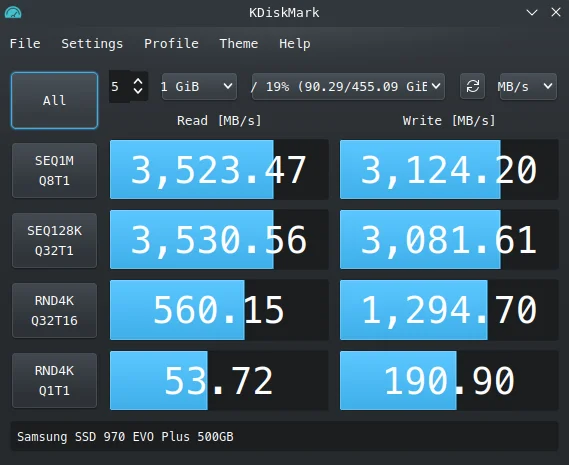
The NVMe drive that I just fitted is a Samsung 970 EVO Plus 500 GB drive. It's not the world's fastest drive either, but sitting on the NVMe interface it is clocking a bit over 7x faster than the older SSD drive on the SATA interface.
The NVMe drive is showing a sequential read speed of 3,523 MB/s compared to 464 MB/s for the SATA drive. Sequential write speeds are 3,124 MB/s compared to 180 MB/s. Both tests were run using KDiskMark.
See
#technology #SSD #NVMe

GadgeteerZA
An NVMe drive is giving me 700% faster performance than my previous SATA SSD drive
I just upgraded my main boot drive on my Linux desktop, from a 120 GB SATA SSD drive to a 500 GB NVMe SSD drive. Whilst it is true the Crucial CT12...
Use FilePizza App to Send Someone a File Without Using Any Cloud Storage
“FilePizza isn't the only application like this. There's p2pfileshare.com and sharedrop.io, to name a couple. FilePizza stands out because of the simplicity—just share a file and copy the URL—and because it has a unique URL. These links only work as long as the computer is on and the browser window offering the file is open. Without a cloud service, it's on your device to share the file with whoever might download it. Close the tab, and the file is gone.”
What is good about this app (as the article also says, not the only one that does this) is there is no uploading of your file to any remote service, and once you close the browser, the access to the file is gone. The best part is just having to remember the domain name and that is really all — no accounts, no login, no installations, no complications.
See
#technology #filesharing

Lifehacker
Use This App to Send Someone a File Without Using Any Cloud Storage
File.pizza is a web service that allows you to directly share a file from your computer with another device—no cloud storage or app needed. The n...
Time to ditch US tech for homegrown options, says Dutch parliament
“The motions were submitted and all passed yesterday during a discussion in the Netherlands' House of Representatives on concerns about government data being shipped overseas. While varied, they all center on the theme of calling on the government to replace software and hardware made by US tech companies, acquire new contracts with Dutch companies who offer similar services, and generally safeguard the country's digital sovereignty.”
“With each IT service our government moves to American tech giants, we become dumber and weaker,” Dutch MP Barbara Kathmann, author of four of the motions, told The Register.
The BRICS countries actually made this decision a few years ago, for the same reasons. Not all BRICS countries followed through on this, for example South Africa. But Russia, Brazil, China, and India had made quite a few strides towards even implementing their own desktop OS.
But apart from digital sovereignty, the second issue is just as important regarding dumbing down of your own skills. This is something I have also blogged about with regard to outsourcing of services to any cloud provider. An organisation not only loses its ability to provide its own services, but finds it more difficult over time to even technically evaluate any IT offerings, as there are no longer any staff with real technical skills left.
See
#technology #outsourcing #cloudservices #digitalsovereignty

Time to ditch US tech services, says Dutch parliament
: Trump administration 'has made the call for tech sovereignty an urgent geopolitical issue'
Photography Sim Games are now a Thing too
I was just watching demos of two photography sim games, supposedly launching officially in 2025. But what stood out for me was that both involve walking through the wilderness in some really stunning scenery, and taking into account all the normal environmental variables and technical camera challenges, you need to capture the photos.
So no rushing, racing, or shooting is required.
“The in-game camera includes an abundance of settings that you’d expect from a real-world professional DSLR camera. The camera simulates settings such as Auto/Manual Focus, Flash, Exposure, Contrast, White Balance, Aperture, Burst Shot, and other effects for full creative control over your photography. The game further provides tools that allow for manipulation of the environmental conditions for your photos, such as manual adjustment of light angles, fog, snow, wind, and rain.”
The two games I looked at are:
* Lushfoil Photography Sim at
* Photography Simulator at
These look really relaxing, and it's also a great way to practice some skills before setting out in the real world to try to capture these types of scenes.
#technology #gaming #photography


Annapurna Interactive
Annapurna Interactive works with game creators from around the world, helping them create and release personal experiences for everyone.
Photography Simulator

GIMP 3's New Features Make the Best Free and Open Source Image Editor Even Better
“Among the biggest changes is nondestructive filters. Previously applying filters, such as blurs, was final—you could use the undo function to get back to a pre-filtered state, but you couldn't simply edit or remove the filter. You can now tweak the settings of filters, or even remove filters entirely from the layer panel.”
The UI scaling is a lot better now, but I still struggle a bit with the interface, trying to find what I want to use. So I set a few tweaks and must say it looks a bit easier for me now.
I included a screenshot with this post, but I set the Icon theme to Default (mine was on Legacy) and disabled the Use symbolic icons toggle. I toggled on the merge menu and title bar, and toggled off the Use tool groups. The last setting just makes it easier to scroll over all those icons to see what does what.
See
#technology #opensource #GIMP


Lifehacker
GIMP 3
New features in GIMP 3 include non-destructive filters, improved text editing, and simpler layer management. Working with filters, layers, and text...

PeerTube 7.1 Expands Podcast 2.0 and Apple Podcast Support
For those who don't know PeerTube, it is an open source decentralised alternative to YouTube with many of the same features. But importantly it also integrates with the Fediverse so anyone from Mastodon, Hubzilla, Friendica, etc can follow a channel on PeerTube and like and comment on the videos, all from the social network they call their home.
“Recognizing that many people like to listen on the go, PeerTube has improved its support for Podcast 2.0 standards, ensuring creators can distribute and manage their shows more efficiently. Even better, these upgrades now enable channels to be submitted directly to Apple Podcasts, provided the channel owner has added the required banner, avatar, and description.”
See
#technology #opensource #decentralised #PeerTube

Linuxiac
PeerTube 7.1 Expands Podcast 2.0 and Apple Podcast Support
PeerTube 7.1 open-source decentralized video platform released with improved podcast support, better playback stability, and more.
These 6 myths about gaming on Linux just aren't true (except one)
For many (like myself) I had to dual boot into Linux years ago mainly because my higher end games did not work on Linux. As far as word processing and most other things, those all worked OK on Linux from way back already.
But with Steam Games I found that Euro Truck Sim 2, Read Dead Redemption II, Assetto Corsa, SnowRunner, etc were all working fine for me on Linux, and my full transition was just fine.
So if gaming is what still holds you back, this linked article may put some myths to rest for you. It's true there may be some specific exceptions still, but for most users, Linux should just be fine nowadays as far as gaming goes. Yes, some of the latest Adobe products may still not work on it, but Adobe is pricing itself out of its market for non-professionals anyway.
See
#technology #Linux #gaming #myths

XDA
These 6 myths about gaming on Linux just aren't true (except one)
Gaming on Linux has never been better.
There is a lot of good news to be found outside of your social media feeds
Contrary to what often gets surfaced in social media feeds, and many newspapers too, there is actually a lot of good news going around. Unfortunately, good news does not sell well at all, and it is usually clickbait headlines causing rage or anger, that seem to draw attention.
It is for this reason that some social networks make a point of pushing these posts into people's feeds so that it increases engagement and drives comments etc. They design algorithms that analyse what buttons can be pressed to drive engagement and thereby surface posts that will do this driving.
The alternative is a cleaner chronological feed just based on who you follow, and when they posted. These users may have a more positive experience depending on who they follow.
Which is why many want to break away from watching traditional news channels and legacy social networks. There are actually many places dedicated to positive and uplifting news.
Some are websites like:
Whilst some are focussed Subreddits such as:
https://www.reddit.com/r/goodnews/
https://www.reddit.com/r/UpliftingNews/
Fediverse https://kglitch.social/m/positivenews
Fediverse upliftingnews@lemmy.world
Bluesky also has two curated feeds called 'Positive News' and 'Uplifting and Good News'.
To make this easier, you could also install or use an RSS reader which will bring various sources to you in one place, without all the distractions of visiting the various sites.
There is also a hack at
which explains how to cobble a couple of different positive news Subreddits into a single feed to follow.
#technology #positivenews #goodnews

The Optimist Daily: Making Solutions the News

Good News Network
The Good News Network: Positive Stories 24/7
Your daily source for only good news: Inspiring stories and images from around the world will make you feel uplifted, optimistic and positive about...

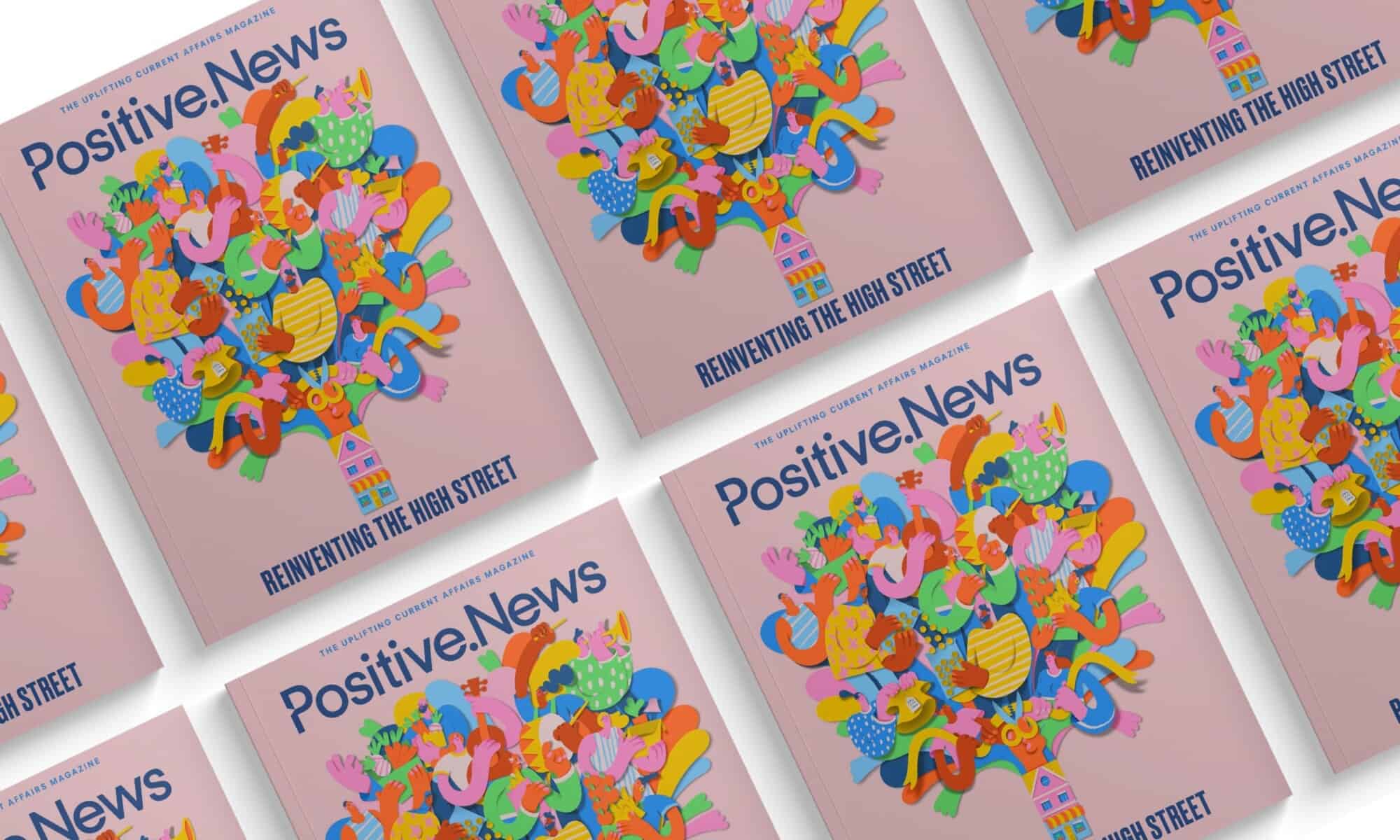
Positive News
Positive News | Good journalism about good things
Positive News is the first media organisation in the world dedicated to quality, independent reporting about what’s going right

How-To Geek
How I Use Reddit to Stay on Top of The News
Stay on top of the news the fun way.