Art tutorial for promo renders, part 1.
 Eye-catching promos are essential when it comes to demonstrating the merits of a product. Showcasing how a 3D figure can be used for art concepts helps the viewer to conjure up their imagination and be inspired to create art.
Another dimension of promo art is informing the consumer about the product and visualizing what they can do with it.
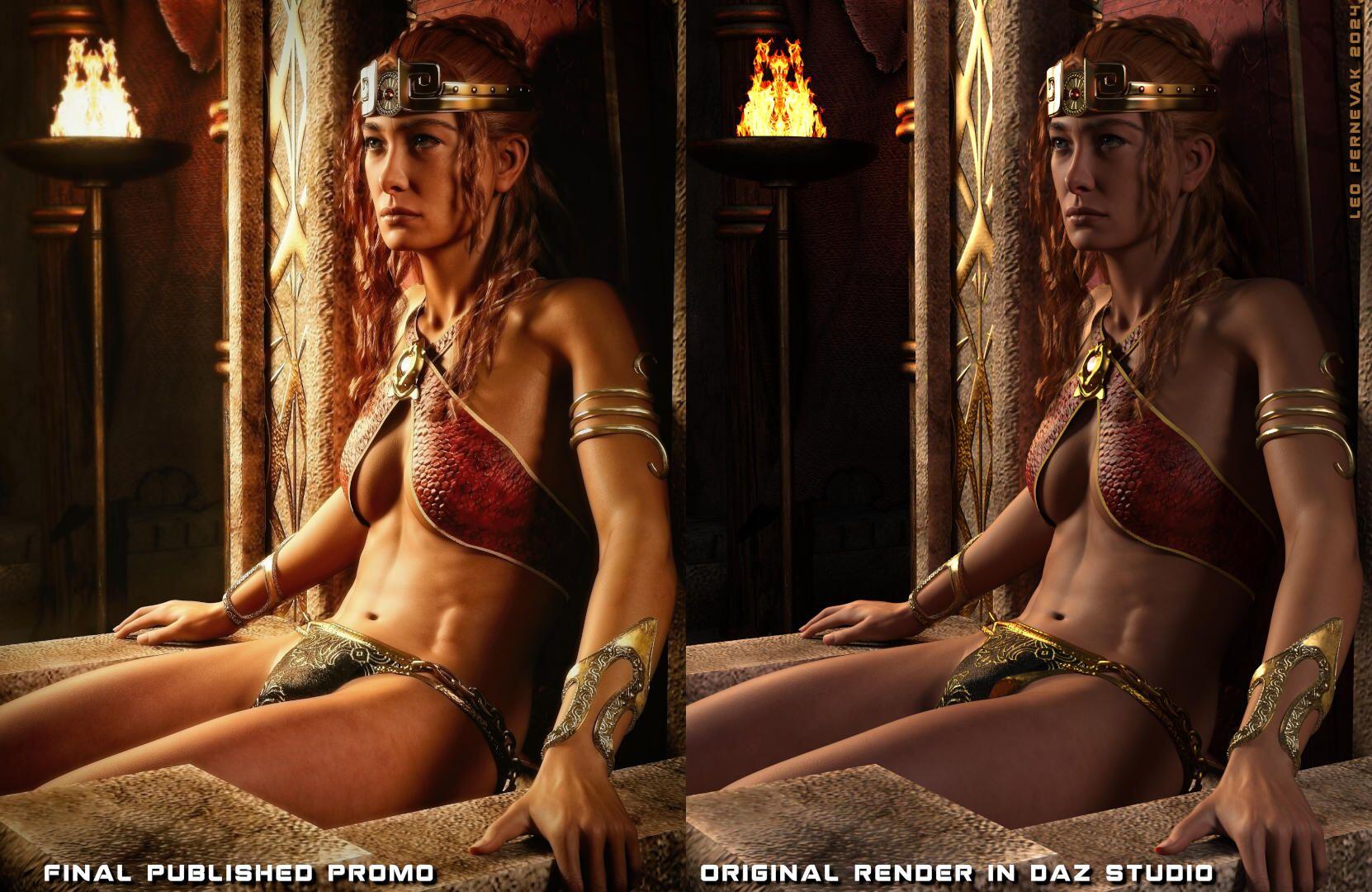
In the example above I placed this female character in a Conan type of setting and adjusted her pose to a casual, reclined position, gripping the throne with her left hand. The underwear that I applied to her did not fit the character properly, due to it being from a different generation. This is a common issue.
I fixed the underwear problem in GIMP by first using the Free Select Tool to cut out a copy of the underwear to a separate layer. Then I used the Warp Transform Tool to nudge the pixels where I wanted them. Lastly I trimmed the selection and used both the clone tool and a general paintover to fix the areas that needed a rework.
Finally I needed to improve the lighting. I decided to light up the area to the left around the incense burner to increase the contrast and bring some life to the image.
I started by using the Free Select Tool to meticulously select the area I wanted to impact. After the selection was done I proceeded to brighten the area and applying a slight bloom effect.
In the last stage I like to use ON1 Effects for the final postwork since I'm not fully familiar with GIMP as of date. But any application where you can increase contrast, improve/change saturation, balance the levels sliders and apply a circular edge toning/darkening are useful. Nothing beyond the basics is necessary. Of course, never use tools that change the product you are demonstrating.
With applications like FilterForge you can design your own postwork process by connecting and micromanaging nodes where you can plug in user sliders. It may just render a bit slow at higher resolutions so that's an inherent limitation.
Thanks for reading. If you are a GIMP user feel free to comment with tips that you use in your postwork process. While I enjoy using other tools as well it is great to promote free and open source software like GIMP.
#GIMP #Promo #PromoArt #Render #Postwork #Daz #Studio #DazStudio #Genesis #Character #3D #Product #Art #Commission #ArtCommission
Eye-catching promos are essential when it comes to demonstrating the merits of a product. Showcasing how a 3D figure can be used for art concepts helps the viewer to conjure up their imagination and be inspired to create art.
Another dimension of promo art is informing the consumer about the product and visualizing what they can do with it.
In the example above I placed this female character in a Conan type of setting and adjusted her pose to a casual, reclined position, gripping the throne with her left hand. The underwear that I applied to her did not fit the character properly, due to it being from a different generation. This is a common issue.
I fixed the underwear problem in GIMP by first using the Free Select Tool to cut out a copy of the underwear to a separate layer. Then I used the Warp Transform Tool to nudge the pixels where I wanted them. Lastly I trimmed the selection and used both the clone tool and a general paintover to fix the areas that needed a rework.
Finally I needed to improve the lighting. I decided to light up the area to the left around the incense burner to increase the contrast and bring some life to the image.
I started by using the Free Select Tool to meticulously select the area I wanted to impact. After the selection was done I proceeded to brighten the area and applying a slight bloom effect.
In the last stage I like to use ON1 Effects for the final postwork since I'm not fully familiar with GIMP as of date. But any application where you can increase contrast, improve/change saturation, balance the levels sliders and apply a circular edge toning/darkening are useful. Nothing beyond the basics is necessary. Of course, never use tools that change the product you are demonstrating.
With applications like FilterForge you can design your own postwork process by connecting and micromanaging nodes where you can plug in user sliders. It may just render a bit slow at higher resolutions so that's an inherent limitation.
Thanks for reading. If you are a GIMP user feel free to comment with tips that you use in your postwork process. While I enjoy using other tools as well it is great to promote free and open source software like GIMP.
#GIMP #Promo #PromoArt #Render #Postwork #Daz #Studio #DazStudio #Genesis #Character #3D #Product #Art #Commission #ArtCommission
Eye-catching promos are essential when it comes to demonstrating the merits of a product. Showcasing how a 3D figure can be used for art concepts helps the viewer to conjure up their imagination and be inspired to create art.
Another dimension of promo art is informing the consumer about the product and visualizing what they can do with it.
In the example above I placed this female character in a Conan type of setting and adjusted her pose to a casual, reclined position, gripping the throne with her left hand. The underwear that I applied to her did not fit the character properly, due to it being from a different generation. This is a common issue.
I fixed the underwear problem in GIMP by first using the Free Select Tool to cut out a copy of the underwear to a separate layer. Then I used the Warp Transform Tool to nudge the pixels where I wanted them. Lastly I trimmed the selection and used both the clone tool and a general paintover to fix the areas that needed a rework.
Finally I needed to improve the lighting. I decided to light up the area to the left around the incense burner to increase the contrast and bring some life to the image.
I started by using the Free Select Tool to meticulously select the area I wanted to impact. After the selection was done I proceeded to brighten the area and applying a slight bloom effect.
In the last stage I like to use ON1 Effects for the final postwork since I'm not fully familiar with GIMP as of date. But any application where you can increase contrast, improve/change saturation, balance the levels sliders and apply a circular edge toning/darkening are useful. Nothing beyond the basics is necessary. Of course, never use tools that change the product you are demonstrating.
With applications like FilterForge you can design your own postwork process by connecting and micromanaging nodes where you can plug in user sliders. It may just render a bit slow at higher resolutions so that's an inherent limitation.
Thanks for reading. If you are a GIMP user feel free to comment with tips that you use in your postwork process. While I enjoy using other tools as well it is great to promote free and open source software like GIMP.
#GIMP #Promo #PromoArt #Render #Postwork #Daz #Studio #DazStudio #Genesis #Character #3D #Product #Art #Commission #ArtCommission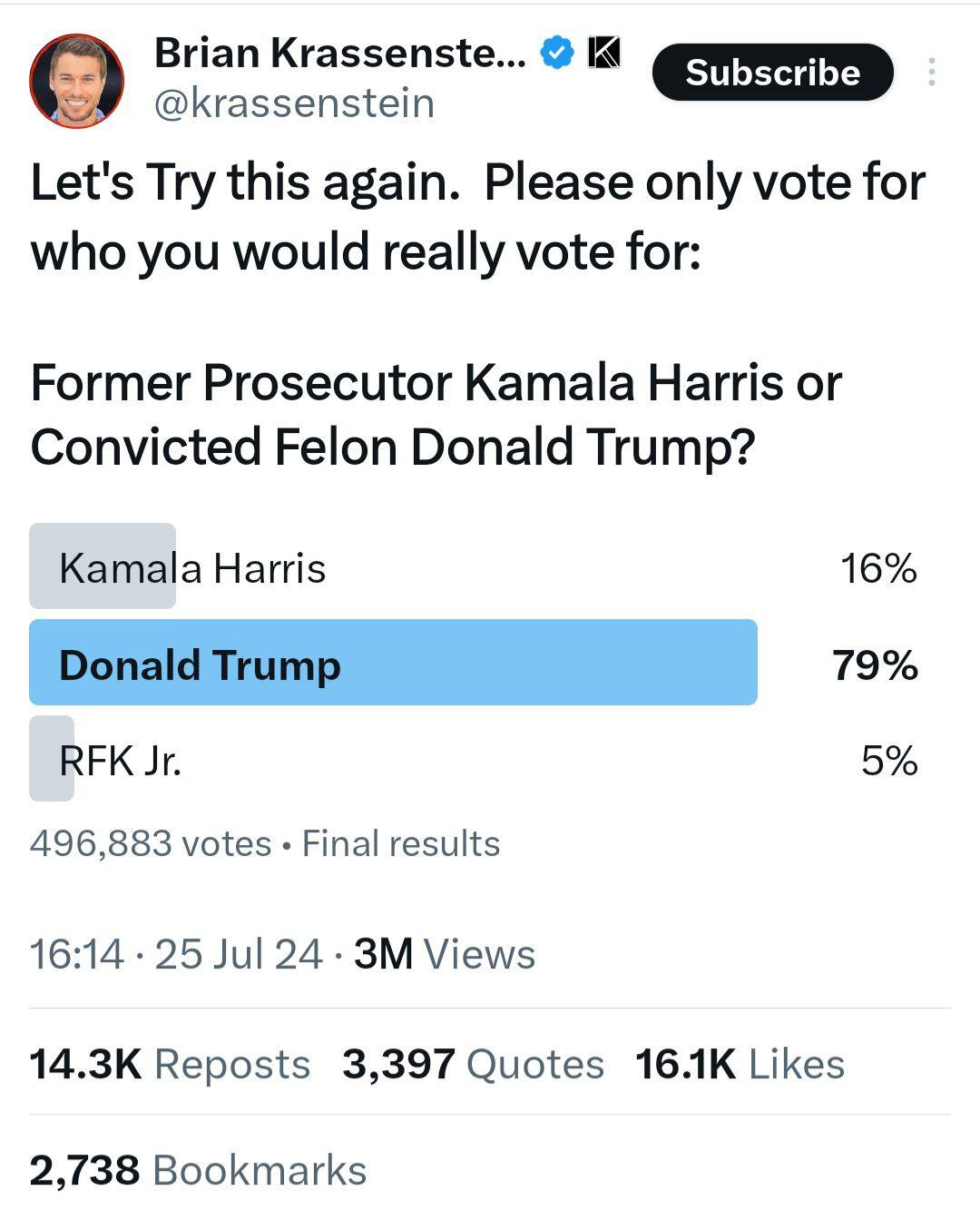 It is entirely possible that the platform attracts more of a centre-right audience or that the centre-right is more active.
Yet, the account of Brian Krassenstein has 844k followers and we may assume with some confidence that most of his followers are pro-democrat. If half of his followers had voted, Kamala might have won his poll.
I say *might* here because increased spread of the poll could also have brought more visibility to pro-Trump or pro-JFK jr votes.
This brings me to the formulation. Perhaps referring to Trump as a convicted felon is not the brilliant strategic move Brian thought it was. Maybe the formulation added a few extra thousand votes in favor of Trump. Why? Because the establishment in most Western countries have been against Trump for the past 8 years.
Yet another possibility is that Kamala Harris simply isn't very popular among people in general.
Anti-establishment has become attractive for a lot of people. This means climate *realism*, not climate alarmism, abandoning the UN Agenda 21 sustainability goals, reducing energy costs, energy taxes and costly regulations, avoiding WW3 escalations as well as furthering peace negotiations in Ukraine.
"The Establishment" has come to mean: net zero, ESG scores, DEI ideology, CBDCs, climate scare mongering, increased costs of energy and living expenses, moneyprinting via high degrees of government spending, abandonment of merit in favor of ideology, and so on, with carbon allowances and social credit scores on the establishment horizon.
While Trump is far from perfect, not every polititician has stood up in Davos and told the World Economic Forum to get lost with their socialist de-industrialization and anti-energy policies, calling them "Prophets of Doom".
Trump at Davos in 2020:
Going back to 2017, Trump pulled the US out of the Paris climate accord. He said that it is designed to kill the US economy:
On January 20, 2021, Biden signed the US back into the Paris climate accord. This was done on his first day in office. Clearly a high priority issue even if perhaps mostly symbolic. It displayed allegiance to the UN Agenda 21.
2023. Trump critiquing Germany for its harmful climate alarmism policies:
2024, February:
"I will not allow the creation of a CBDC"
It is possible that Trump became anti-establishment by pure chance, as his stance was to protect US energy sector and strengthen the American economy.
From there is was inescapable that Trump would end up in conflict with the UN Agenda 21 and its next milestone Agenda 2030. Probably without even knowing what they were.
His pro-energy stance was unacceptable to the Al Gore's of the world, including Bill and Hillary Clinton, Barack Obama, Elizabeth Warren, Justin Trudeau, Emmanuel Macron, Rishi Sunak, Angela Merkel as well as the deep state in the Scandinavian countries, all of which have heartily embraced the UN Agenda 21 and its authoritarian de-industrialization plans.
Clean, cheap and reliable energy runs the world and provides us with the benefits of civilization.
Being pro-energy has become anti-establishment.
#Trump #Agenda21 #Agenda2030 #Establishment #Energy #CBDC
It is entirely possible that the platform attracts more of a centre-right audience or that the centre-right is more active.
Yet, the account of Brian Krassenstein has 844k followers and we may assume with some confidence that most of his followers are pro-democrat. If half of his followers had voted, Kamala might have won his poll.
I say *might* here because increased spread of the poll could also have brought more visibility to pro-Trump or pro-JFK jr votes.
This brings me to the formulation. Perhaps referring to Trump as a convicted felon is not the brilliant strategic move Brian thought it was. Maybe the formulation added a few extra thousand votes in favor of Trump. Why? Because the establishment in most Western countries have been against Trump for the past 8 years.
Yet another possibility is that Kamala Harris simply isn't very popular among people in general.
Anti-establishment has become attractive for a lot of people. This means climate *realism*, not climate alarmism, abandoning the UN Agenda 21 sustainability goals, reducing energy costs, energy taxes and costly regulations, avoiding WW3 escalations as well as furthering peace negotiations in Ukraine.
"The Establishment" has come to mean: net zero, ESG scores, DEI ideology, CBDCs, climate scare mongering, increased costs of energy and living expenses, moneyprinting via high degrees of government spending, abandonment of merit in favor of ideology, and so on, with carbon allowances and social credit scores on the establishment horizon.
While Trump is far from perfect, not every polititician has stood up in Davos and told the World Economic Forum to get lost with their socialist de-industrialization and anti-energy policies, calling them "Prophets of Doom".
Trump at Davos in 2020:
Going back to 2017, Trump pulled the US out of the Paris climate accord. He said that it is designed to kill the US economy:
On January 20, 2021, Biden signed the US back into the Paris climate accord. This was done on his first day in office. Clearly a high priority issue even if perhaps mostly symbolic. It displayed allegiance to the UN Agenda 21.
2023. Trump critiquing Germany for its harmful climate alarmism policies:
2024, February:
"I will not allow the creation of a CBDC"
It is possible that Trump became anti-establishment by pure chance, as his stance was to protect US energy sector and strengthen the American economy.
From there is was inescapable that Trump would end up in conflict with the UN Agenda 21 and its next milestone Agenda 2030. Probably without even knowing what they were.
His pro-energy stance was unacceptable to the Al Gore's of the world, including Bill and Hillary Clinton, Barack Obama, Elizabeth Warren, Justin Trudeau, Emmanuel Macron, Rishi Sunak, Angela Merkel as well as the deep state in the Scandinavian countries, all of which have heartily embraced the UN Agenda 21 and its authoritarian de-industrialization plans.
Clean, cheap and reliable energy runs the world and provides us with the benefits of civilization.
Being pro-energy has become anti-establishment.
#Trump #Agenda21 #Agenda2030 #Establishment #Energy #CBDC #Art #Scifi #Rocks #Landscape #Desert #noAI #Rebelle