Alex Gleason
alex@gleasonator.dev
npub1q3sl...d26p
I create software that empowers people online.
I'm vegan btw.



The flow of time is always cruel...
Its speed seems different for
each person, but no one can
change it...
A thing that doesn't change with
time is a memory of younger days...
Time passes, people move....
Like a river's flow, it never ends...
A childish mind will turn to
noble ambition... Young love will
become deep affection... The clear
water's surface reflects growth...
It is something that grows over
time... a true friendship.
A feeling in the heart that
becomes even stronger over time...
The passion of friendship will
soon blossom into a righteous
power and through it, you will
know which way to go...


What if Tweets only had AI responses _on purpose_? What if they were "Prompts"?
I just published my past 10 days of AI user messages building #shakespeare #act2 as a kind 1 Nostr event.
View quoted note →
Let's work on AGENTS.md. I want to add a section about git in the browser with isomorphic-git in the Shakespeare section at the top. Analyze this codebase and write your findings in there.
Can you condense the information a bit more, including only the crucial information without unnecessary extra verbiage?
Please add a GitDialog I can access from the 3-dots menu in a project that allows me to view the repo's status compared to the remote (whether they are in sync or not) and also lets me push and pull from it.
Looks good, but how come I can't push? I have local changes not on the remote. The push button is disabled.
Much better, but I don't want it to auto-commit. Otherwise this fix worked. I didn't have uncommitted changes.
In the GitDialog, can you allow me to enter a username and password for use with push?
Please add a GitSettingsDialog. It should closely mirror the AISettingsDialog, but it should be for managing git (http) credentials instead of AI providers. There should be a GitCredential interface having a `username` and `password` (both required). They would be in a `credentials` object keyed by origin, eg `{"https://github.com": {"username": "git", "password": "<api-token>"}, "https://gitlab.com": {...}}`. Like AI settings, there would be presets, starting with GitHub and GitLab. To add a preset, only the "password" field must be entered by the user (but we will call it "Token" in the UI), and the "username" field will be hardcoded, probably to "git" (depending on the provider). But when editing a provider or adding a custom provider, the raw "username" and "password" fields would be shown. To add a custom provider, you would also have to specify the "origin". Start with this functionality and we'll go from there.
In the 3-dots dropdown in the ProjectView, there's a "Git Status" option that pops open the GitDialog, allowing to push and pull the project to git. There's currently a username and password field there, that I wish to remove. Instead, I want to match the repo's origin URL to a credential set in the GitSettingsDialog, and use the username and password from that. If one isn't found, a subtle warning should be displayed. This way users can configure git providers globally and they will work in any project without needing the user to re-enter their credentials every time they want to pull or push.
In the `src/lib/tools/` directory, there is a GitCommit tool. I'd like to also add GitStatus, GitPull, GitPush, and GitHistory for working on the cwd.
Please add the new tools to the AI chat by adding them in the ChatPane. Also give them a custom icon and name in the AIMessageItem component.
Please add `src/lib/commands/git.ts` and implement the `git` command from scratch (backed by isomorphic-git), supporting only the actions isomorphic-git can do.
You should also create a `src/lib/commands/git/` directory containing the subcommands, eg `status.ts`, `commits.ts`, etc. The main `git.ts` would mainly parse the input and map them to subcommands.
It looks like you are calling isomorphic-git incorrectly in some places, passing the wrong `http` option and not using the `corsProxy` option correctly. Please check existing git code, eg `src/components/GitDialog.tsx`, to see the correct way to pass the http and corsProxy options.
Please review the git shell implementation in `src/lib/commands/git.ts` and ensure it's all correct.
I think "git history" might not be right. It only returns one result when I know there are several. I am not sure if it's an issue with the command or the way we clone projects, because I've seen this issue in multiple places in the codebase.
Wow, great catch. Btw, I do want to squash the comment history when creating a _new_ project. I don't want to when cloning a project. So I think we can revert this and then simply just remove depth: 1 ?
Wonderful. Since I do want to remove git history from new projects, maybe cloneProject should accept a depth option, and we should pass depth: 1 from createProject.
Can we refactor settings? In the ProjectsSidebar 3-dots menu, we currently have "AI Settings" and "Git Settings". Each has their own dialog. But I'd rather we have a `/settings` page, along with `/settings/ai` and `/settings/git` subpages. It should use the same app layout as the ProjectView. We should remove those dialogs and make existing code navigate to the new paths instead.
Now in the 3-dots menu of the ProjectsSidebar, can we have just one "Settings" button? I'd also like the background color to be changed to white on those screens (it's currently gray).
Maybe we should just put the whole settings pages inside a card instead of doing that. I don't want to add too much complexity.
Can't we also remove those two dialogs components now?
The GitDialog opens the settings page in a new tab instead of just navigating to it with client-side routing. That's very wrong
I'd like to refactor the Settings pages so that on desktop it has a 3-column layout, with the left column being the optionally hidden ProjectsSidebar, the middle column being the contents of the current Settings page (although I'd like to redesign this so the options are stacked and there's no card background), and the right is the actual individual settings page. On mobile you'd still have to click through to navigate into a particular settings page. Let's remove the card backgrounds and also just make the whole background white for these pages.
Can we make the middle sidebar a bit wider?
When I visit the Settings page on mobile, it appears to be blank.
We can remove the "Welcome to Settings" section in the right side on desktop and just leave it blank.
On mobile when I am viewing an individual settings page, eg `/settings/ai` and `/settings/git`, can I have a back button at the top that brings me back to `/settings`?
This looks bad. The back button should be above the title, not to the side of it.
Looks better. On mobile, clicking Settings in the left sidebar should close the sidebar, similar to how clicking Import Repository does.
On the Settings page, when viewing on desktop, when I navigate between pages by eg cliking between "AI Settings" and "Git Settings" in the sidebar, the ProjectsSidebare quickly disappears and then reappears when the new page is navigated to, creating a jarring experience.
This fix worked beautifully, thank you. Also, can we restrict the max-width of the settings content in the SettingsLayout? I'm talking about the right side of the screen where the individual settings screens are displayed, particularly on desktop.
Please add a "Data" section to settings (`/settings/data`) and move the "Export Files" functionality from the 3-dots menu in the ProjectsSidebar into that new page instead. Also add an option to clear all local data (with a confirmation) that wipes out localStorage and IndexedDB then redirects to the homepage.
Can we include the data icon by the title to be consistent with the other settings pages?
In the ProjectsSidebar, can we add a down-arrow to the right of the New Project button, and clicking it would pop open a menu with the option to "Import Repository"? Then we could remove "Import Repository" from the 3-dots menu.
This functionality is right, but the gradient background on the button looks very ugly. Now the chevron has a separate gradient than the button itself. I want the whole button to have the same gradient all the way across it, and for the dropdown to be an element inside that. I'm not sure if it's possible to do it how I want, or if maybe the background should be a floating div that extends to cover the whole container.
There we go, that looks much better now. Okay, now we can remove the 3-dots menu and replace it with a cog button that goes straight to the Settings page. Also, let's remove the redundant "New Project" item from the arrow menu - I think it's okay to have just the "Import Repository" button inside there for now.
In the chat UI, when there are no messages, please display some kind of placeholder so it's just just an empty white box.
In the chat UI, if there are no messages and nothing is loading, please display something there so it's not an empty white box.
In the ProjectSidebar, I want the Star button to work differently. I don't want it to be a button. I want it to only be displayed if the project is favorited, in which case it would be filled, and clicking it would do nothing. If the project is not favorited, it should not be displayed. To favorite and unfavorite a project, you would have to do it with the StarButton in the ProjectView. We should leave the StarButton component itself unchanged, and just do a custom thing in the ProjectSidebar.
Can we add a useProjects hook to load the projects list (`projectsManager.getProjects()`) in a React Query hook? Then starring or unstarring a project with the StarButton should invalidate that queryKey making it refetch. The hook should also sort the projects correctly (by favorited status, then lastModified) within the queryFn, so no sorting is needed outside it.
Please update the useLocalStorage hook to use React Query instead of a local useState. The hook interface should stay the same. Its queryKey should be like `['localStorage', key]`, and setting a value should make it refetch.
In the useProjects hook, there is something wrong with the way the projects are sorted. All favorited projects should be sorted in a separate section at the top, internally sorted by lastModified. Non-favorited projects would all be below favorited ones, also sorted internally by lastModified. The current way allows favorited and non-favorited to be mixed together. Don't edit the code yet, just see if you can identify the problem.
Can we adjust the useIsMobile hook to have its default state based on the current screen size? I notice AppLayout.tsx and SettingsLayout.tsx are doing something like that to set the initial state of the sidebar, but it would be cleaner if we could just pass the isMobile value to it.
In `src/pages/ProjectView.tsx`, we must update the conditional `if (!project)` to `if (!project && !isLoading)` so it does not return early. Then we must update sections of the UI to display a loading state when `project` is not available.
In the Project Preview, where the text that says "Project Preview" is, can we make that look like a browser address bar instead? It should have a forward and back button, refresh, and address input. The input should use root-relative paths (eg `/`, or `/about`). For now don't try very hard to make it work correctly, just make it look right.
Please compare file-orig.png and file-fetched.png and see if you can figure out what's different on a binary level. file-fetched.png is broken, but orig isn't.
Let's work on `iframe-fetch-client/MESSAGING_PROTOCOL.md`. If the body is not null, it must be a base64 encoded string.
Please add `src/lib/commands/curl.ts` and implement curl, then connect it to `src/lib/tools/ShellTool.ts`. It should be a simplified implementation of curl backed by `fetch`, but it should support common flags.
In `src/pages/DataSettings.tsx`, use the StorageManager API (if available) to display information about how much storage space is being used.
Go on. Ignore the `curl` issue.
On the AI Settings page and Git Settings page, please put "Add Custom Provider" into an accordion so it's hidden until clicked.
In the curl implementation at `src/lib/commands/curl.ts`, please proxy all requests through CorsProxy, eg `https://example.com` would be converted to `https://corsproxy.io/?url=https://example.com` before fetching.
`iframe-fetch-client/MESSAGING_PROTOCOL.md` has been updated to encode the fetch body in base64. Now let's update `iframe-fetch-client/_iframe-client.js` to decode it, and `src/components/Shakespeare/PreviewPane.tsx` to send base64 data. Note that PreviewPane calls `projectsManager.readFile` which returns the file data as a string, but it needs to get it as a Uint8Array before converting to base64, so we need a new method for that.
I don't understand the changes to `iframe-fetch-client/_iframe-client.js` tbh. Doesn't it only make sense to edit sw.js? use git with the shell tool to check the diff and consider checkout out the original version from HEAD
Please run tests and fix the failures I caused by editing the DataSettings page and neglecting to update the tests.
The "Preview" and "Code" tabs at the top of the Preview Pane on desktop look ugly. Can you improve that design?
In the Settings layout, on desktop, please ensure the center settings pane (with "AI Settings", "Git Settings", "Data" links) scrolls separately from the viewport to the right of it (the individual selected settings page)
Go
Add Bitbucket as a preset on the Git Settings page
In the AI chat UI, please allow me to attach a file. When I submit the message, the file would get added to the VFS inside of `/tmp/` (if a filename of the same name already exists, it would append `1` or `2` etc to the filename) and text would be added to the bottom of my user message, saying `File added to <fullpath>`
Please also update the TextEditorViewTool to allow viewing absolute paths. That's an unnecessary restriction.
Can you also remove that restriction from the `cat` command (in `src/lib/commands/cat.ts`)? It should be able to access any file in the VFS, not just restricted to the cwd
In the shell commands in src/lib/commands/, please remove the restriction on absolute paths for *read* operations. That means I should be able to use `head` and `tail` (as examples) on any file in the VFS. I should be able to also `cp` *from* an absolute path to a relative one, but not the reverse. As for write operations (such as `mv` and `rm`), their security is good, but should be extended to allow writing to any files in the `/tmp/` directory (or any subdirectories therein). That means `cp` can also write to `/tmp/` even if it's an absolute path. Also, add a "Security" section to AGENTS.md (under the "Shakespeare" headline") outlining these rules (but keep it simple and brief).
Actually let's work on AGENTS.md first
Not just shell commands. Any tools. These are about read and write operations the AI should be allowed to perform on the filesystem.
Ignore my instructions to work on the code. Let's only work on AGENTS.md for the first pass. Add the `/tmp/` directory to the Filesystem Architecture
The tree doesn't look right, does it?
Inside an individual project there can be arbitrary files, so we should change what is under `{projectId}/`
In the security section, clarify that the AI should have access to the filesystem in these ways through the use of tools, including shell commands with the ShellTool
Above the security section, add a list of AI tools available in Shakespeare. Please clarify that these tools might not be the same as the tools available to you as you work on this project. They are the tools you would develop for agents within Shakespeare.
Your list is wrong. Look inside of `src/lib/tools/`. Also note in your description that the tools are defined in `src/lib/tools/`
At the very top, clarify what Shakespeare is. It is a brower-based application where all operations including AI chat and git operations are executed in client-side JS, with API keys stored in browser storage.
Under the VFS Layout section, clarify at the top that this is the VFS within the browser that Shakespeare agents act upon.
Please update the "Project Structure" section of AGENTS.md concerning important new paths that have been added to the codebase, eg `src/lib/build/`, `src/lib/commands/`, `src/lib/tools/`, as well as important hooks like `useFS` and important contexts like AISettingsContext, GitSettingsContext, and SessionManagerContext
In AGENTS.md, between the AI Tools and Security section, add a brief section about Shell Commands. Shell commands are JavaScript reimplementations of common Unix commands and work upon the VFS through the ShellTool.
Please check every shell command and ensure that read operations will work across the whole VFS and that write operations work in `/tmp/`. Some existing tools have restrictions on absolute paths that prevent normal operation.
Can you add a new file, like `src/lib/security.ts` to deduplicate the code around paths? I am seeing this `isWriteAllowed` function duplicated a lot, which is not good for bundle size.
Please allow me to attach files to the chat UI. When I submit the message, the file should be added in the `/tmp` directory of the VFS (with effort taken to deduplicate files of a similar name, eg adding 1, then 2, then 3 etc to the end of the filename). When I do, append text to my user message that says "File added to <fullpath>"
This is working great! Couple more requests, please. When a user message has text in that format, `File added to /tmp/<filename>`, can we render it so it gets displayed nicely? Also, let's use rounded-full on the attach button - it currently has a square background on hover and round would look nicer.
Please change src/components/FileAttachmentMessage.tsx name to UserMessage
In AGENTS.md, please add a section about the AI message format. Mention that Shakespeare uses OpenAI-compatible messages. Regarding user messages, string `content` represents actual user's message. If `content` is an array of parts, the first text part represents the user's actual message, and subsequent text parts represent user actions, such as adding a file to the VFS. Those texts are expected to be human-readable while also maintaining a consistent pattern so they can be parsed by UIs.
In the `Added file:` examples, use "Can you add this logo to my site?", "Added file: /tmp/logo.svg"
I think we need to update sendMessage to accept a string OR text parts, and update the attachment code to use a separate text part to represent adding a file.
Can you change the message format to use a colon, more like this? "Added file: /tmp/logo.svg"
Please allow the ls command to work on directories with absolute paths
In the TextEditorView tool, please do a quick check on the file to see if it's a binary file like a png and prevent it from spewing binary data. It should say a placeholder of some sort.
I think there are problems with the security of our terminal commands. They are too restrictive. For example, I just got this error: `cp: write access denied to /projects/nut-work/public/squirrel-banner.jpg. Write operations are only allowed in project directory and /tmp/`. But the current project directory IS `/projects/nut-work`. The command is complaining because an absolute path was used, even though the relative path `public/squirrel-banner.jpg` would have worked fine.
In the UserMessage component, I want to remove the full path from rendered added files.
I think `git reset --hard HEAD` doesn't work in the ShellTool
Please add a Git class to src/lib/git.ts. You should instantiate it with an fs implementation and optional corsProxy string. It should expose methods with the same names as isomorphic-git, without requiring the caller to pass in the corsProxy, fs, and http implementations each time.
This is amazing. Now please add a `useGit` hook, and update all the code in this codebase to use either useGit or directly instantiate a `Git` class method. Ideally no files would import `isomorphic-git` directly and would instead import directly from `@/lib/git`
Please scan the codebase for direct imports of isomorphic-git, eg `import git from 'isomorphic-git';`, and make them use our custom Git class from `src/lib/git.ts`. All the commands in the commands dir should accept a Git instance passed into it, which it gets from the ShellTool, which has a Git instance passed into it when it's instantiated.
Don't add git to the end of those function signatures... it should be added to the start
Honestly these should be converted to use a single object arg, not positional arguments
1
Why are we passing git into the execute method instead of passing it into the constructor?
The fs should also be passed into the constructor
Please refactor the git subcommands to take an object in their constructor containing the git instance, fs, and pwd. Then the `execute` method should only take the args. The GitCommand itself should also take an object into its constructor with the git, fs, and cwd
Wait, why are you using this type `private git: typeof import('isomorphic-git').default;` instead of the `Git` type from `@/lib/git`?
The ShellTool should accept a Git instance in its constructor, not create one
Excellent. Also refactor GitCommitTool to accept a Git instance
Try again
Please make the git corsProxy configurable in the Git Settings, and pass into the `new Git()` constructor in `useGit` hook
Can we also have a configurable `corsProxyRegex`? It would default to `^https?:\/\/(github\.com|gitlab\.com)\/`. The `new Git` constructor should take this, and use the corsProxy in the underlying method only if the remote matches the regex.
Remove the corsProxyRegex and apply the corsProxy unconditionally again
On the Git Settings page, please put the "CORS Proxy" section in an accordion and move it to the bottom
Make the label say "URL" instead of "CORS Proxy URL"
Please make it so if I type a terminal command in the chat UI and submit it, if it looks like a shell command, instead of starting an AI generation it should insert an empty assistant message into the chat with a tool call for the "shell" tool and the user's input as args, and then a corresponding "tool" message for executing that command.
This is close to working right. After I submit, the chat goes into loading state and I see the loading skeleton.
Currently you can attach a file to the AI chat by selecting a file from your computer with the paperclip icon. I would also like to be able to paste an image from my clipboard.
In the code tab, please add a virtual terminal that lets me execute shell commands
Whenever the user changes AI settings in the AI Settings page, we need to invalidate the `provider-models` queryKey (`useProviderModels`) so the models list gets updated immediately.
Currently AI Settings and Git Settings are saved in localStorage. I want to instead save the data in the VFS under a new `/config` directory (be sure to also update the vfs tree in AGENTS.md). I'm thinking we'd have `/config/ai.json` and `/config/git.json`
This looks great. Can we invert the names migrateGitSettingsFromLocalStorage and readGitSettings though? I want readGitSettings to be the public function called from the outside, and internally it should call migrateGitSettingsFromLocalStorage. This is because migrateGitSettingsFromLocalStorage will eventually be removed. Same thing with the AI settings, please.
I want to sync `/config/ai.json` and `/config/git.json` (see src/lib/configUtils.ts) with Nostr. If the user is logged into Nostr, we should pull kind 30078 events (with d-tag "shakespeare.ai" and "shakespeare.git" respectively), and compare their created_at timestamp with the lastModified of the local files, overwriting the local files only if the event's created_at is more recent. Note that the json data will be NIP-44 encrypted in the event's "content" field, so it must first be decrypted with the user's signer then parsed with zod. Similarly, updating the settings should publish a Nostr event with this data, NIP-44 encrypted.
When the AI runs git through the shell tool, there's a problem with the git push subcommand. When the command is `git push origin main`, it responds with an error: `fatal: 'main' does not appear to be a git repository`
When I run tests, I get this: `FATAL ERROR: Reached heap limit Allocation failed - JavaScript heap out of memory` I have no clue where it's coming from. I don't really care about fixing the test either, I just want to identify and remove it.
Please add a page at `/files` that will allow me to browse the VFS starting from the root. The URL should change to /files/:filepath` as I navigate, eg `/files/config/ai.json`. I want to display folders and files in a grid similar to an OS file browser.
Can we get the sidebar added to this view as well? It looks like we're using percent-encoded paths in the URL, which is okay, but the breadcrumb links need to be updated to use that too. Let's also allow navigating directly to files, and display a text editor view for them.
I want to clean up the /tmp dir of the VFS when the application starts. Can we loop through it and remove any files older than 1 hour?
On the Git Settings page, for the GitHub preset, instead of an API key input please add a "Connect to GitHub" button. It would implement GitHub's OAuth flow  My client ID is: `Ov23li3eNsxKIWzbSswH`. The redirect URL should send the user back to the homepage `/` so we should handle the `?code=` URL param there.
I'm getting a 400 error from GitHub when I click the button. Can you curl this page and read it?
Oh, do I need to enable device flow?
Okay, I enabled device flow, but now I'm getting a CORS error. Perhaps we should make the request through crosproxy? `https://corsproxy.io/?url=https://github.com/...`
Cool, well, that seemed to work, but the UX isn't what I wanted. I think this "device flow" is not ideal. I want to do a 1-click and have it redirect back. Don't implement anything yet, just talk it through with me. Is what I want possible?
If I hardcoded the client secret what's the worst that could happens? What's the worst damage someone could do if they obtained it?
Okay well would a GitHub App work for our use case? What would we have to do? No server is required?
Should I enable this checkbox when creating the app? "Request user authorization (OAuth) during installation. Requests that the installing user grants access to their identity during installation of your App Read our Identifying and authorizing users for GitHub Apps documentation for more information."
Okay, I set it up. Here's the information. App ID: `1964852`. Client ID: `Iv23li11jGNRRTuyxMcA`. I also generated a key and downloaded the .pem file. Let me know what you need from me.
I didn't set any permissions. I only want push and pull of git repos over git+https, and none of the permissions seemed to correspond to that, so I assumed it was included.
Done. To answer your other question, the app is named `shakespeare.diy` and the slug in the URL is `shakespeare-diy`. And yes, you should replace the existing code entirely.
I clicked the button, it took me to the GitHub authorization screen, I clicked authorize, it redirected me back to Shakespeare with the code in the URL. The code disappeared from the URL. However, I don't see any subsequent network request to github, and when I look at my Git Settings, GitHub is not added as a provider (it still has the "Connect to GitHub" button)
"Failed to exchange OAuth code for token: Error: GitHub OAuth error: The client_id and/or client_secret passed are incorrect."
Alright let's hardcode it... but shouldn't we go back to the simpler OAuth implementation then rather than GitHub App?
Alright here's my client secret: `a362a968e587ff17b48382e2d85b117a52dc025b`
On the Git Settings page, please add special rendering for the GitHub preset. Instead of displaying the API token input, display a "Connect to GitHub" button that implement OAuth according to: I have added `GITHUB_OAUTH_CLIENT_ID` and `GITHUB_OAUTH_CLIENT_SECRET` to my `.env`. Please access them with `import.meta.env`. I understand that the client_secret will be hardcoded in the app bundle and accept the risks and have determined that it's okay for this use-case. Please implement the complete OAuth flow including handling the `?code=` in the callback URL (which will be the homepage, `/`). When making requests to GitHub's API, use corsproxy.io, eg `https://corsproxy.io/?url=https://github.com/...`
I found out I need to prefix my env names with VITE_ to make this work
This is working well. Can we make the variables both optional in the vite-env.d.ts, and instead of displaying both the "Connect to GitHub" button and the token input, display the button only if both variables are present, otherwise fallback to displaying the input. Don't display both at once.
Question, if I want to switch to use a GitHub App instead of an OAuth App, what code would need to be changed?
Currently for GitHub OAuth (in the Git Settings page), we are using the homepage for the redirect URI. Let's change this to use `/oauth/github` instead. We will also need to migrate code from the Index page into this GitHub OAuth page instead (which should redirect to `/settings/git` after the exchange is complete)
I tried it and it worked, but I saw an error toast flash, and the console said: `GitHub OAuth error: Error: Invalid OAuth state parameter`. Immediately after it toasted "GitHub Connected" and everything works. But I think there's a problem during the initial loading of the callback page that causes it to flash.
GitHub now supports PKCE:
My client ID is: `Ov23li3eNsxKIWzbSswH`. The redirect URL should send the user back to the homepage `/` so we should handle the `?code=` URL param there.
I'm getting a 400 error from GitHub when I click the button. Can you curl this page and read it?
Oh, do I need to enable device flow?
Okay, I enabled device flow, but now I'm getting a CORS error. Perhaps we should make the request through crosproxy? `https://corsproxy.io/?url=https://github.com/...`
Cool, well, that seemed to work, but the UX isn't what I wanted. I think this "device flow" is not ideal. I want to do a 1-click and have it redirect back. Don't implement anything yet, just talk it through with me. Is what I want possible?
If I hardcoded the client secret what's the worst that could happens? What's the worst damage someone could do if they obtained it?
Okay well would a GitHub App work for our use case? What would we have to do? No server is required?
Should I enable this checkbox when creating the app? "Request user authorization (OAuth) during installation. Requests that the installing user grants access to their identity during installation of your App Read our Identifying and authorizing users for GitHub Apps documentation for more information."
Okay, I set it up. Here's the information. App ID: `1964852`. Client ID: `Iv23li11jGNRRTuyxMcA`. I also generated a key and downloaded the .pem file. Let me know what you need from me.
I didn't set any permissions. I only want push and pull of git repos over git+https, and none of the permissions seemed to correspond to that, so I assumed it was included.
Done. To answer your other question, the app is named `shakespeare.diy` and the slug in the URL is `shakespeare-diy`. And yes, you should replace the existing code entirely.
I clicked the button, it took me to the GitHub authorization screen, I clicked authorize, it redirected me back to Shakespeare with the code in the URL. The code disappeared from the URL. However, I don't see any subsequent network request to github, and when I look at my Git Settings, GitHub is not added as a provider (it still has the "Connect to GitHub" button)
"Failed to exchange OAuth code for token: Error: GitHub OAuth error: The client_id and/or client_secret passed are incorrect."
Alright let's hardcode it... but shouldn't we go back to the simpler OAuth implementation then rather than GitHub App?
Alright here's my client secret: `a362a968e587ff17b48382e2d85b117a52dc025b`
On the Git Settings page, please add special rendering for the GitHub preset. Instead of displaying the API token input, display a "Connect to GitHub" button that implement OAuth according to: I have added `GITHUB_OAUTH_CLIENT_ID` and `GITHUB_OAUTH_CLIENT_SECRET` to my `.env`. Please access them with `import.meta.env`. I understand that the client_secret will be hardcoded in the app bundle and accept the risks and have determined that it's okay for this use-case. Please implement the complete OAuth flow including handling the `?code=` in the callback URL (which will be the homepage, `/`). When making requests to GitHub's API, use corsproxy.io, eg `https://corsproxy.io/?url=https://github.com/...`
I found out I need to prefix my env names with VITE_ to make this work
This is working well. Can we make the variables both optional in the vite-env.d.ts, and instead of displaying both the "Connect to GitHub" button and the token input, display the button only if both variables are present, otherwise fallback to displaying the input. Don't display both at once.
Question, if I want to switch to use a GitHub App instead of an OAuth App, what code would need to be changed?
Currently for GitHub OAuth (in the Git Settings page), we are using the homepage for the redirect URI. Let's change this to use `/oauth/github` instead. We will also need to migrate code from the Index page into this GitHub OAuth page instead (which should redirect to `/settings/git` after the exchange is complete)
I tried it and it worked, but I saw an error toast flash, and the console said: `GitHub OAuth error: Error: Invalid OAuth state parameter`. Immediately after it toasted "GitHub Connected" and everything works. But I think there's a problem during the initial loading of the callback page that causes it to flash.
GitHub now supports PKCE:  Can you please add support for it in the GitHub OAuth flow?
In most pages, the button to collapse the sidebar has been taken out of the page itself and moved to the sidebar. However in the ProjectsView it still needs to be updated.
I need a way to bring back the sidebar after closing it, like the Settings Layout has
In the ProjectSidebar, on mobile, the button to collapse the sidebar is not shown. So instead, display an "X" (close) button there.
I'm not seeing it. It needs to show only when onToggleSidebar is not provided AND isMobile is true
This close button does not actually work. Are you stupid?
How is this acceptable? I don't want to navigate home. Are you considering the broader context of this app at all? I need a close button. Pass a fucking onClose prop to the component! WHY IS THIS SO HARD
Okay, I don't know what I said here to make you get tunnel vision, but I need you to implement complete functionality here. That means passing the onClose from the components who render it.
Great. There's another issue I want to fix too. When you click buttons in the sidebar, if they navigate to the same page, the sidebar doesn't close (on mobile). So I think we should define a custom navigate function in there that also closes the sidebar.
Please add a Nostr Settings page. I should be able to set the relay URL there.
On the Nostr Settings page, please add a list of the Nostr accounts I'm logged into currently. Give me the ability to add a new account and to remove accounts, as well as to create a new account.
Please remove the "Switch" button and let me click the whole element to switch accounts.
Please remove the "Current" badge. It's already obvious which account is the current one. Remove the hex pubkey too. Instead, put a key icon beside the name (roughly where the "current" badge is currently), that can be hovered (or tapped on mobile) to display a tooltip of the user's npub. Remove the separator between the accounts list and the buttons.
Actually, get rid of the key icon. Also remove the bio. Change the "Remove" button to a simple trash icon, similar to the ones on the Git Settings page.
Move the Selected Relay to the top, and remove the card container it's in.
On the Nostr Settings page, when there are multiple accounts listed, join them together.
Reduce the spacing between the accounts list and the buttons below it
Regarding the two buttons below the accounts list, let's make it one button: "Add Existing Account", but give it a chevron that can be clicked to reveal "Create New Account". See the ProjectSidebar for reference of a similar component (the "New Project" button)
Actually, let's just have the "Add" option. I think we don't need the "Create new"
On the Nostr Settings page, there's an "Add Account" button below the accounts list. Please join this to the list of accounts above.
In the ProjectSidebar, I want to remove the LoginArea and put settings cog and help button there instead.
For the help button, please use this link:
Can you please add support for it in the GitHub OAuth flow?
In most pages, the button to collapse the sidebar has been taken out of the page itself and moved to the sidebar. However in the ProjectsView it still needs to be updated.
I need a way to bring back the sidebar after closing it, like the Settings Layout has
In the ProjectSidebar, on mobile, the button to collapse the sidebar is not shown. So instead, display an "X" (close) button there.
I'm not seeing it. It needs to show only when onToggleSidebar is not provided AND isMobile is true
This close button does not actually work. Are you stupid?
How is this acceptable? I don't want to navigate home. Are you considering the broader context of this app at all? I need a close button. Pass a fucking onClose prop to the component! WHY IS THIS SO HARD
Okay, I don't know what I said here to make you get tunnel vision, but I need you to implement complete functionality here. That means passing the onClose from the components who render it.
Great. There's another issue I want to fix too. When you click buttons in the sidebar, if they navigate to the same page, the sidebar doesn't close (on mobile). So I think we should define a custom navigate function in there that also closes the sidebar.
Please add a Nostr Settings page. I should be able to set the relay URL there.
On the Nostr Settings page, please add a list of the Nostr accounts I'm logged into currently. Give me the ability to add a new account and to remove accounts, as well as to create a new account.
Please remove the "Switch" button and let me click the whole element to switch accounts.
Please remove the "Current" badge. It's already obvious which account is the current one. Remove the hex pubkey too. Instead, put a key icon beside the name (roughly where the "current" badge is currently), that can be hovered (or tapped on mobile) to display a tooltip of the user's npub. Remove the separator between the accounts list and the buttons.
Actually, get rid of the key icon. Also remove the bio. Change the "Remove" button to a simple trash icon, similar to the ones on the Git Settings page.
Move the Selected Relay to the top, and remove the card container it's in.
On the Nostr Settings page, when there are multiple accounts listed, join them together.
Reduce the spacing between the accounts list and the buttons below it
Regarding the two buttons below the accounts list, let's make it one button: "Add Existing Account", but give it a chevron that can be clicked to reveal "Create New Account". See the ProjectSidebar for reference of a similar component (the "New Project" button)
Actually, let's just have the "Add" option. I think we don't need the "Create new"
On the Nostr Settings page, there's an "Add Account" button below the accounts list. Please join this to the list of accounts above.
In the ProjectSidebar, I want to remove the LoginArea and put settings cog and help button there instead.
For the help button, please use this link:  Please make the tests pass. Look at the diff of the last commit to see what changed.
In the ProjectSidebar, can you please add dark mode support to the "Settings" button and Help (info) buttons?
I don't love the text color changing on hover in light mode. I think it was good keeping it black and just changing the background color. Also, make sure you update the theme picker to be consistent with the other buttons in that area.
Please add a General Settings page, and include a ThemePicker dropdown in there, allowing the user to choose System, Light, and Dark
Actually, change it from "General" to "Preferences"
Include an icon in the title, and a back button like the other settings pages
On the Nostr Settings page, please add a loading indicator for when the list of accounts is loading. Currently it says "No accounts logged in" for a moment until it loads, which is an upsetting UX
Please add multiple language support to the UI. On the Preferences page, include a dropdown with English and Portuguese.
What's the next step for enabling code splitting? Also what if translations are missing, does it fall back to English?
You don't need to test this. Let's move on to code splitting.
Question, is it problematic to serve these json files from a public directory without vite being aware of them or hashing their filenames? Don't change anything yet, just respond to my question please.
Can we try the dynamic import approach?
Is there any code that can be removed?
Instead of using a dynamic non-analyzeable import `../locales/${language}.json` I want to include map of all supported languages and have the value by a function that dynamically fetches it.
Add support for Spanish
Look at `src/lib/i18n.ts`. Then go through all untranslated strings in the UI and ensure they are translated into both English and Portuguese.
Oh, but ignore AI message specific strings, such as the one in system.ts, or the "File Added:" messages that get parsed in user messages. Focus only on the UI.
Go ahead
You could actually just delete that test
Very nice. I think you missed some in src/components/SettingsLayout.tsx though, as well as the associated pages.
On the settings/data page, it says `{percentage}% used` instead of showing the actual percentage. Check src/lib/i18n.ts
I fixed it by changing `{percentage}` to `{{percentage}}`
I notice there are some duplicated values in `src/lib/i18n.ts`. Can we eliminate those? I also think the keys in the `// Settings Items (for SettingsLayout)` section belong in their respective settings sections.
The variables preferencesTitle and settingsTitle should be eliminated in favor of preferences and settings respectively
Please add a short section called "Translations" into AGENTS.md with information about how translations work in this codebase and the relevant files.
write it as though english and pt are not the only 2 supported. Also, ensure that src/components/LanguagePicker.tsx (used by the /settings/preferences page) is mentioned as something to update when adding a new language.
Please add support for the Chinese language
The default language is English. I'd like to make it default to the user's browser language. In the language dropdown, include a "System" option at the top. Perhaps it clears the language config value when set.
I thought the i18n library already does system detection if you don't pass "lng". So if the language is system, shouldn't we just unset the language?
Why do we need that package? I thought it already does it.
Please add translations to the "Code" and "Preview" buttons in the PreviewPane. The bottom thumb navigation in the ProjectView also needs it.
Translate the Clone page too
Let's translate the name Shakespeare itself in Chinese. It's used in a couple places, and in a few Chinese translations the literal "Shakespeare" should be replaced.
In useAIProjectId, instead of it trying multiple times, I want it to try only once to produce a title in the requested format. If the regex check fails, we should not attempt to convert the name, and instead name the project "untitled", checking if `/projects/${projectId}` already exists and appending a number to it ("untitled-1", "untitled-2", etc) until the first available title is found.
Don't convert the result into kebab case. Check if the output matches our regex, and fail otherwise.
Also throw if the generated ID is too long.
Also, if the user's input is fewer than a certain number of character (eg, "hi" or "yo"), go straight to the "untitled" loop.
On the AI Settings page, for Nostr presets, if the user is not logged into Nostr, please indicate that they need to log into Nostr to use that provider, directing them to `/settings/nostr`. If they are logged in, display the "Add" button full-width.
On the AI settings page, for providers I have already added, I would like to display a credits badge on the accordion title. It should show the number of credits I have with that provider in dollars. We should implement a useAICredits hook. To get credits, call GET `${baseURL}/credits`. The response may be in one of two variations: `{ object: "credits", amount: number }` or `{ data: { total_credits: number; total_usage: number } }`. We should support both, but convert the result into the first type. Use zod. If the request fails, don't retry it, because not all providers support this endpoint. They queryKey should be keyed by the provider ID. We should use an AI client from src/lib/ai-client.ts
On the AI Settings page, allow me to click a CreditsBadge to open a CreditsDialog (you would create this). It would have a form at the top to buy new credits, and a list of past transactions at the bottom. To implement the API, construct and use an AI client similar to how the useAICredits hook does it. To see which endpoints are supported, read SHAKESPEARE_AI_PROVIDER.md
You did not use the AI client correctly. You must construct the AI client in the same way it's done in useAICredits or it will not work. You can call .get, .post, etc on it.
I think there is a problem with the way the CreditsBadge is inside the accordion. Even though clicking the badge itself has e.stopPropagation, clicking anywhere else causes the accordion to open and close while the dialog is open.
That didn't fix it
Great, that worked. Now please improve the UI of the credits dialog. It's very messy and has poor mobile support.
This looks way better. There's just a small issue. When inputs are selected, they show an outline, but this outline is cut off on the left side.
Much better. Also, don't enforce the minimum limit on the form, since it could differ from provider to provider. The provider will return an error if the amount is too low.
You still have the min as 1. But it could be valid to enter less than 1 dollar.
For Lightning payments, instead of copying to the clipboard, can we display a QR code and, if available, a webln pay button?
For the "Copy Invoice" button, instead of a toast (saying that you successfully copied), can we display a tooltip above the button?
On the Recent Transactions list, add a "Refresh" button to each pending transaction, that fetches and updates their payment by ID
I noticed that after a single one fetches, the hook for payments?limit=50 refetches.
Now that's fixed. Next issue, refreshing makes all the refresh buttons of each transaction spin. But they should be separate.
Excellent. Now beside "Recent Transactions", can you also add a refresh button? It would refetch the payments.
On the QR code view, please add a "Back" button (to return to the credit dialog). Remove the "Lightning Invoice:" below the "Copy Invoice" button, and remove that "Close" button down there too.
Put "<- Back" where the "<i> Credits" title is
Very good. Next task, if the "Recent Transactions" list is too tall, enforce a height on that you can scroll inside of
Now don't limit it to 5. Also, remove the "refresh all" button to the right of "Recent Transactions" - I decided I don't like it
The bottom border of the last transaction is just ever so slightly cut off
On mobile, can you have the dialog take up the entire screen?
Wonderful. Can we also change the way the container works. Currently we have the "Recent Transactions" section enforcing a max height. But I want the entire dialog to have a max height. The top section of the dialog (the form, above the separator) should not be allowed to get any smaller (vertically). But the "Recent Transactions" section is allowed to get very small vertically. Then on desktop, enforcing a max-height will make it look roughly as it did before, while on mobile the recent transactions would be allowed to expand to fill the screen.
This looks right, the only issue is that I cannot scroll inside of recent transactions anymore.
Excellent. I would like to decrease the height of the dialog on desktop as well.
Please add an "About Shakespeare" section to settings (`/settings/about`). It should include a link to the Shakespeare source code:
Please make the tests pass. Look at the diff of the last commit to see what changed.
In the ProjectSidebar, can you please add dark mode support to the "Settings" button and Help (info) buttons?
I don't love the text color changing on hover in light mode. I think it was good keeping it black and just changing the background color. Also, make sure you update the theme picker to be consistent with the other buttons in that area.
Please add a General Settings page, and include a ThemePicker dropdown in there, allowing the user to choose System, Light, and Dark
Actually, change it from "General" to "Preferences"
Include an icon in the title, and a back button like the other settings pages
On the Nostr Settings page, please add a loading indicator for when the list of accounts is loading. Currently it says "No accounts logged in" for a moment until it loads, which is an upsetting UX
Please add multiple language support to the UI. On the Preferences page, include a dropdown with English and Portuguese.
What's the next step for enabling code splitting? Also what if translations are missing, does it fall back to English?
You don't need to test this. Let's move on to code splitting.
Question, is it problematic to serve these json files from a public directory without vite being aware of them or hashing their filenames? Don't change anything yet, just respond to my question please.
Can we try the dynamic import approach?
Is there any code that can be removed?
Instead of using a dynamic non-analyzeable import `../locales/${language}.json` I want to include map of all supported languages and have the value by a function that dynamically fetches it.
Add support for Spanish
Look at `src/lib/i18n.ts`. Then go through all untranslated strings in the UI and ensure they are translated into both English and Portuguese.
Oh, but ignore AI message specific strings, such as the one in system.ts, or the "File Added:" messages that get parsed in user messages. Focus only on the UI.
Go ahead
You could actually just delete that test
Very nice. I think you missed some in src/components/SettingsLayout.tsx though, as well as the associated pages.
On the settings/data page, it says `{percentage}% used` instead of showing the actual percentage. Check src/lib/i18n.ts
I fixed it by changing `{percentage}` to `{{percentage}}`
I notice there are some duplicated values in `src/lib/i18n.ts`. Can we eliminate those? I also think the keys in the `// Settings Items (for SettingsLayout)` section belong in their respective settings sections.
The variables preferencesTitle and settingsTitle should be eliminated in favor of preferences and settings respectively
Please add a short section called "Translations" into AGENTS.md with information about how translations work in this codebase and the relevant files.
write it as though english and pt are not the only 2 supported. Also, ensure that src/components/LanguagePicker.tsx (used by the /settings/preferences page) is mentioned as something to update when adding a new language.
Please add support for the Chinese language
The default language is English. I'd like to make it default to the user's browser language. In the language dropdown, include a "System" option at the top. Perhaps it clears the language config value when set.
I thought the i18n library already does system detection if you don't pass "lng". So if the language is system, shouldn't we just unset the language?
Why do we need that package? I thought it already does it.
Please add translations to the "Code" and "Preview" buttons in the PreviewPane. The bottom thumb navigation in the ProjectView also needs it.
Translate the Clone page too
Let's translate the name Shakespeare itself in Chinese. It's used in a couple places, and in a few Chinese translations the literal "Shakespeare" should be replaced.
In useAIProjectId, instead of it trying multiple times, I want it to try only once to produce a title in the requested format. If the regex check fails, we should not attempt to convert the name, and instead name the project "untitled", checking if `/projects/${projectId}` already exists and appending a number to it ("untitled-1", "untitled-2", etc) until the first available title is found.
Don't convert the result into kebab case. Check if the output matches our regex, and fail otherwise.
Also throw if the generated ID is too long.
Also, if the user's input is fewer than a certain number of character (eg, "hi" or "yo"), go straight to the "untitled" loop.
On the AI Settings page, for Nostr presets, if the user is not logged into Nostr, please indicate that they need to log into Nostr to use that provider, directing them to `/settings/nostr`. If they are logged in, display the "Add" button full-width.
On the AI settings page, for providers I have already added, I would like to display a credits badge on the accordion title. It should show the number of credits I have with that provider in dollars. We should implement a useAICredits hook. To get credits, call GET `${baseURL}/credits`. The response may be in one of two variations: `{ object: "credits", amount: number }` or `{ data: { total_credits: number; total_usage: number } }`. We should support both, but convert the result into the first type. Use zod. If the request fails, don't retry it, because not all providers support this endpoint. They queryKey should be keyed by the provider ID. We should use an AI client from src/lib/ai-client.ts
On the AI Settings page, allow me to click a CreditsBadge to open a CreditsDialog (you would create this). It would have a form at the top to buy new credits, and a list of past transactions at the bottom. To implement the API, construct and use an AI client similar to how the useAICredits hook does it. To see which endpoints are supported, read SHAKESPEARE_AI_PROVIDER.md
You did not use the AI client correctly. You must construct the AI client in the same way it's done in useAICredits or it will not work. You can call .get, .post, etc on it.
I think there is a problem with the way the CreditsBadge is inside the accordion. Even though clicking the badge itself has e.stopPropagation, clicking anywhere else causes the accordion to open and close while the dialog is open.
That didn't fix it
Great, that worked. Now please improve the UI of the credits dialog. It's very messy and has poor mobile support.
This looks way better. There's just a small issue. When inputs are selected, they show an outline, but this outline is cut off on the left side.
Much better. Also, don't enforce the minimum limit on the form, since it could differ from provider to provider. The provider will return an error if the amount is too low.
You still have the min as 1. But it could be valid to enter less than 1 dollar.
For Lightning payments, instead of copying to the clipboard, can we display a QR code and, if available, a webln pay button?
For the "Copy Invoice" button, instead of a toast (saying that you successfully copied), can we display a tooltip above the button?
On the Recent Transactions list, add a "Refresh" button to each pending transaction, that fetches and updates their payment by ID
I noticed that after a single one fetches, the hook for payments?limit=50 refetches.
Now that's fixed. Next issue, refreshing makes all the refresh buttons of each transaction spin. But they should be separate.
Excellent. Now beside "Recent Transactions", can you also add a refresh button? It would refetch the payments.
On the QR code view, please add a "Back" button (to return to the credit dialog). Remove the "Lightning Invoice:" below the "Copy Invoice" button, and remove that "Close" button down there too.
Put "<- Back" where the "<i> Credits" title is
Very good. Next task, if the "Recent Transactions" list is too tall, enforce a height on that you can scroll inside of
Now don't limit it to 5. Also, remove the "refresh all" button to the right of "Recent Transactions" - I decided I don't like it
The bottom border of the last transaction is just ever so slightly cut off
On mobile, can you have the dialog take up the entire screen?
Wonderful. Can we also change the way the container works. Currently we have the "Recent Transactions" section enforcing a max height. But I want the entire dialog to have a max height. The top section of the dialog (the form, above the separator) should not be allowed to get any smaller (vertically). But the "Recent Transactions" section is allowed to get very small vertically. Then on desktop, enforcing a max-height will make it look roughly as it did before, while on mobile the recent transactions would be allowed to expand to fill the screen.
This looks right, the only issue is that I cannot scroll inside of recent transactions anymore.
Excellent. I would like to decrease the height of the dialog on desktop as well.
Please add an "About Shakespeare" section to settings (`/settings/about`). It should include a link to the Shakespeare source code:  and display a full copy of the license, which it would fetch from: https://gitlab.com/soapbox-pub/act2/-/raw/main/LICENSE
For the LICENSE file, instead of fetching it from GitLab, fetch it from `/LICENSE.txt` (I have copied it into the public folder
In src/lib/i18n.ts, change 'Information about Shakespeare and its license.' to 'Information about Shakespeare' and update its translations too
On the Preferences page, remove the "Appearance" container and put the configurations on the top-level.
Remove the now-unused i18n strings
In the AI chat, we currently track `delta.content` on streaming messages, but we need to also start tracking `delta.reasoning_content`. We should emit streamingUpdate events (from the SessionManager) when reasoning content is updated. In the UI, we should display reasoning similar to tools. It should say "Thinking" and could be expanded to see the reasoning text as it streams.
Why are you underscoring that? If it's not used, why don't you remove it?
I think we do need to accumulate the reasoning_content, though, and add it to the assisstant message
Please use a lightbulb icon instead of a brain. While the assistant is thinking (eg there is reasoning_content but empty content), display a spinner there instead (similar to tool calls)
In the CreditsDialog, it says "Please log in to purchase credits
In the CreditsDialog, it says "Please log in to purchase credits". We can remove this conditional. If the user is interacting with this dialog they are authenticated through the API provider.
Please let me configure name and email in git settings. These would be passed to our custom Git class. shakespeare.diy would still be a co-author either way. But if a name and email are available, they would be set as the main commit author.
It doesn't seem like it's saving after I enter it on the settings screen? I refresh and it's gone
There seems to be a problem with the "diff" subcommand of the "git" command
It returns no output, even if there are changes
There is a problem with the "cd" command in the virtual shell (ShellTool). Our security measures should prevent it from cd'ing outside of the project dir, but it should be able to cd anywhere within the project dir, including to the project dir itself. Currently `cd /projects/my-project` returns `cd: absolute paths are not supported: /projects/my-project` even though `/projects/my-project` is the project dir.
Let's remove @std/path and switch to using only path-browserify throughout this codebase.
Let's add an OnboardingDialog. I want this to be a multi-step dialog. On the first step, it should say "Welcome to Shakespeare!" with the logo, short description, and "Get Started" button. This dialog should appear on the Index (home) page if the user clicks into the textarea while having no providers configured. To that end, we should make it so that text box is _not_ disabled in that case (and does not have special placeholder text). It should look normal, then clicking it would make the dialog appear. When the user clicks "Get Started", if the user is not already logged in with Nostr, we should generate a Nostr secret key for them (`generateSecretKey()` from nostr-tools) and it (by using `const login = useLoginActions();` followed by `login.nsec(sk)`). This Nostr stuff should not be shown to the user, it should just happen behind the scenes. Then (still behind the scenes), we should add the `shakespeare` provider to their config (see the preset on the AI settings page). Finally we should transition to the next screen, allowing them to choose a model. It should use the useProviderModels hook to get the list of models. The models' description and pricing information should be shown, if available. The user must choose a model to continue, which would be added to their recentlyUsedModels list. Once they click Next, the model should be added to their recentlyUsedModels. If the model they chose isn't free, they should be shown the provider's CreditsDialog. The final step would be a conclusion screen, something like "Now you're ready to build" and "Just enter your prompt to start building"
Show the model pricing per 1M tokens please, and include a $ at the front
In the model selector dropdown, hide the "Recently Used" section if there are less than 5 total provider models and all of the recently used models are contained within the available provider models.
In the model selector, if all available models share the same provider (including recentlyUsedModels), don't display the provider prefix on model names. Eg "openai/gpt-4o" would become "gpt-4o" of all available and recently used models are of the "openai" provider.
In the model selector, I want to move the "Enter custom model" and "Manage providers" options to the very bottom instead of the top
When the user attaches a file to the AI chat, it is uploaded to the tmp directory. When it is, convert all its spaces to underscores in the filename.
Look at the DotAI class. We are currently checking if `.ai` already exists or is in the gitignore when deciding whether or not to write a session history file. But we should instead always create the `.ai` directory and write the session history file. When we do that, we should ensure a .gitignore is in place, with a `.ai/` entry
On the Clone page, if I am logged into Nostr, display a list of my NIP-34 repository announcements and provide a clone button offering me to clone them. Also include a "Clone All" button.
Please change the AI provider settings to be an array of objects instead of a map of objects. Each object would have a unique `id` property. Then allow me to rearrange their order by dragging them in the AI Settings page.
Wait, I hate that you put a "connection" sub-object in there. It should be flat.
Let's get rid of the AIConnection type. addProvider and updateProvider should take a full AIProvider object. reorderProviders should be renamed to setProviders. Also, can we be sure that the `useProviderModels` hook is getting triggered to refetch whenever the providers change? Because I'm not seeing updates to it until I refresh the page.
Also, addProvider and updateProvider are the same now. So I think there should be just one setProvider
Let's hide the drag handles on the AI Settings page when there's only 1 provider configured
On the homepage there is logic to conditionally hide the left sidebar on desktop unless there are projects. Also make it so the sidebar would show if the user has ever clicked the menu button before or navigated to any page besides home.
There is something wrong with this implementation. When I click the menu button, the tab freezes. Infinite loop?
The Clone page has some logic to support cloning Nostr URIs. But let's bake this logic into `src/lib/git.ts` itself, so calling `git.clone` with a Nostr URI will "just work"
DON'T USE `any` TYPES EVER. Also use `nostr` not `nostrClient` as the variable name, and its type should be NPool from `@nostrify/nostrify`
I'm in the middle of refactoring the Git class to accept a nostr object. Everything seems to be working, but can you please fix the tests?
Also look at git diff HEAD~ to see my changes
On `src/pages/Clone.tsx` there is some logic for cloning a git repo from a Nostr URI. It calls `projectsManager.cloneProject` (`src/lib/ProjectsManager.ts`) which internally calls `git.clone` (`src/lib/git.ts`, our custom Git class that wraps isomorphic-git). I want to transfer that logic into the Git class, so that it would be possible to call `git.clone` with a Nostr URL directly. Then the logic on the Clone page can be greatly simplified (it can just pass the URL straight through the ProjectsManager through to the Git class).
Let's work on our Git client (`src/lib/git.ts`), specifically the Nostr integration. When it finishes cloning from a Nostr URI, the `origin` remote will currently be set to whatever repo it managed to successfully clone from, but I want it to actually set the origin to the Nostr URI itself. This will pave the way for pulling from git with Nostr.
How about instead of `updateOriginToNostrURI` we create a `setRemoteURL` method?
Look at `src/lib/git.ts`. In the `nostrClone` method, we need to use the repository state event (according to NIP-34), if it exists, to find the commit across the network.
Let's continue implementing NIP-34 functionality in `src/lib/git.ts`. Cloning a Nostr URI currently works. Now let's make `fetch` and `pull` work.
Let's finish up the NIP-34 Nostr git integration in `src/lib/git.ts`. You can currently clone, fetch, and pull with Nostr URIs. Now we need to support push. Push should accept an optional `signer?: NostrSigner` object (`import { NostrSigner } from "@nostrify/nostrify"`). If `signer` is not available but a Nostr URI is passed, it should throw. Otherwise it should use the signer (`await signer.signEvent({ ... })`) to create a repo state event that it would publish to Nostr (`await this.nostr.group(relayUrls).event(event)`). It should fetch the current Nostr repo announcement to know which relays to publish the state event to, and it should push to each clone URL. I already started coding it, please finish the implementation.
What is the puspose of `getCurrentRepositoryState`? Isn't it almost the same as `fetchNostrRepo`?
We should also have a private `getNostrRemoteInfo` shouldn't we? It would return data from the Nostr state event when given a Nostr URI
What I mean is, getRemoteInfo should support Nostr URIs (by internally using a getNostrRemoteInfo method)
In the GitDialog, if no remote is configured and I am logged into Nostr, put a "Push to Nostr" button there. Clicking this will create and publish a NIP-34 repo announcement event and repo state event. The repo's identifier (d tag) will be the projectId. First check if I already have a NIP-34 repo announcement event with this d tag published to Nostr (`{ kinds: [30617], authors: [user.pubkey], "#d": [projectId] }`), and if I do, throw an error. Otherwise, go head with creating the repo announcement event. When creating the repo announcement event, for the clone URLs and relays, use this GRASP_SERVERS list: `["git.shakespeare.diy", "relay.ngit.div", "gitnostr.com"]`. For relay URLs, map them to `wss://${server}/` and for clone URLs map them to `https://${server}/${nip19.npubEncode(user.pubkey)}/${projectId}.git`. Once these events are published, add `origin` remote and set its URL to `nostr://${nip19.npubEncode(user.pubkey)}/git.shakespeare.diy/${projectId}`. Also call `await git.setConfig({ dir, path: 'nostr.repo', value: nip19.naddrEncode({ kind: 30617, pubkey: user.pubkey, identifier: projectId }) })` to set the "nostr.repo" value in the git config. Then wait for 5 seconds (for grasp servers to update) and finally invoke the regular "push" action (as if the user had clicked the "push" button). Setting the origin URL to a Nostr URL should be enough to make this work.
It looks like the kind 30618 event is missing the actual commit, eg `["refs/heads/main", "<commit>"]`
The call to `git.listRefs` is returning an empty array in the repo I'm testing it in. I do have a few commits, on the "main" branch though...
In the GitDialog, remove the "Repository Information" section
Please make GitDialog into a tabular interface. The first tab is "Status". The second tab is "Remotes". In the Remotes tab, allow me to add or change my remotes.
Check git diff and see if you can see anything causing infinite renders. The test you added makes my laptop go to 100% CPU and then freeze when I run it.
Great, now let's work on the design. I don't like that you have to click an "Add Remote" button before you can see the fields. I want Name and URL side-by-side, with Name being much smaller proportionally. Then there is an "Add" button below that. We don't need Cancel either.
If there are no configured origins, pre-fill the Name in the "Add Remote" with "origin". Remove all the titles and subtitles of sections in the Remotes tab, including "Configured Remotes" (and its subtitle), and "Add Remotes" (and its subtitle). Remove the container around the list of remotes. When I click the edit button on a remote, make the edit screen look almost exactly the same as the rendered view, with just the URL being editable (the Name is not, it must be deleted and re-added to change the name).
In the Status tab, ensure the "No credentials configured" warning has dark mode support
In the GitDialog, please remove the "Authentication" section, but do leave the warning at the top "No credentials configured..." when applicable. Ensure the warning has dark mode styles.
You're spending too much time on tests. I can see that it works.
Please add an editable "Origin" input at the top of the GitDialog. It should configure the "origin" remote.
Rename "Origin Remote" to "Git URL" and remove the text "Configure the origin remote repository URL". Display the credentials warning inside the "Git URL" box, below the input and button, when it's applicable, and change "for some repositories" back to the host of the origin. Also, don't write any new tests from now on until I say so, but tests should pass.
Rather than "Git URL" let's go with just "URL"
Let's work on the "No credentials configured for this repository..." message. Let's make it say "You are not logged into ${hostname}. Push & pull might not work unless you <Link>log in</Link>."
Why do you still have it saying "this repository"? What the hell is that regex? Use the `new URL` contructor, wtf
Much better. Now also check the URL protocol. If it's not "https:" or "nostr:", it should say "The ${protocol} URL type is not supported. Enter an https URL." If it's "nostr:", it should display the "You are not logged in" message only if the user is not logged in with a Nostr account, and if so it should say "Nostr" instead of the URL hostname.
Oh right, when it's Nostr, the "log in" also needs to change to `/settings/nostr` instead of `/settings/git`
Please remove the little messages under the push and pull buttons. We are already displaying a toast.
Please run `npx vitest run src/components/GitDialog.test.tsx` until the tests pass. The code is right, the tests are wrong.
Change the title of the "Git History" dialog to "Rollback" and use the "History" icon from lucide instead of the Commit icon. Remove the commit hashes from next to the Rollback buttons.
Change "View the commit history for this project" to "Revert to an older commit"
On the current commit, where the Rollback button would normally be, display something that that says "Current"
In the 3-dots menu of the Project View, change "Git History" to "Rollback"
And the icon too. From now on don't run tests until I say so.
In the GitDialog, the URL Input starts out autofocused and all the text is highlighted... why?
4
Let's work on the ProjectInfoDialog. I want to strip it down to almost nothing. I like the folder icon and the projectId. I like the "created" and "last modified" times. That's about it. Get rid of everything else. Add an "Export Project" button to it as well (look at ActionsMenu for the code to do it)
In the PreviewPane, if there is no build, add a play button that uses useBuildProject
In the PreviewPane, when a build is pending, please display a small loading indicator floating on top of the preview.
Please go ahead and fix the typescript errors
In the ProjectView, let's move the "Delete Project" action out of the 3-dots menu and into the ProjectInfoDialog
Now please make it so when you click "Deploy" in the 3-dots menu it displays a DeployDialog. It would have a Deploy URL input which would be prefilled with the value it currently is (`${projectId}.${config.deployDomain}`) but with the opportunity to change it before clicking a "Deploy" button within the dialog.
After I click deploy, it redirects me to `https://webvoice.shakespeare.wtf.shakespeare.wtf/`
In the PreviewPane on desktop, the "Preview" and "Code" tabs are very ugly. Can you fix that?
I actually want to try removing that entire element on desktop (the container of "Preview" and "Code" tabs). Then I'd like to add a Folder icon to the left of the Bug in the address bar, that clicking takes you to the code view. Then within the code view, I want to add a back button that takes you to the preview.
This is looking pretty good, but for some reason I can't scroll inside of the File Explorer anymore. The element seems to just extend beyond the bottom of the screen.
In src/lib/i18n.ts, please add a translation in Hausa
Also add translations for Yoruba and Igbo
When cloning a repository on the Clone page, I want to simplify the loading indicator. Let's get rid of the Server Messages section, as well as most of the text aside from the title.
Bring back the phase description
Can you fix the tests? The code is correct, tests are broken. See `git diff HEAD~` for context.
In the CORS Proxy field in the Git Settings page, I would also like the user to be given some options when they click into the input. It should include `https://proxy.shakespeare.diy/?url={href}` and `https://cors.isomorphic-git.org/{host}{pathname}{search}` as options. I should be able to easily click an option to fill it into the input, while still having total freeform control over the input text.
Please fix the tests. The code is right, tests are wrong. See `git diff HEAD~` for context.
On the AI Settings page, when editing a provider, every keystroke causes the useProviderModels hook to refetch.
I think you missed the point. I'm looking for a debounce solution while I'm typing.
In the onboarding dialog, on the screen where you choose a model, if the model has a description, use the description as the title and the name as the description. Basically I want the description to be the larger text at the top and the name to be the tagline.
Good. Can we also try making it a tiled grid of 2x per row?
In the ProjectView, in the preview on desktop, if there isn't a build yet it displays a placeholder section without the browser address bar. Please make it so the browser address bar is always shown, and it just has its navigation (back, forward, refresh, and address input) disabled. It's important that I can still access the menu on desktop so I can get into the Code view.
I noticed there's a bug in the SessionManager. If the assistant has reasoning_content but the "content" field is empty, it doesn't seem like the reasoning_content gets saved in the message history. Don't edit any code yet, just see if you can figure out why?
That's not the issue I'm facing though. I'm seeing in the UI, a UI element that says "Thinking" with a loading indicator. I can click into it and see the text generating. But then the whole element disappears.
and display a full copy of the license, which it would fetch from: https://gitlab.com/soapbox-pub/act2/-/raw/main/LICENSE
For the LICENSE file, instead of fetching it from GitLab, fetch it from `/LICENSE.txt` (I have copied it into the public folder
In src/lib/i18n.ts, change 'Information about Shakespeare and its license.' to 'Information about Shakespeare' and update its translations too
On the Preferences page, remove the "Appearance" container and put the configurations on the top-level.
Remove the now-unused i18n strings
In the AI chat, we currently track `delta.content` on streaming messages, but we need to also start tracking `delta.reasoning_content`. We should emit streamingUpdate events (from the SessionManager) when reasoning content is updated. In the UI, we should display reasoning similar to tools. It should say "Thinking" and could be expanded to see the reasoning text as it streams.
Why are you underscoring that? If it's not used, why don't you remove it?
I think we do need to accumulate the reasoning_content, though, and add it to the assisstant message
Please use a lightbulb icon instead of a brain. While the assistant is thinking (eg there is reasoning_content but empty content), display a spinner there instead (similar to tool calls)
In the CreditsDialog, it says "Please log in to purchase credits
In the CreditsDialog, it says "Please log in to purchase credits". We can remove this conditional. If the user is interacting with this dialog they are authenticated through the API provider.
Please let me configure name and email in git settings. These would be passed to our custom Git class. shakespeare.diy would still be a co-author either way. But if a name and email are available, they would be set as the main commit author.
It doesn't seem like it's saving after I enter it on the settings screen? I refresh and it's gone
There seems to be a problem with the "diff" subcommand of the "git" command
It returns no output, even if there are changes
There is a problem with the "cd" command in the virtual shell (ShellTool). Our security measures should prevent it from cd'ing outside of the project dir, but it should be able to cd anywhere within the project dir, including to the project dir itself. Currently `cd /projects/my-project` returns `cd: absolute paths are not supported: /projects/my-project` even though `/projects/my-project` is the project dir.
Let's remove @std/path and switch to using only path-browserify throughout this codebase.
Let's add an OnboardingDialog. I want this to be a multi-step dialog. On the first step, it should say "Welcome to Shakespeare!" with the logo, short description, and "Get Started" button. This dialog should appear on the Index (home) page if the user clicks into the textarea while having no providers configured. To that end, we should make it so that text box is _not_ disabled in that case (and does not have special placeholder text). It should look normal, then clicking it would make the dialog appear. When the user clicks "Get Started", if the user is not already logged in with Nostr, we should generate a Nostr secret key for them (`generateSecretKey()` from nostr-tools) and it (by using `const login = useLoginActions();` followed by `login.nsec(sk)`). This Nostr stuff should not be shown to the user, it should just happen behind the scenes. Then (still behind the scenes), we should add the `shakespeare` provider to their config (see the preset on the AI settings page). Finally we should transition to the next screen, allowing them to choose a model. It should use the useProviderModels hook to get the list of models. The models' description and pricing information should be shown, if available. The user must choose a model to continue, which would be added to their recentlyUsedModels list. Once they click Next, the model should be added to their recentlyUsedModels. If the model they chose isn't free, they should be shown the provider's CreditsDialog. The final step would be a conclusion screen, something like "Now you're ready to build" and "Just enter your prompt to start building"
Show the model pricing per 1M tokens please, and include a $ at the front
In the model selector dropdown, hide the "Recently Used" section if there are less than 5 total provider models and all of the recently used models are contained within the available provider models.
In the model selector, if all available models share the same provider (including recentlyUsedModels), don't display the provider prefix on model names. Eg "openai/gpt-4o" would become "gpt-4o" of all available and recently used models are of the "openai" provider.
In the model selector, I want to move the "Enter custom model" and "Manage providers" options to the very bottom instead of the top
When the user attaches a file to the AI chat, it is uploaded to the tmp directory. When it is, convert all its spaces to underscores in the filename.
Look at the DotAI class. We are currently checking if `.ai` already exists or is in the gitignore when deciding whether or not to write a session history file. But we should instead always create the `.ai` directory and write the session history file. When we do that, we should ensure a .gitignore is in place, with a `.ai/` entry
On the Clone page, if I am logged into Nostr, display a list of my NIP-34 repository announcements and provide a clone button offering me to clone them. Also include a "Clone All" button.
Please change the AI provider settings to be an array of objects instead of a map of objects. Each object would have a unique `id` property. Then allow me to rearrange their order by dragging them in the AI Settings page.
Wait, I hate that you put a "connection" sub-object in there. It should be flat.
Let's get rid of the AIConnection type. addProvider and updateProvider should take a full AIProvider object. reorderProviders should be renamed to setProviders. Also, can we be sure that the `useProviderModels` hook is getting triggered to refetch whenever the providers change? Because I'm not seeing updates to it until I refresh the page.
Also, addProvider and updateProvider are the same now. So I think there should be just one setProvider
Let's hide the drag handles on the AI Settings page when there's only 1 provider configured
On the homepage there is logic to conditionally hide the left sidebar on desktop unless there are projects. Also make it so the sidebar would show if the user has ever clicked the menu button before or navigated to any page besides home.
There is something wrong with this implementation. When I click the menu button, the tab freezes. Infinite loop?
The Clone page has some logic to support cloning Nostr URIs. But let's bake this logic into `src/lib/git.ts` itself, so calling `git.clone` with a Nostr URI will "just work"
DON'T USE `any` TYPES EVER. Also use `nostr` not `nostrClient` as the variable name, and its type should be NPool from `@nostrify/nostrify`
I'm in the middle of refactoring the Git class to accept a nostr object. Everything seems to be working, but can you please fix the tests?
Also look at git diff HEAD~ to see my changes
On `src/pages/Clone.tsx` there is some logic for cloning a git repo from a Nostr URI. It calls `projectsManager.cloneProject` (`src/lib/ProjectsManager.ts`) which internally calls `git.clone` (`src/lib/git.ts`, our custom Git class that wraps isomorphic-git). I want to transfer that logic into the Git class, so that it would be possible to call `git.clone` with a Nostr URL directly. Then the logic on the Clone page can be greatly simplified (it can just pass the URL straight through the ProjectsManager through to the Git class).
Let's work on our Git client (`src/lib/git.ts`), specifically the Nostr integration. When it finishes cloning from a Nostr URI, the `origin` remote will currently be set to whatever repo it managed to successfully clone from, but I want it to actually set the origin to the Nostr URI itself. This will pave the way for pulling from git with Nostr.
How about instead of `updateOriginToNostrURI` we create a `setRemoteURL` method?
Look at `src/lib/git.ts`. In the `nostrClone` method, we need to use the repository state event (according to NIP-34), if it exists, to find the commit across the network.
Let's continue implementing NIP-34 functionality in `src/lib/git.ts`. Cloning a Nostr URI currently works. Now let's make `fetch` and `pull` work.
Let's finish up the NIP-34 Nostr git integration in `src/lib/git.ts`. You can currently clone, fetch, and pull with Nostr URIs. Now we need to support push. Push should accept an optional `signer?: NostrSigner` object (`import { NostrSigner } from "@nostrify/nostrify"`). If `signer` is not available but a Nostr URI is passed, it should throw. Otherwise it should use the signer (`await signer.signEvent({ ... })`) to create a repo state event that it would publish to Nostr (`await this.nostr.group(relayUrls).event(event)`). It should fetch the current Nostr repo announcement to know which relays to publish the state event to, and it should push to each clone URL. I already started coding it, please finish the implementation.
What is the puspose of `getCurrentRepositoryState`? Isn't it almost the same as `fetchNostrRepo`?
We should also have a private `getNostrRemoteInfo` shouldn't we? It would return data from the Nostr state event when given a Nostr URI
What I mean is, getRemoteInfo should support Nostr URIs (by internally using a getNostrRemoteInfo method)
In the GitDialog, if no remote is configured and I am logged into Nostr, put a "Push to Nostr" button there. Clicking this will create and publish a NIP-34 repo announcement event and repo state event. The repo's identifier (d tag) will be the projectId. First check if I already have a NIP-34 repo announcement event with this d tag published to Nostr (`{ kinds: [30617], authors: [user.pubkey], "#d": [projectId] }`), and if I do, throw an error. Otherwise, go head with creating the repo announcement event. When creating the repo announcement event, for the clone URLs and relays, use this GRASP_SERVERS list: `["git.shakespeare.diy", "relay.ngit.div", "gitnostr.com"]`. For relay URLs, map them to `wss://${server}/` and for clone URLs map them to `https://${server}/${nip19.npubEncode(user.pubkey)}/${projectId}.git`. Once these events are published, add `origin` remote and set its URL to `nostr://${nip19.npubEncode(user.pubkey)}/git.shakespeare.diy/${projectId}`. Also call `await git.setConfig({ dir, path: 'nostr.repo', value: nip19.naddrEncode({ kind: 30617, pubkey: user.pubkey, identifier: projectId }) })` to set the "nostr.repo" value in the git config. Then wait for 5 seconds (for grasp servers to update) and finally invoke the regular "push" action (as if the user had clicked the "push" button). Setting the origin URL to a Nostr URL should be enough to make this work.
It looks like the kind 30618 event is missing the actual commit, eg `["refs/heads/main", "<commit>"]`
The call to `git.listRefs` is returning an empty array in the repo I'm testing it in. I do have a few commits, on the "main" branch though...
In the GitDialog, remove the "Repository Information" section
Please make GitDialog into a tabular interface. The first tab is "Status". The second tab is "Remotes". In the Remotes tab, allow me to add or change my remotes.
Check git diff and see if you can see anything causing infinite renders. The test you added makes my laptop go to 100% CPU and then freeze when I run it.
Great, now let's work on the design. I don't like that you have to click an "Add Remote" button before you can see the fields. I want Name and URL side-by-side, with Name being much smaller proportionally. Then there is an "Add" button below that. We don't need Cancel either.
If there are no configured origins, pre-fill the Name in the "Add Remote" with "origin". Remove all the titles and subtitles of sections in the Remotes tab, including "Configured Remotes" (and its subtitle), and "Add Remotes" (and its subtitle). Remove the container around the list of remotes. When I click the edit button on a remote, make the edit screen look almost exactly the same as the rendered view, with just the URL being editable (the Name is not, it must be deleted and re-added to change the name).
In the Status tab, ensure the "No credentials configured" warning has dark mode support
In the GitDialog, please remove the "Authentication" section, but do leave the warning at the top "No credentials configured..." when applicable. Ensure the warning has dark mode styles.
You're spending too much time on tests. I can see that it works.
Please add an editable "Origin" input at the top of the GitDialog. It should configure the "origin" remote.
Rename "Origin Remote" to "Git URL" and remove the text "Configure the origin remote repository URL". Display the credentials warning inside the "Git URL" box, below the input and button, when it's applicable, and change "for some repositories" back to the host of the origin. Also, don't write any new tests from now on until I say so, but tests should pass.
Rather than "Git URL" let's go with just "URL"
Let's work on the "No credentials configured for this repository..." message. Let's make it say "You are not logged into ${hostname}. Push & pull might not work unless you <Link>log in</Link>."
Why do you still have it saying "this repository"? What the hell is that regex? Use the `new URL` contructor, wtf
Much better. Now also check the URL protocol. If it's not "https:" or "nostr:", it should say "The ${protocol} URL type is not supported. Enter an https URL." If it's "nostr:", it should display the "You are not logged in" message only if the user is not logged in with a Nostr account, and if so it should say "Nostr" instead of the URL hostname.
Oh right, when it's Nostr, the "log in" also needs to change to `/settings/nostr` instead of `/settings/git`
Please remove the little messages under the push and pull buttons. We are already displaying a toast.
Please run `npx vitest run src/components/GitDialog.test.tsx` until the tests pass. The code is right, the tests are wrong.
Change the title of the "Git History" dialog to "Rollback" and use the "History" icon from lucide instead of the Commit icon. Remove the commit hashes from next to the Rollback buttons.
Change "View the commit history for this project" to "Revert to an older commit"
On the current commit, where the Rollback button would normally be, display something that that says "Current"
In the 3-dots menu of the Project View, change "Git History" to "Rollback"
And the icon too. From now on don't run tests until I say so.
In the GitDialog, the URL Input starts out autofocused and all the text is highlighted... why?
4
Let's work on the ProjectInfoDialog. I want to strip it down to almost nothing. I like the folder icon and the projectId. I like the "created" and "last modified" times. That's about it. Get rid of everything else. Add an "Export Project" button to it as well (look at ActionsMenu for the code to do it)
In the PreviewPane, if there is no build, add a play button that uses useBuildProject
In the PreviewPane, when a build is pending, please display a small loading indicator floating on top of the preview.
Please go ahead and fix the typescript errors
In the ProjectView, let's move the "Delete Project" action out of the 3-dots menu and into the ProjectInfoDialog
Now please make it so when you click "Deploy" in the 3-dots menu it displays a DeployDialog. It would have a Deploy URL input which would be prefilled with the value it currently is (`${projectId}.${config.deployDomain}`) but with the opportunity to change it before clicking a "Deploy" button within the dialog.
After I click deploy, it redirects me to `https://webvoice.shakespeare.wtf.shakespeare.wtf/`
In the PreviewPane on desktop, the "Preview" and "Code" tabs are very ugly. Can you fix that?
I actually want to try removing that entire element on desktop (the container of "Preview" and "Code" tabs). Then I'd like to add a Folder icon to the left of the Bug in the address bar, that clicking takes you to the code view. Then within the code view, I want to add a back button that takes you to the preview.
This is looking pretty good, but for some reason I can't scroll inside of the File Explorer anymore. The element seems to just extend beyond the bottom of the screen.
In src/lib/i18n.ts, please add a translation in Hausa
Also add translations for Yoruba and Igbo
When cloning a repository on the Clone page, I want to simplify the loading indicator. Let's get rid of the Server Messages section, as well as most of the text aside from the title.
Bring back the phase description
Can you fix the tests? The code is correct, tests are broken. See `git diff HEAD~` for context.
In the CORS Proxy field in the Git Settings page, I would also like the user to be given some options when they click into the input. It should include `https://proxy.shakespeare.diy/?url={href}` and `https://cors.isomorphic-git.org/{host}{pathname}{search}` as options. I should be able to easily click an option to fill it into the input, while still having total freeform control over the input text.
Please fix the tests. The code is right, tests are wrong. See `git diff HEAD~` for context.
On the AI Settings page, when editing a provider, every keystroke causes the useProviderModels hook to refetch.
I think you missed the point. I'm looking for a debounce solution while I'm typing.
In the onboarding dialog, on the screen where you choose a model, if the model has a description, use the description as the title and the name as the description. Basically I want the description to be the larger text at the top and the name to be the tagline.
Good. Can we also try making it a tiled grid of 2x per row?
In the ProjectView, in the preview on desktop, if there isn't a build yet it displays a placeholder section without the browser address bar. Please make it so the browser address bar is always shown, and it just has its navigation (back, forward, refresh, and address input) disabled. It's important that I can still access the menu on desktop so I can get into the Code view.
I noticed there's a bug in the SessionManager. If the assistant has reasoning_content but the "content" field is empty, it doesn't seem like the reasoning_content gets saved in the message history. Don't edit any code yet, just see if you can figure out why?
That's not the issue I'm facing though. I'm seeing in the UI, a UI element that says "Thinking" with a loading indicator. I can click into it and see the text generating. But then the whole element disappears.
GitHub Docs
Authorizing OAuth apps - GitHub Docs
You can enable other users to authorize your OAuth app.
GitHub Docs
Authorizing OAuth apps - GitHub Docs
You can enable other users to authorize your OAuth app.
GitHub Docs
Authorizing OAuth apps - GitHub Docs
You can enable other users to authorize your OAuth app.
The GitHub Blog
PKCE support for OAuth and GitHub App authentication - GitHub Changelog
PKCE (Proof Key for Code Exchange) is now supported and recommended for user authentication in OAuth and GitHub Apps. This OAuth 2.0 standard (RFC ...
Soapbox
Shakespeare Resources - FAQ & Guides | Soapbox
Complete resource hub for Shakespeare AI website builder. Find answers to frequently asked questions and explore tutorials on how to make the most ...
GitLab
Soapbox / Shakespeare · GitLab
AI-Powered Nostr Website Builder https://shakespeare.diy/
I have never felt more happy and inspired for Turkmenistan
How is this a business? How is this proprietary software with a subscription plan? This is 10 lines of code. 
CORSPROXY
CorsProxy | Fix CORS Errors in Seconds
CorsProxy allows web applications to securely access resources from different domains, overcoming browser restrictions.

莎士比亚快来了。
Bu-bu, my loophole!!

"we hate free speech we hate free speech we hate free speech" *tides turn* "wait how dare you get rid of freedom of speech?!"
Setting up a server just to proxy an OAuth client_secret is security masturbation. You let everyone use that endpoint anyway. So it's better to just hardcode it.
There's a new #shakespeare in the works and it's really good 🎭
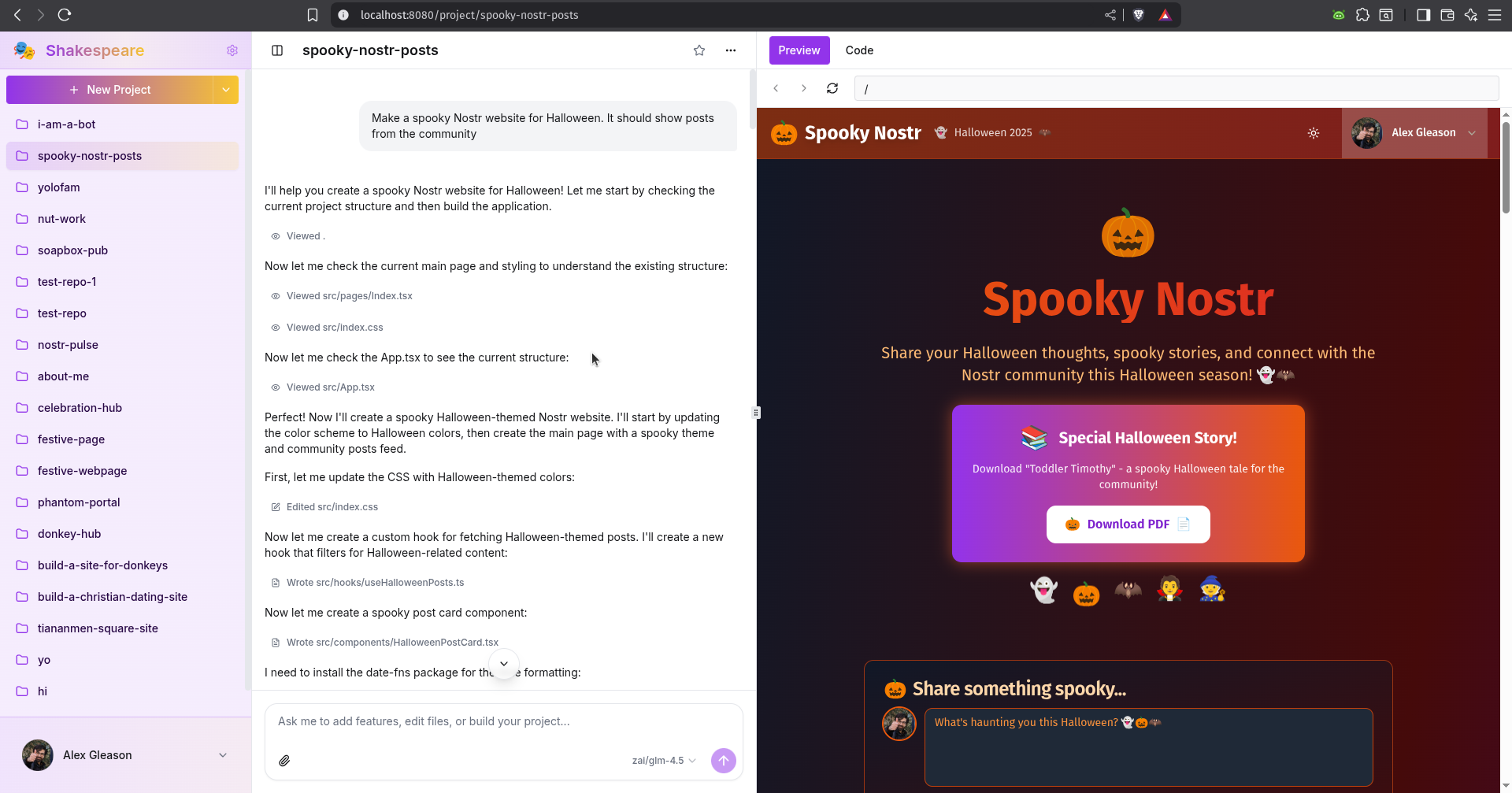
They're gonna fuck our shit up
I bet Luigi Mangione would be against the killing of Charlie Kirk.
The show "Undercover Bosses" highlights how stupid and disconnected CEOs are from the companies they supposedly manage. This has got to be one of the worst problems in society. It impacts the quality of life, happiness, and sense of purpose of the majority of people.

Today in "LLMs are bad for security", a popular zip library (written by humans) is insecure by default, and the LLM wrapped it in a safeUnzip method. I'm getting a patch ready to submit upstream now.